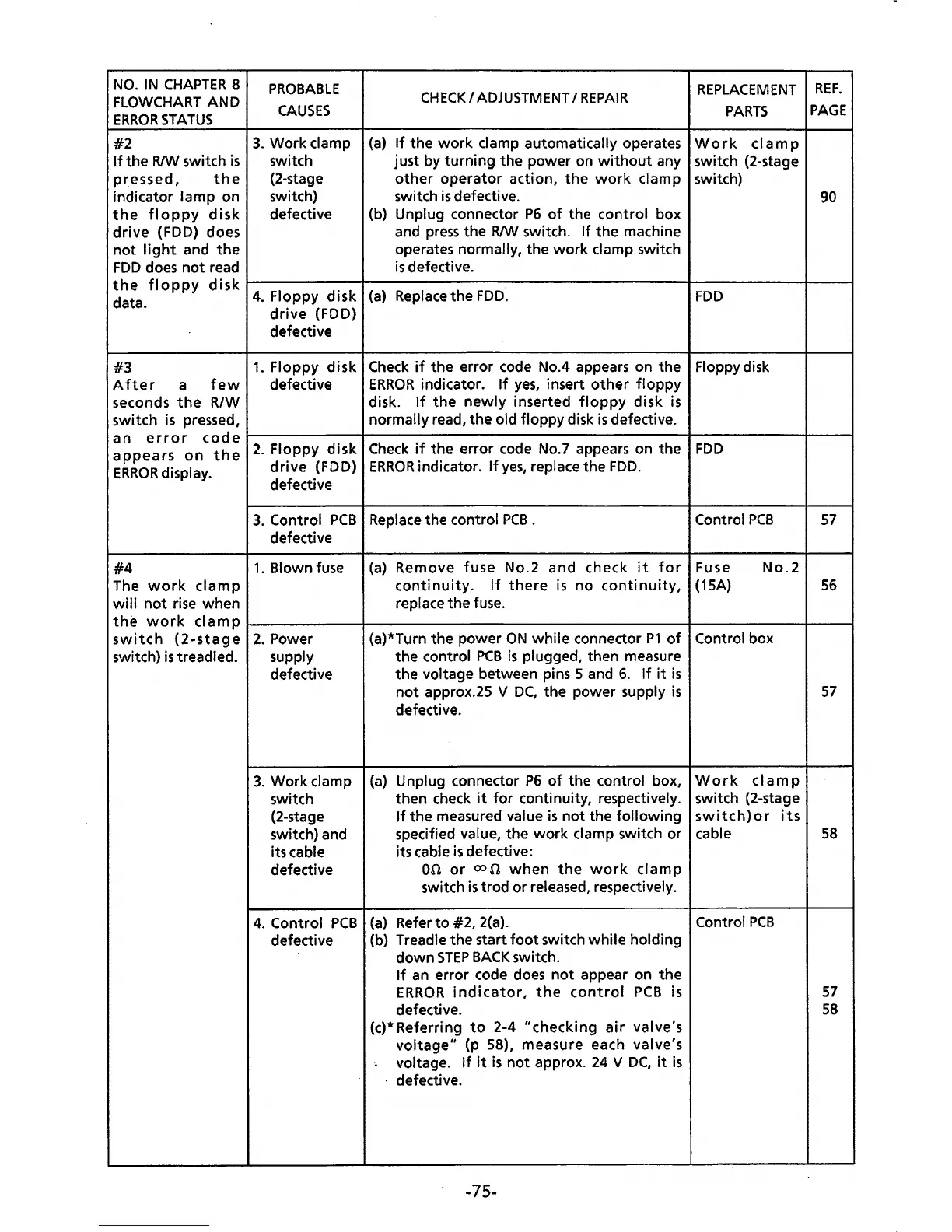
NO.
IN
CHAPTER
8
FLOWCHART
AND
ERROR
STATUS
#2
If
the
R/W
switch
is
pr.essed,
the
indicator lamp on
the
floppy
disk
drive
(FDD) does
not
light
and
the
FDD
does
not
read
PROBABLE
CAUSES
3.
Work clamp
switch
(2-stage
switch)
defective
CHECK
I
ADJUSTMENT
I
REPAIR
(a)
If
the
work
clamp automatically operates
just by turning the power on
without
any
other
operator
action,
the
work
clamp
switch
is
defective.
(b) Unplug connector
P6
of
the control box
and
press
the R/W switch. If the machine
operates normally,
the
work
clamp switch
is
defective.
REPLACEMENT
PARTS
Work
clamp
switch (2-stage
switch)
REF.
PAGE
90
the
floppy
disk
t------+-----------------1---------1-~
data.
4.
Floppy
disk
(a)
Replace
the
FDD.
FDD
drive
(FDD)
defective
#3
1.
Floppy
disk
Check
if
the error code No.4 appears on the Floppydisk
After
a
few
defective
ERROR
indicator.
If
yes,
insert
other
floppy
seconds
the
RIW disk.
If
the
newly
inserted
floppy
disk
is
switch
is
pressed, normally read, the old floppy disk
is
defective.
an
error
code~----------+---------------------------------4-----------~--~
appears
on
the
2.
Floppy
disk
Check
if
the error code No.7 appears on the
FDD
ERROR
display.
drive
(FDD)
ERROR
indicator.
If
yes,
replace the
FDD.
defective
#4
The
work
clamp
will
not
rise
when
3.
Control
PCB
Replace
the control
PCB
.
defective
Control
PCB
1.
Blown fuse
(a)
Remove
fuse
No.2 and check
it
for
Fuse
No.2
continuity.
If
there
is
no
continuity,
(15A)
replace
the
fuse.
57
56
the
work
clamp
l------------+---------------------------l----------+-----1
switch
(2-stage
switch)
is
treadled.
2.
Power
supply
defective
3. Work clamp
switch
(2-stage
switch) and
its cable
defective
4.
Control
PCB
defective
(a)*Turn the power
ON
while
connector
P1
of
Control box
the control
PCB
is
plugged, then measure
the voltage between pins 5 and
6.
If
it
is
not
approx.25 V
DC,
the
power supply
is
defective.
(a)
Unplug connector
P6
of
the control box,
then check
it
for
continuity, respectively.
If
the measured value
is
not
the following
specified value, the
work
clamp switch or
its cable
is
defective:
on
or
00
n
when
the
work
clamp
switch
is
trod
or released, respectively.
(a)
Refer
to
#2, 2(a).
(b) Treadle the start
foot
switch while holding
down
STEP
BACK
switch.
If
an
error code does
not
appear on
the
ERROR
indicator,
the
control
PCB
is
defective.
(c)* Referring
to
2-4
"checking
air
valve's
voltage"
(p 58), measure each valve's
·.
voltage.
If
it
is
not
approx.
24
V
DC,
it
is
· defective.
-75-
Work
clamp
switch (2-stage
switch)or
its
cable
Control
PCB
57
58
57
58



 To Next Page