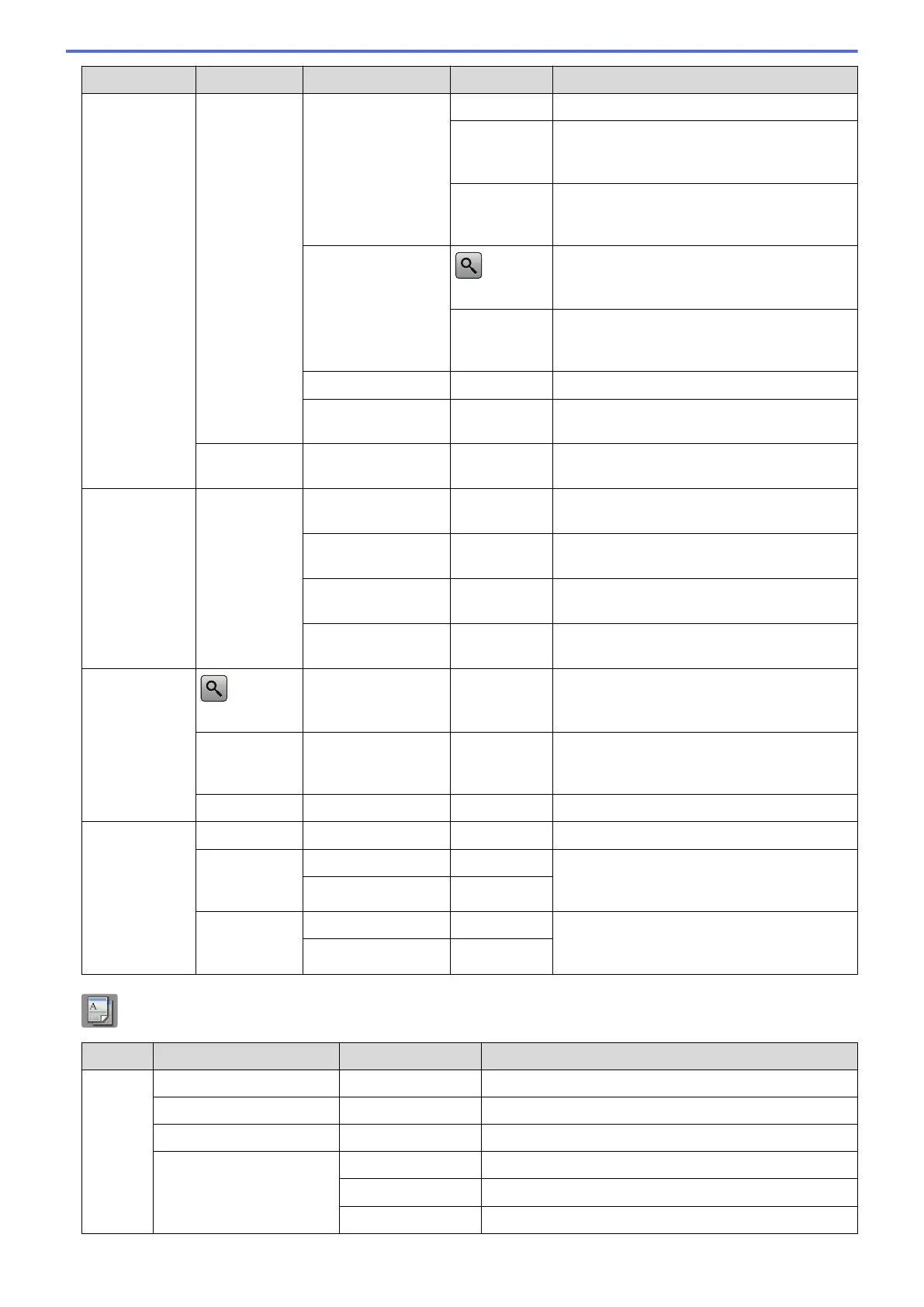
Level 1 Level 2 Level 3 Level 4 Descriptions
Sending
Faxes
Options
Call History Redial
Redial the last number you dialed.
Outgoing
Call
Select a number from the Outgoing Call
history and then send a fax to it, add it to the
Address Book, or delete it.
Caller ID
history
Select a number from the Caller ID history
and then send a fax to it, add it to the
Address Book, or delete it.
Address Book
(Search:)
Search within the Address Book.
Edit
Store Address Book numbers, set up Group
numbers for Broadcasting, and change and
delete Address Book numbers.
Set New Default
- Save your settings as the default.
Factory Reset
- Restore all settings back to the factory
settings.
Save as
Shortcut
- - Save the current settings as a shortcut.
Received
Faxes
Print/
Delete
Print All(New
Faxes)
- Print the new received faxes.
Print All(Old
Faxes)
- Print the old received faxes.
Delete All(New
Faxes)
- Delete the new received faxes.
Delete All(Old
Faxes)
- Delete the old received faxes.
Address
Book
(Search:)
- - Search within the Address Book.
Edit
- - Store Address Book numbers, set up Group
numbers for Broadcasting, and change and
delete Address Book numbers.
-
Apply
- Start sending a fax using the Address Book.
Call
History
Redial
- - Redial the last number you dialed.
Outgoing
Call
Apply
- Select a number from the Outgoing Call
history and then send a fax to it, add it to the
Address Book, or delete it.
Edit
-
Caller ID
history
Apply
- Select a number from the Caller ID history
and then send a fax to it, add it to the
Address Book, or delete it.
Edit
-
[Copy]
Level 1
Level 2 Level 3 Descriptions
Options Quality
- Select the Copy resolution for your type of document.
Paper Type
- Select the paper type that matches the paper in the tray.
Paper Size
- Select the paper size that matches the paper in the tray.
Enlarge/Reduce 100%
-
Enlarge
Select an enlargement ratio for the next copy.
Reduce
Select a reduction ratio for the next copy.
588



 To Next Page
 Loading...