138
Recalling from USB media/SD
card
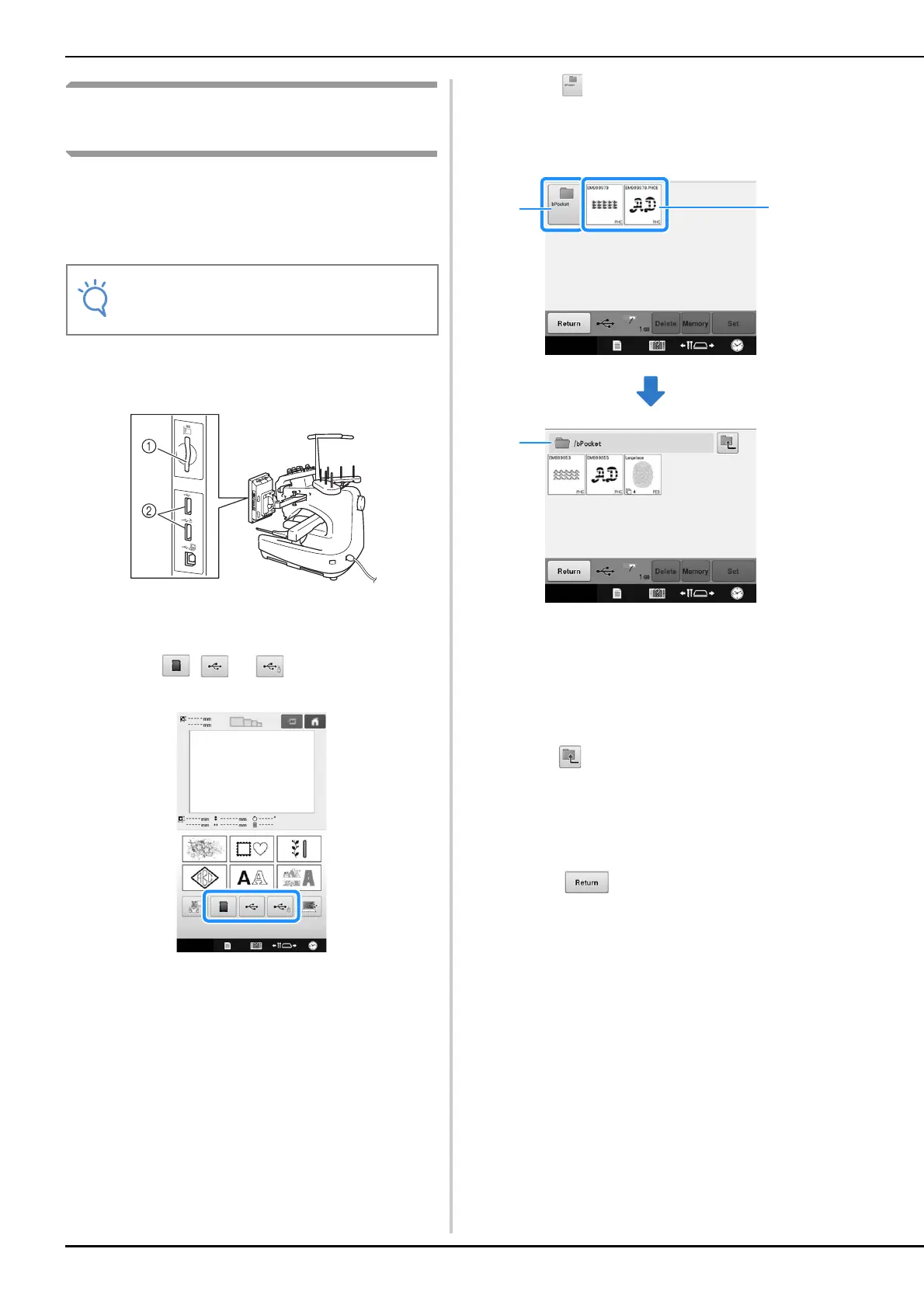
You can recall a specific embroidery pattern from
either direct USB media/SD card or a folder in the
USB media/SD card. If the pattern is in a folder,
check each folder to find the embroidery pattern.
a
Insert the USB media/SD card into the USB
port/SD card slot on the machine.
1 SD card slot
2 USB ports
b
Touch , or .
Embroidery patterns and a folder in a top folder are
displayed.
c
Touch when there is a subfolder to sort
two or more stitch patterns to USB media/
SD card, the embroidery pattern in the
subfolder is displayed.
1 Folder name
2 Embroidery patterns in USB media/SD card
3 Path
* The path to show the current folder at the top of the
list.
* Embroidery patterns and subfolders within a folder
are displayed.
* Press to return to the previous folder.
* Use the computer to create folders. Folders cannot
be created with the machine.
d
Touch the key of the pattern you want to
retrieve.
* Touch to return to the original screen.
• The processing speed may vary by quantity
of data.















 To Next Page