EMBROIDERING TUTORIAL
37
2
* The keys in the table above appear and can be used
in most of the screens described later in this manual.
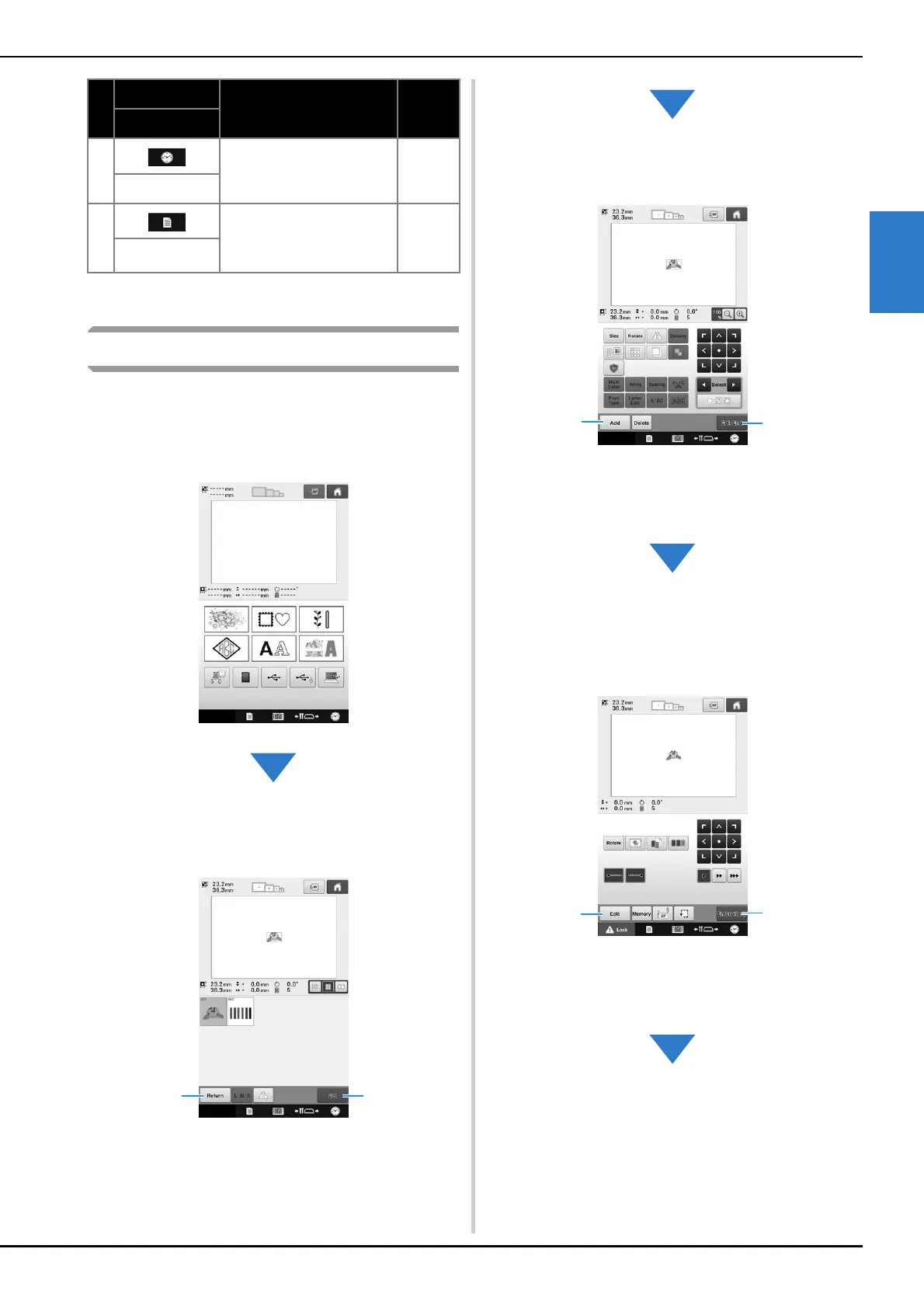
Screen overview
The basic operation flow is shown below.
In the pattern type selection screen, select a
pattern type. (Refer to page 38, 64.)
In the pattern list screen, select the pattern. (Refer
to page 39, 65.)
1 Touch this key to return to the pattern type
selection screen.
2 Touch this key to continue to the pattern editing
screen.
In the pattern editing screen, edit the pattern.
(Refer to page 40, 66.)
1 Touch this key to return to the pattern type
selection screen and add another pattern.
2 Touch this key to continue to the embroidering
settings screen.
In the embroidering settings screen, if it is a
combined pattern, edit the entire pattern, specify
the embroidering settings and check the
embroidery area. (Refer to page 46, 68.)
1 Touch this key to return to the pattern editing
screen.
2 Touch this key to continue to the embroidering
screen.
6
Touch this key to set the
clock to your local time.
p.36
Clock key
7
Touch this key to change the
embroidery machine
settings.
p.177
Settings key
No.
Display
Function Page
Key Name















 To Next Page