26
d
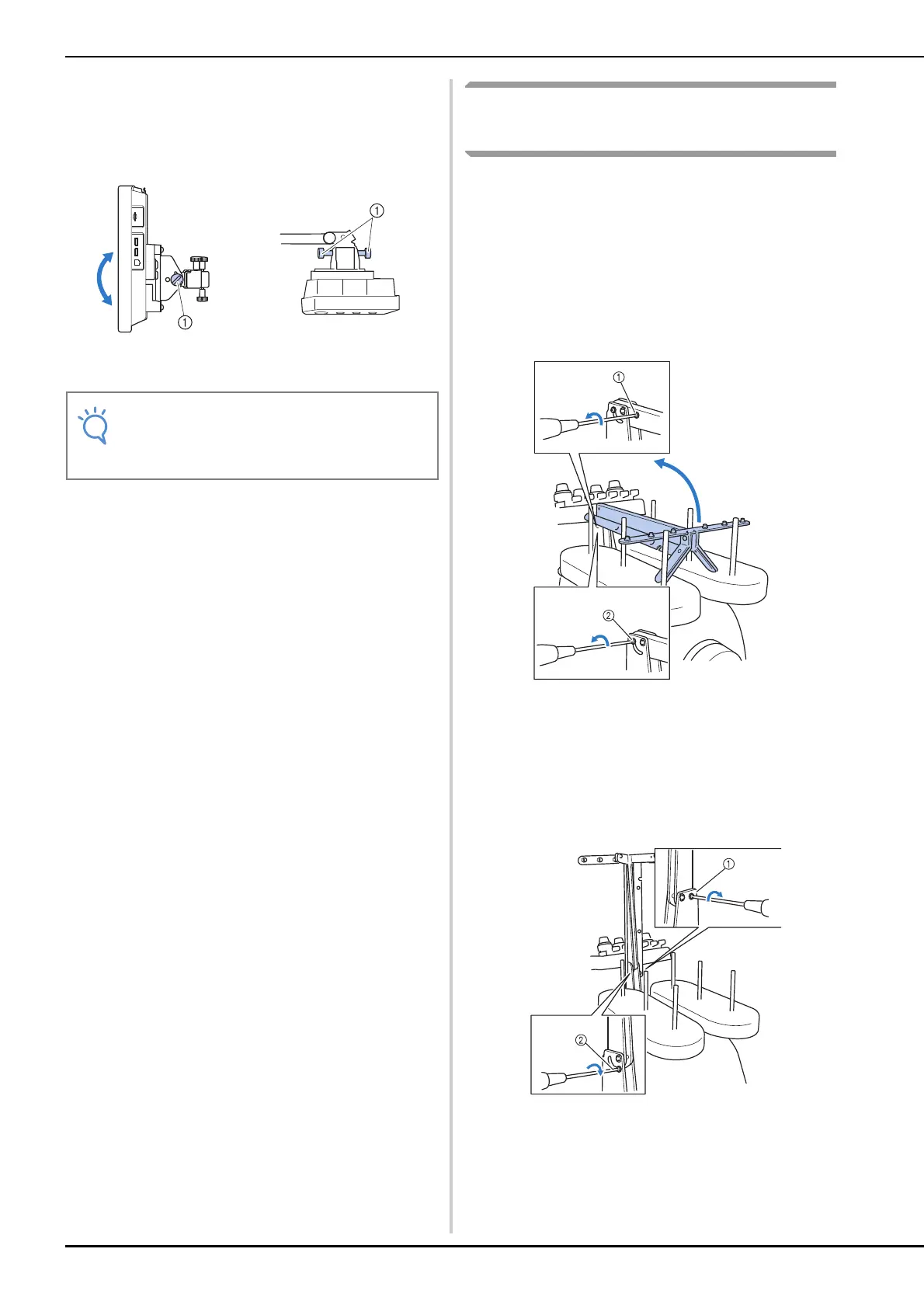
Adjust the angle of the operation panel.
Loosen the 2 thumb screws behind the operation
panel, adjust the operation panel to an easy-to-view
angle, and then tighten the thumb screws.
1 Thumb screws
Preparing the thread guide
assembly
Raise the thread guide assembly. Locate the
included Phillips screwdriver.
a
Using the Phillips screwdriver, loosen the
screws on the left side of the thread guide
assembly support so that the thread guide
assembly can be raised.
Remove screw 1, and then turn screw 2 three or four
times to loosen it.
1 Remove the screw.
2 Turn the screw three or four times to loosen it.
b
Raise thread guide into position and tighten
screw 2 on the left. Insert screw 1 into
right side of the thread guide assembly
support and tighten.
1 Insert screw and tighten.
2 Tighten screw.
(Side view) (Top view)
• Using the disc-shaped screwdriver
included, loosen and firmly tighten the five
thumb screws.















 To Next Page