144
h
After the embroidery pattern has been
opened by the machine, the embroidering
screen appears.
The opened embroidery pattern appears in the
pattern display area with the icon for the Link
function.
1 Icon for Link function
2 10-digit machine ID
3 Number of the pattern in the queue
• Touch to delete the pattern.
• For details on using the embroidery editing
software, refer to the Instruction Manual
included with it.
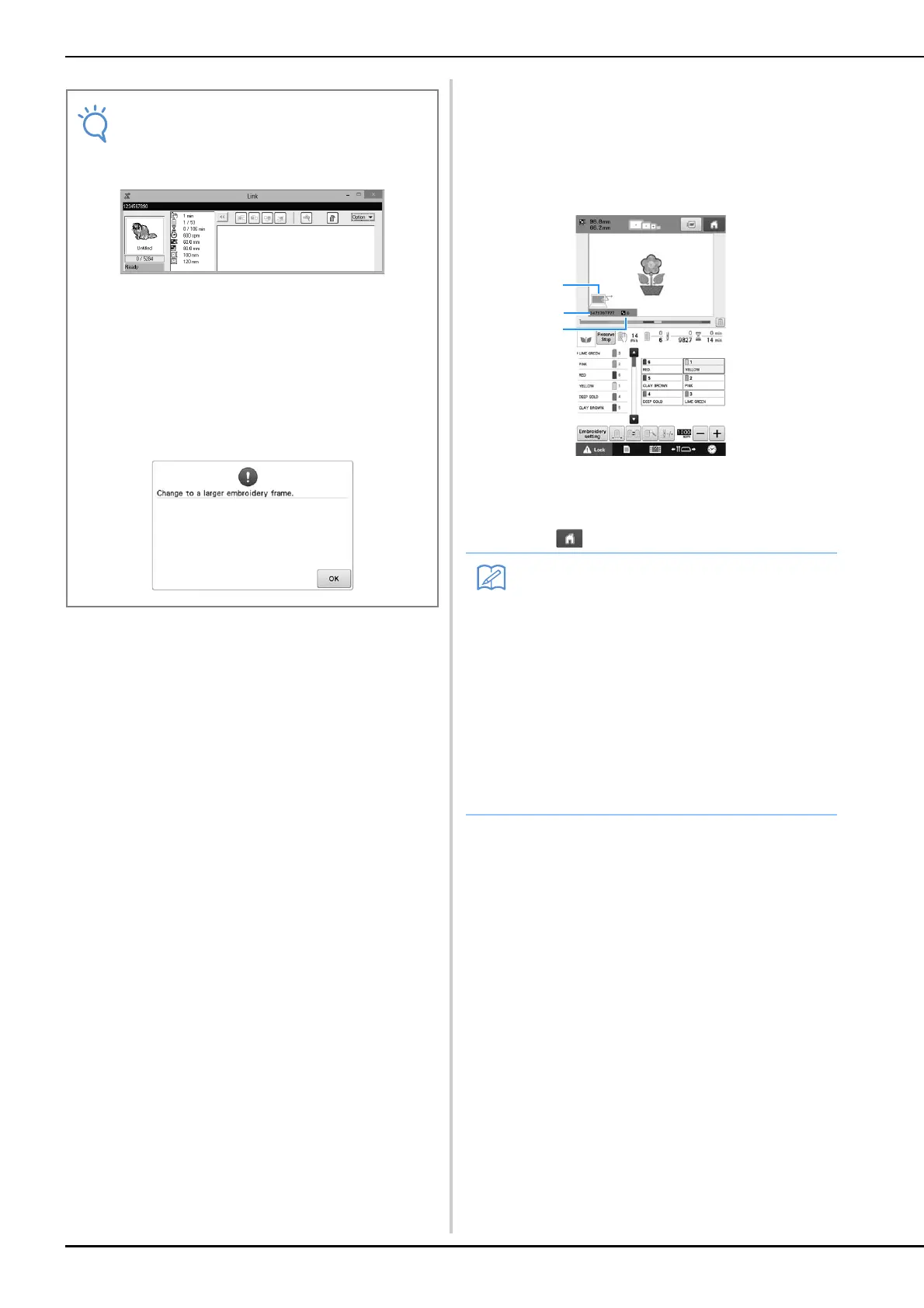
* This Link dialog box is found in PE-DESIGN NEXT
software.
• If the following error message appears, the
type of embroidery frame installed on the
machine is not compatible with the size of
the pattern. Replace the embroidery frame
with one compatible with the size of the
pattern.
• While the embroidery machine is connected
to the computer, the machine’s status can
be displayed by using a function of the
embroidery editing software. If multiple
embroidery machines are connected at the
same time, check the status of the
machines using the 10-digit machine ID that
appears in the machine’s screen. The
following information can be viewed from
the computer.
• Number of the stitch being sewn and total
number of stitches in the pattern
• Information on sewing errors




 To Next Page