EMBROIDERING TUTORIAL
75
2
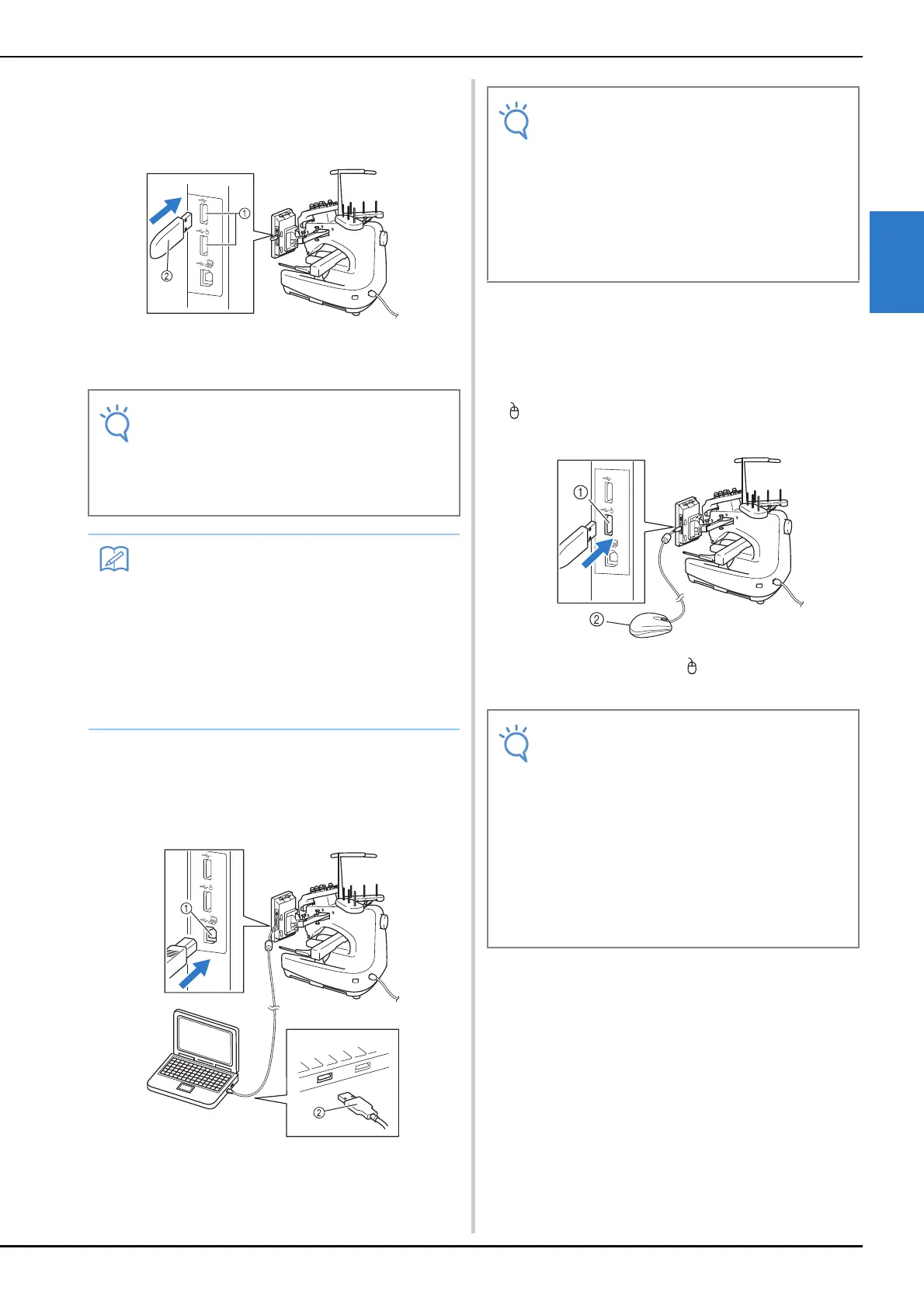
■ Using USB media
When sending or reading patterns using the USB
media, connect the device to the USB port.
1 USB ports
2 USB media
■ Connecting the machine to the
computer
Using the included USB cable, the sewing machine
can be connected to your computer.
1 USB port for computer
2 USB cable connector
■ Using a USB mouse
The USB mouse, connected to the sewing machine,
can be used to perform a variety of operations in the
screens.
Connect a USB mouse to the USB port marked with
. You can also connect a USB mouse to the other
USB port.
1 USB port marked with
2 USB mouse
• The processing speed may vary by quantity
of data.
• Do not insert anything other than USB
media into the USB media port. Otherwise,
the USB media drive may be damaged.
• USB media is widely used, however some
USB media may not be usable with this
machine. Please visit our website
( http://s.brother/cpbac ) for more details.
• Depending on the type of USB media being
used, either directly plug the USB device
into the machine's USB port or plug the
USB media Reader/Writer into the
machine's USB port.
• The connectors on the USB cable can only
be inserted into a port in one direction. If it
is difficult to insert the connector, do not
insert it with force. Check the orientation of
the connector.
• For details on the position of the USB port
on the computer (or USB hub), refer to the
instruction manual for the corresponding
equipment.
• Do not perform operations with the mouse
at the same time that you are touching the
screen with your finger or the included
touch pen.
• A USB mouse can be connected or
disconnected at any time.
• Only the left mouse button and its wheel
can be used to perform operations. No
other buttons can be used.
• The mouse pointer does not appear in the
screen saver.















 To Next Page