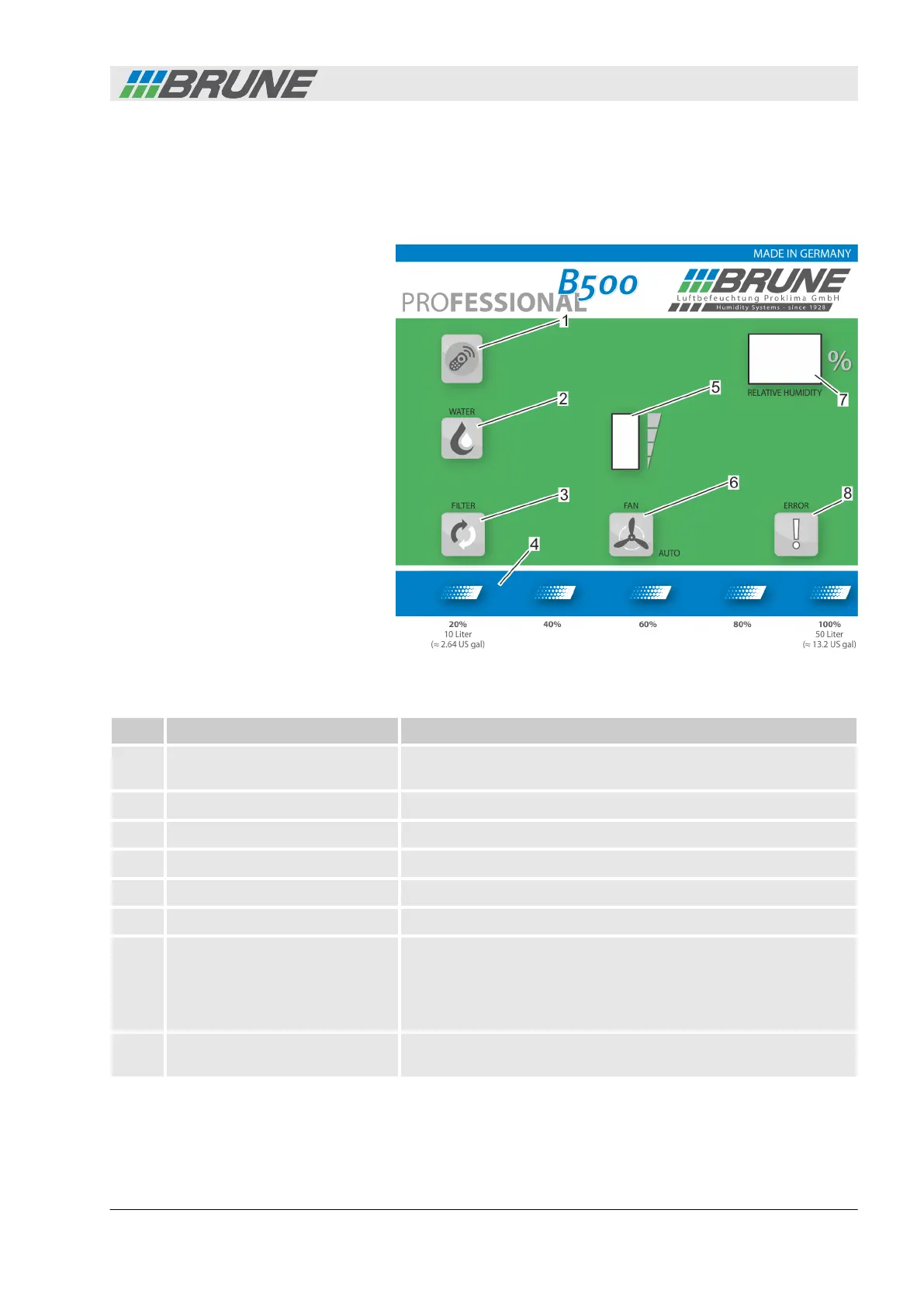
1.4 Control panel
The control panel provides information about the state of the
device. It provides information about the current water level, the
current air humidity value and any possible device malfunctions.
Fig. 5: Control panel
Item Name Function
1 [Remote control receiver
sensor]
The receiver sensor receives and processes the radio signal of
the remote control.
2 [Water level indicator] Lights up when the humidifier water tank is empty.
3 [Filter replacement display] Lights up when the humidifier filter needs to be replaced
4 [Water level indicator] Shows the level of the water tank in liters/gallons
5 [Fan speed level indicator] Shows the speed level when the fan is in manual mode
6 [Automatic fan indicator] Lights up when the fan is in automatic mode
7 Display The following information is shown on the display:
n Actual/target value of air humidity
n Menu codes in programming mode
n Error codes during malfunctions
8 [Malfunction indicator] Lights up when a malfunction of the humidifier is present. Here,
observe the error code on the display.
The Evaporation Humidifier B500 Professional
Evaporation Humidifier B500 Professional 9



 To Next Page