Choice of Reset Mode
SMART MATRIX QUILT 2 - 14
Choice of Reset Mode
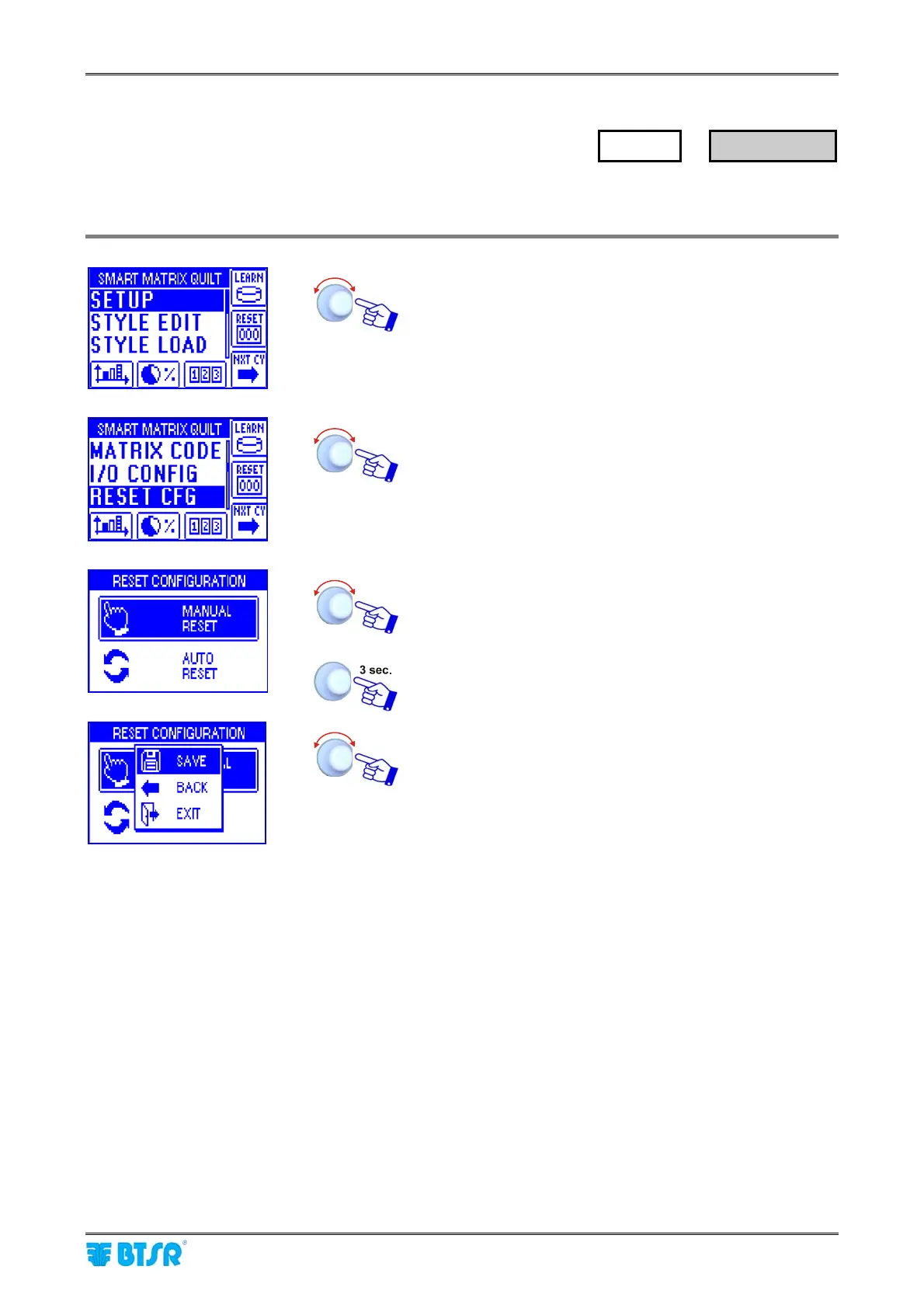
This function allows you to choose the reset operation mode, after an alarm condition (either MANUAL or
AUTOMATIC).
Enter the SETUP menu.
Select RESET CFG.
Select the desired option (MANUAL RESET or AUTO
RESET).
To activate the save function.
SAVE to save the choice, BACK to return to the previous
screen without saving, EXIT to return to menu.
If you select the MANUAL option, then after an alarm signaling, you will have to press the RESET button, or
another button capable of providing the RESET signal (according to the polarity previously set with the I/O
CONFIG function), prior to restart the machine.
Is you select the AUTO option, then you may restart the machine after an alarm signaling, without supplying
any manual RESET signal. The system automatically acknowledges the restart condition through the
SLOW/FAST or PRX signals, and it automatically carries out the RESET function.
SETUP
→
RESET CFG












 To Next Page