Home
Buffalo
Storage
LinkStation 210D
Page 18 (Opening Settings from a Mobile Device)
Buffalo LinkStation 210D - Opening Settings from a Mobile Device
137 pages
Manual
Save Page as PDF
To Next Page
To Next Page
To Previous Page
To Previous Page
Loading...
17
Chapt
er 2 C
onfigur
a
tion
4
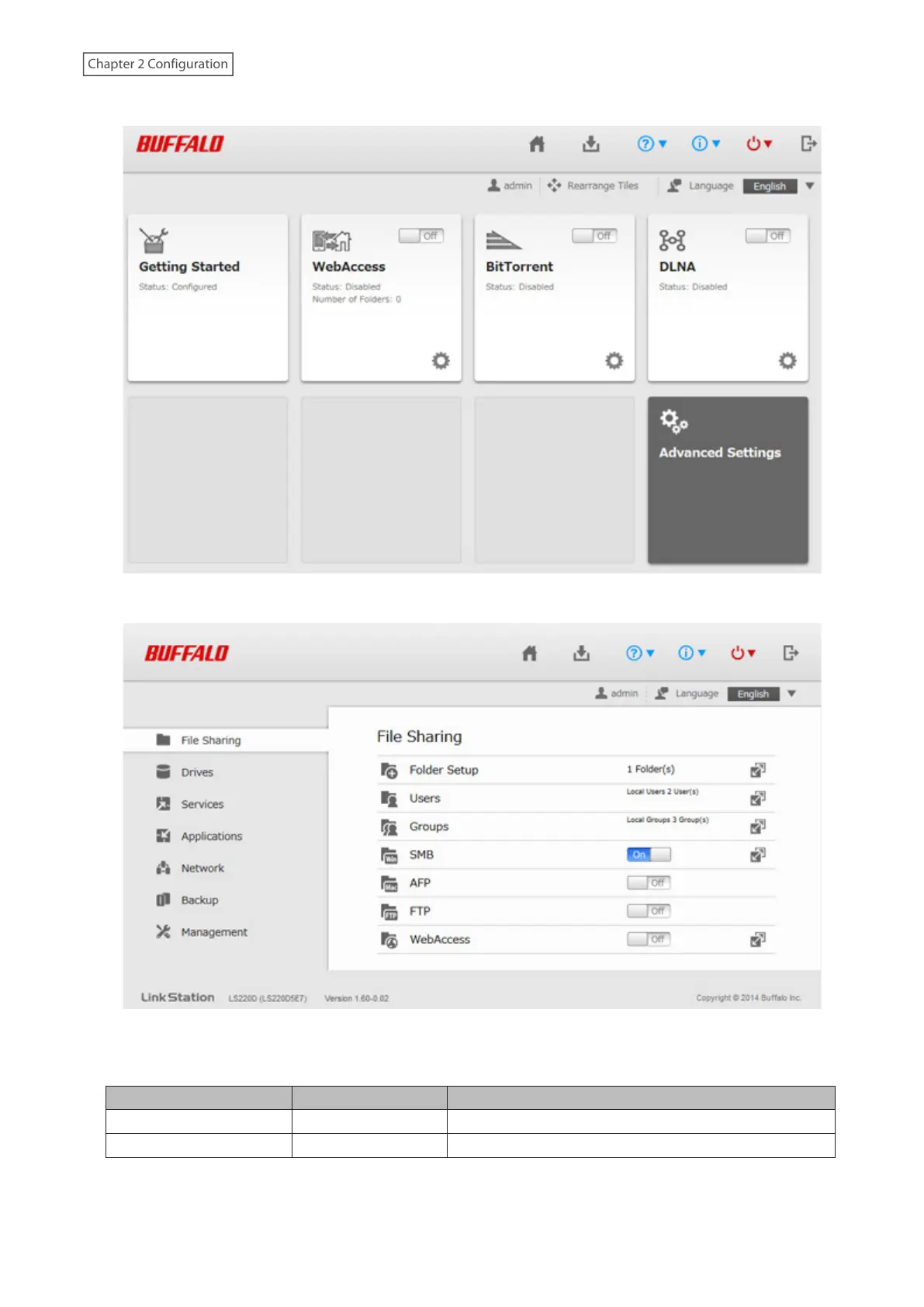
Easy Admin will open. Click [Advanc
ed S
ettings].
5
Advanced Settings will open.
Notes:
•
Username/P
assword Combinations:
Username
P
assword
Settings Available
admin (default)
password (default)
All
guest
blank
System inf
ormation (read-only)
17
19
Table of Contents
Main Page
default chapter
2
Table of Contents
2
Chapter 1 Getting Started
8
Diagrams
8
Turning the Linkstation on and off
9
Installing Applications
10
NAS Navigator2
10
Smartphone Navigator
10
Webaccess
10
Settings up through Setup Wizard
10
Accessing Shared Folders
12
Accessing from a Computer
12
Accessing from a Mobile Device
12
Chapter 2 Configuration
14
Opening Settings from a Computer
14
Opening Easy Admin
14
Opening Advanced Settings
16
Opening Settings from a Mobile Device
19
Chapter 3 File Sharing
22
Configuring Shared Folders
22
Adding a Shared Folder
22
Recycle bin
24
Read-Only Shares
24
Hidden Shares
24
Configuring Users
25
Adding a User
25
Converting Local Users into External Users
28
Adding a Group
28
Configuring Access Restrictions
30
Local Users and Groups
31
Active Directory
32
NT Domain
35
User Authentication with an External SMB Server
37
Chapter 4 Storage Management
41
RAID Modes
41
Working with RAID Arrays
41
Using JBOD
41
Changing the RAID Mode
42
Expanding RAID Capacity Without Deleting Data
44
RAID Scanning
45
Adding an External Drive
46
Connecting an External Drive
46
Compatibility
46
Dismounting Drives
47
Dismounting Using the Function Button
47
Dismounting from Settings
47
Checking Drives
48
Formatting Drives
49
Erasing Data on the Linkstation Completely
51
Quotas
51
Quotas for Users
51
Quotas for Groups
52
Drive Replacement
53
Replacing a Defective Drive
54
Rebuilding the RAID Array
56
Chapter 5 Remote Access
58
Webaccess
58
Configuring from Easy Admin
58
Configuring from Advanced Settings
59
Accessing Remotely
61
Ftp
61
Chapter 6 Backup
63
Backing up Data on the Linkstation
63
Backup Modes
63
Preparing a Backup Destination
64
Configuring a Backup Job
65
Backing up Your Mac with Time Machine
69
Copying from a USB Device
75
Enabling Direct Copy
76
Starting Direct Copy
76
Chapter 7 Multimedia
77
Dlna
77
Configuring from Easy Admin
77
Configuring from Advanced Settings
78
Playing Files
79
Connected DLNA-Compatible Devices
79
Streaming to DLNA-Compatible Devices
80
Disabling Playback from Specific Devices
81
Itunes Server
82
Bittorrent
84
Configuring Bittorrent
84
Opening the Download Manager
85
Downloading Files
87
Connecting a Printer
88
Chapter 8 Advanced Features
90
Email Notification
90
Sleep Mode
91
Encrypting Data Transmission
93
Encrypting Settings Data
93
Encrypting FTP Transfer Data
93
SSL Keys
93
Restoring Factory Defaults
94
Initializing from Settings
94
Initializing Using the Function Button
95
Updating the Firmware
95
Name, Date, Time, and Language
95
Jumbo Frames
99
Changing the IP Address
100
Chapter 9 Configuring from Mobile Devices
102
Settings Available from Your Mobile Device
102
Configuring Users
102
Adding a User
103
Changing the Password
106
Deleting a User
108
Configuring Shared Folders
110
Adding a Shared Folder
110
Configuring Access Restrictions
112
Deleting a Shared Folder
114
Configuring Webaccess
116
Configuring the DLNA Server
122
Managing USB Devices
122
Dismounting USB Drives
123
Enabling Direct Copy
124
Starting Direct Copy
124
Enabling a Print Server
126
Rebuilding the RAID Array
126
Chapter 10 Utilities
128
NAS Navigator2
128
Windows
128
Macos
128
Novabackup
128
Chapter 11 Appendix
129
Power LED Operations
129
Default Settings
131
Specifications
132
Related product manuals
Buffalo LinkStation 200 Series
137 pages
Buffalo LinkStation Pro
57 pages
Buffalo LinkStation 700 Series
204 pages
Buffalo LinkStation Pro LS-XHL
64 pages
Buffalo LinkStation Live LS-CHL
76 pages
LinkStation LS220D Series
2 pages
LinkStation Quad LS-QL/R5
96 pages
LinkStation Pro Duo LS-WTGL/R1
71 pages
LinkStation Pro Shared Network Storage
59 pages
Buffalo Link Station LS710D
204 pages
Buffalo Link Station LS720D
204 pages
TeraStation Live HS-DH-TGL/R5
92 pages














 To Next Page