26
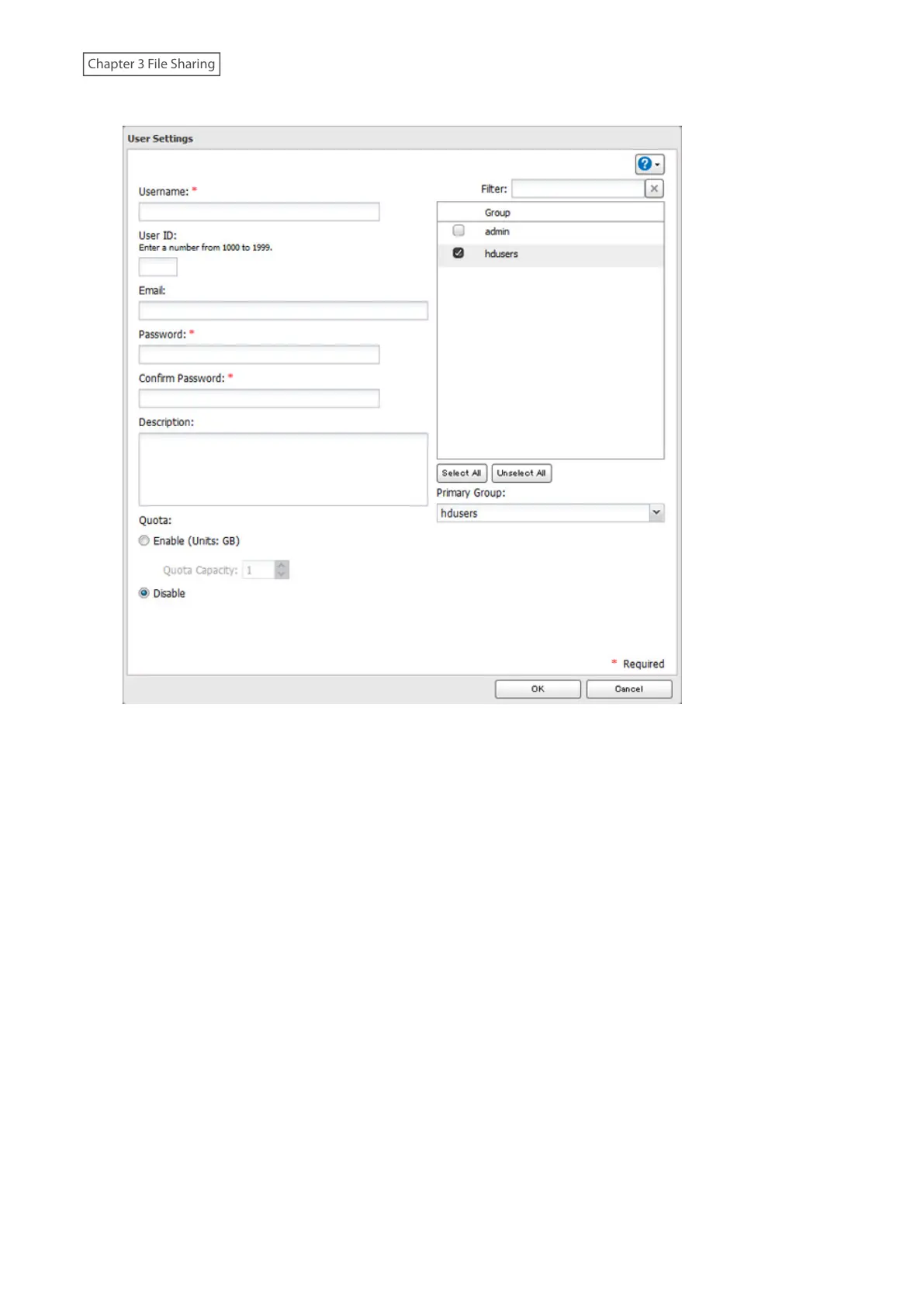
4 Enter the desired settings, then click [OK].
Notes:
• Usernames may contain up to 128 alphanumeric characters, hyphens (-), underscores (_), periods (.), and the
symbols ! # & @ $ * ^ %. The first character should not be a symbol.
• The user ID should be a number from 1000 to 1999. Each user ID should be unique. If this field is left blank, a user
ID is assigned automatically.
• Do not duplicate user IDs, group IDs, usernames, or group names. Each should be distinct and unique.
• User descriptions may contain up to 75 alphanumeric characters, hyphens (-), underscores (_), and spaces.
Multibyte characters are supported. The first character should not be a symbol or space.
• Passwords may contain up to 20 alphanumeric characters, hyphens (-), underscores (_), commas (,), periods (.),
semicolons (;), tildes (~), and the symbols @ ! # $ % & ' ) ( * + / > < = ? " ] [ ^ } { |. The first character should not be a
symbol unless it is an underscore.
• Use the same username and password for both Windows and the LinkStation or you may be unable to access
shared folders.
• If a user belongs to multiple groups, the most strict access restrictions will apply. For example, if a user is added to
a group with read and write access, and also to a read-only group, the user will effectively have read-only access.
• Do not use any of the following words as a username as these words are reserved for internal use by the
LinkStation: adm, admin, administrator, all, apache, bin, daemon, disk, ftp, ftpuser, guest, halt, hdusers, kmem,
lp, mail, man, mysql, news, nobody, nogroup, none, operator, root, shadow, shutdown, sshd, sync, sys, tty, users,
utmp, uucp, www



 To Next Page