EasyManua.ls Logo

Bukh D4 - Page 120

Bukh D4
141 pages
Print Icon
To Next Page IconTo Next Page
To Previous Page IconTo Previous Page
Loading...
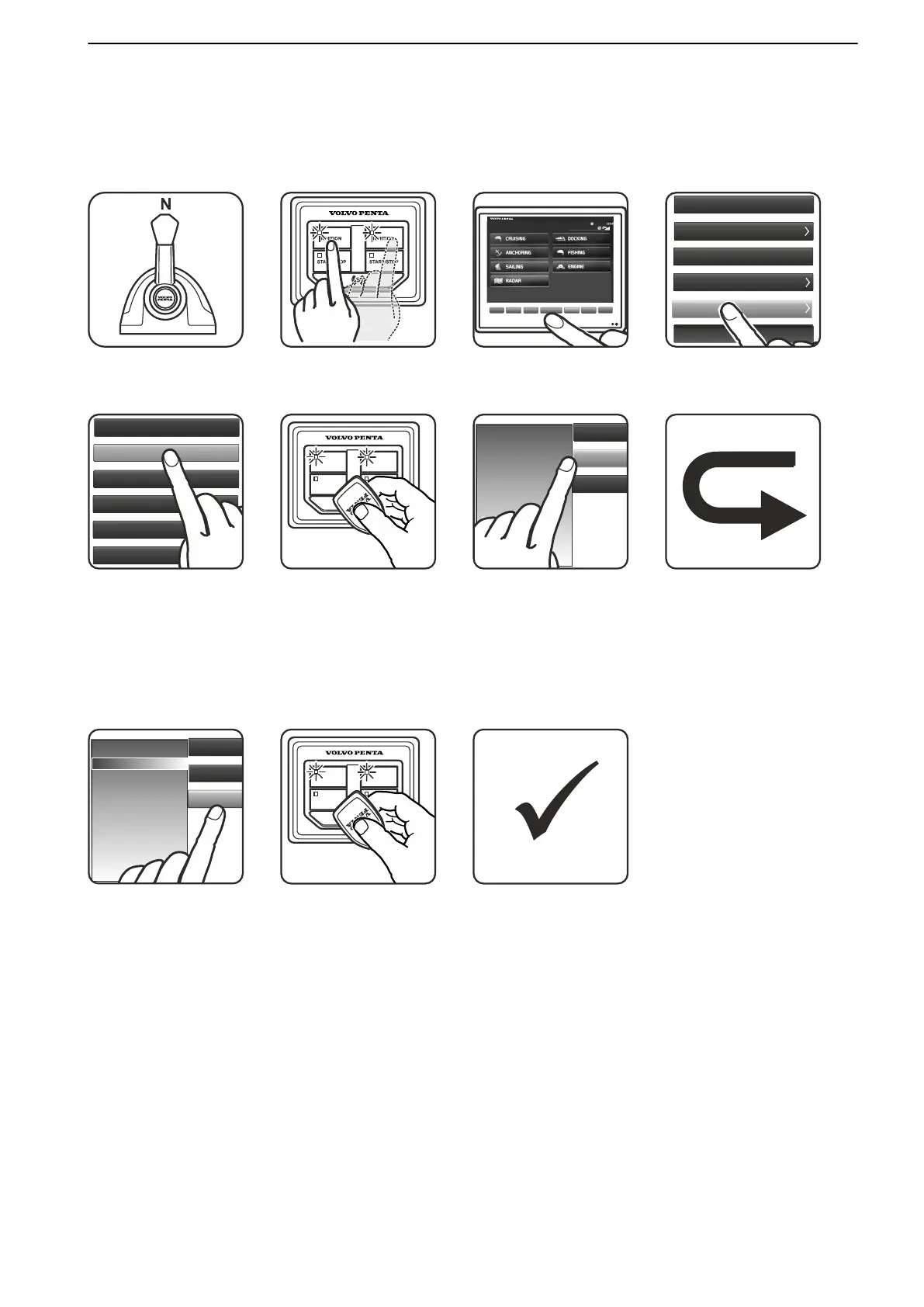
Add e-Key, Glass Cockpit
NOTICE! The ignition must be on and engine(s)
stopped.
Up to four e-Keys can be added.
GARMIN
Settings
Engage
Waypoints
Meny
SOS
Info
Mark
Settings
Engage
Waypoints
Meny
SOS
Info
Mark
Settings
Home
System
Preferences
Communications
Alarms
My Vessel
Other vessels
1. Move control to neutral. 2. Turn the ignition on. 3. Main Menu > Settings. 4. My Vessel.
e-KEY Management
ACP Mode Normal
Speed Factor 115
Fuel Tank
Gauge Ranges
Vessel Type
IGNITION IGNITION
START/STOP START/STOP
Delete e-Key
Add e-Key
Identify e-Key
My Vessel
Other vessels
Name
e-Key 1
5. e-Key management.
Select Add e-Key.
6. Hold the new e-Key in
front of the Start/Stop
panel. Confirm with OK.
7. e-Key added.
Remaining available
locations for e-Key in
display. Further options
appear in right side
menu.
8. Repeat step(s) 6
for additional e-Keys.
Delete e-Key
Add e-Key
Identify e-Key
My Vessel
Other vessels
Name
e-Key 1
e-Key 2
e-Key 3
IGNITION IGNITION
START/STOP START/STOP
9. Settings Menu:
Delete key(s)
Identify e-Key
Hold the new e-Key in
front of the Start/Stop
panel.
10. NOTICE! A valid e-
Key is required as
authorization for future
e-Key Management.
11. Ignition must be
turned off for at least 15
seconds to confirm the
calibration.
Calibration and Settings
47708085 11-2016 © Bukh 121

Table of Contents

Related product manuals