Control Panels
Bukh control panels can be installed in different
combinations. The panels all look the same but are
configured to handle different functionality. The
number of available panels and their function depend
on the boat’s functionality setup.
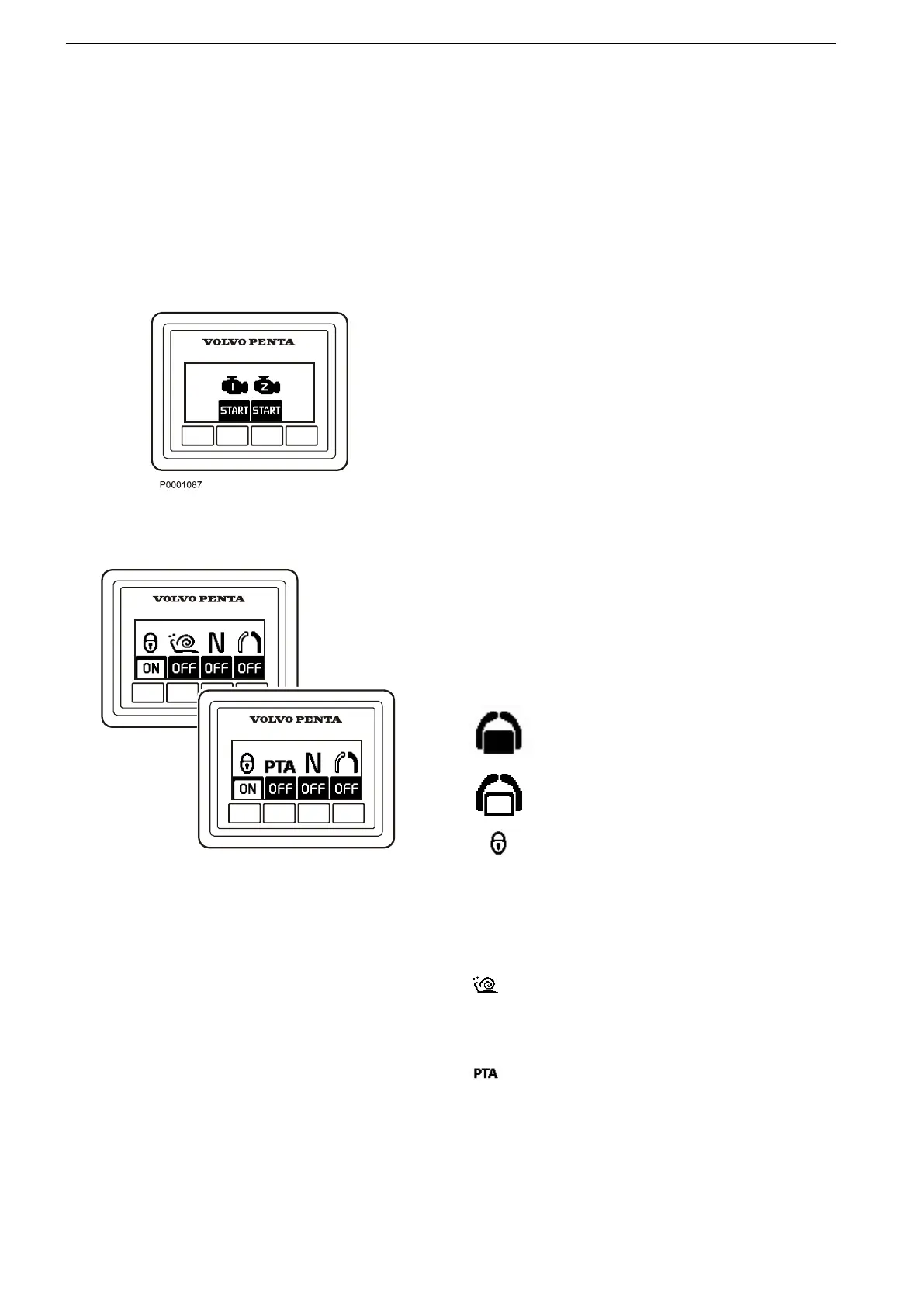
Start/Stop Panel
The Start/Stop panel is used for starting and stopping
the engine.
To start the engine, the ignition must be switched on
at the main helm station.
Read the starting instructions in the chapter
Starting, page 56 to make sure the correct start
procedure is used.
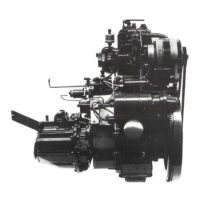
Station Panel
Activation
Activate the helm station with a single press of the
button.
Further pressure locks the helm station.
To render the helm station inactive, hold the button
down for 3 seconds.
Inactive helm station
Active helm station
Locked helm station
Lowspeed and Power Trim Assistant (PTA)
Depending on the installation the optional functions
lowspeed or Power Trim Assistant are engaged with
the button.
Lowspeed
For further information about the function, refer to
Optional, page 40
.
Power Trim Assistant (PTA)
For further information about the function, refer to
Instruments and Controls, page 30
.
Instruments and Controls
14 47708085 11-2016 © Bukh


 To Next Page