4" Display
The 4” display is an optional supplement to the Bukh
control system. Via the display it is possible to view
and control all installed functions in the system.
IMPORTANT:
Prolonged exposure to strong sunlight may damage
the screen and cause functional faults.
Make a habit of protecting the screen by using the
protective cover when the boat is not in use.
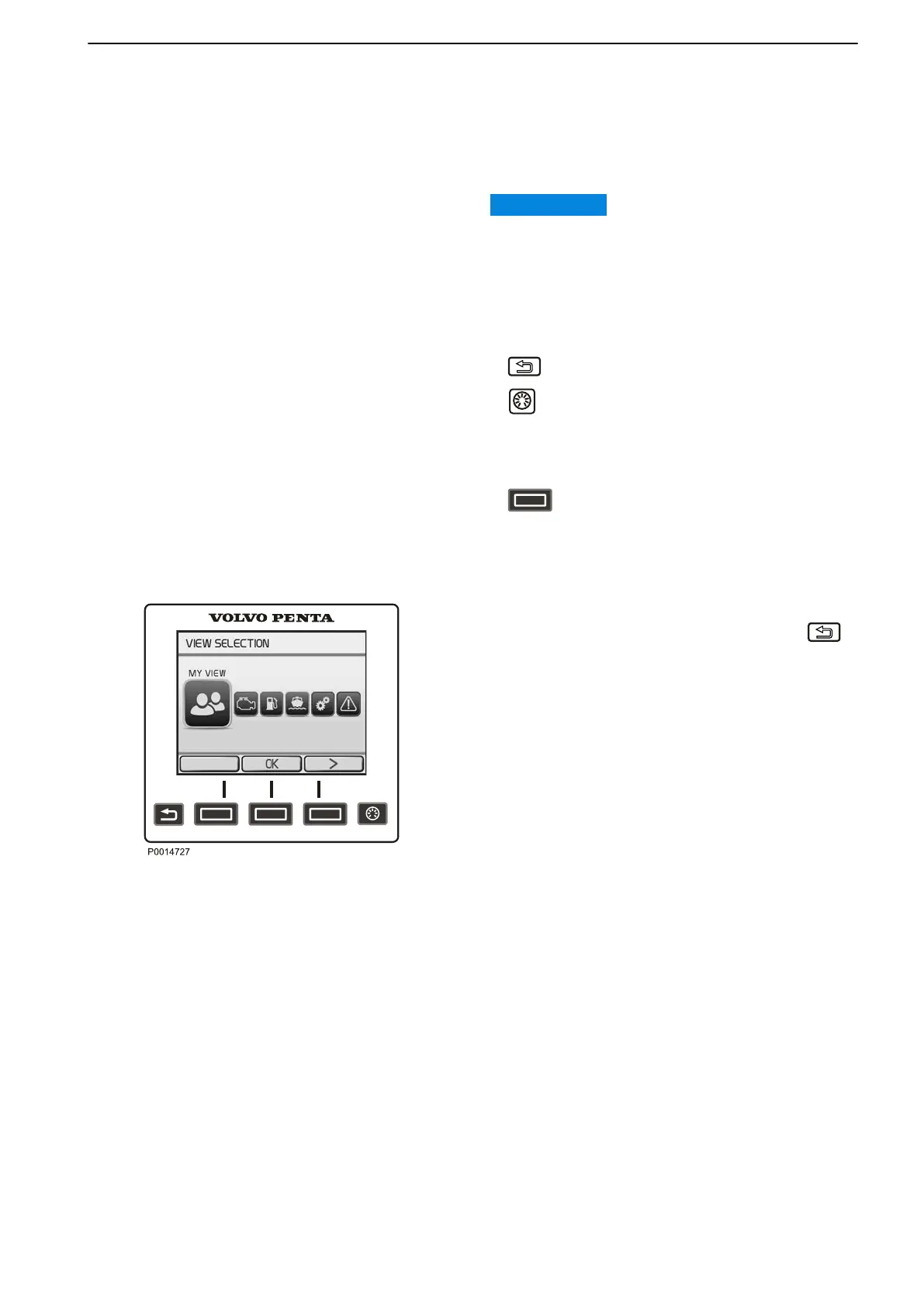
The Bukh 4" screen is controlled using the panel
buttons as follows:
Return to the previous menu.
Adjust display contrast. If contrast changes are
not confirmed, display contrast will automatically
revert to its former state shortly after the button is
released.
The button functions are shown on the
display. Navigate
back or forth or confirm a selection
by pressing the appropriate button.
View Selection
When starting up the system, the last selected view is
shown. To return to the main menu, press the
button. Use the arrow buttons to navigate to the
desired screen.
The following screens are available in the 4” display:
•
My View shows operating information.
•
Engine View shows engine information.
•
Fuel Economy shows the trip computer.
•
Vessel shows information regarding the boat
installation
•
Settings shows display settings and installed
functions.
•
Warning Manager shows detected faults and their
corrective actions.
•
Battery View shows battery information.
View Selection
Instruments and Controls
47708085 11-2016 © Bukh 21


 To Next Page