EN
80
Setup
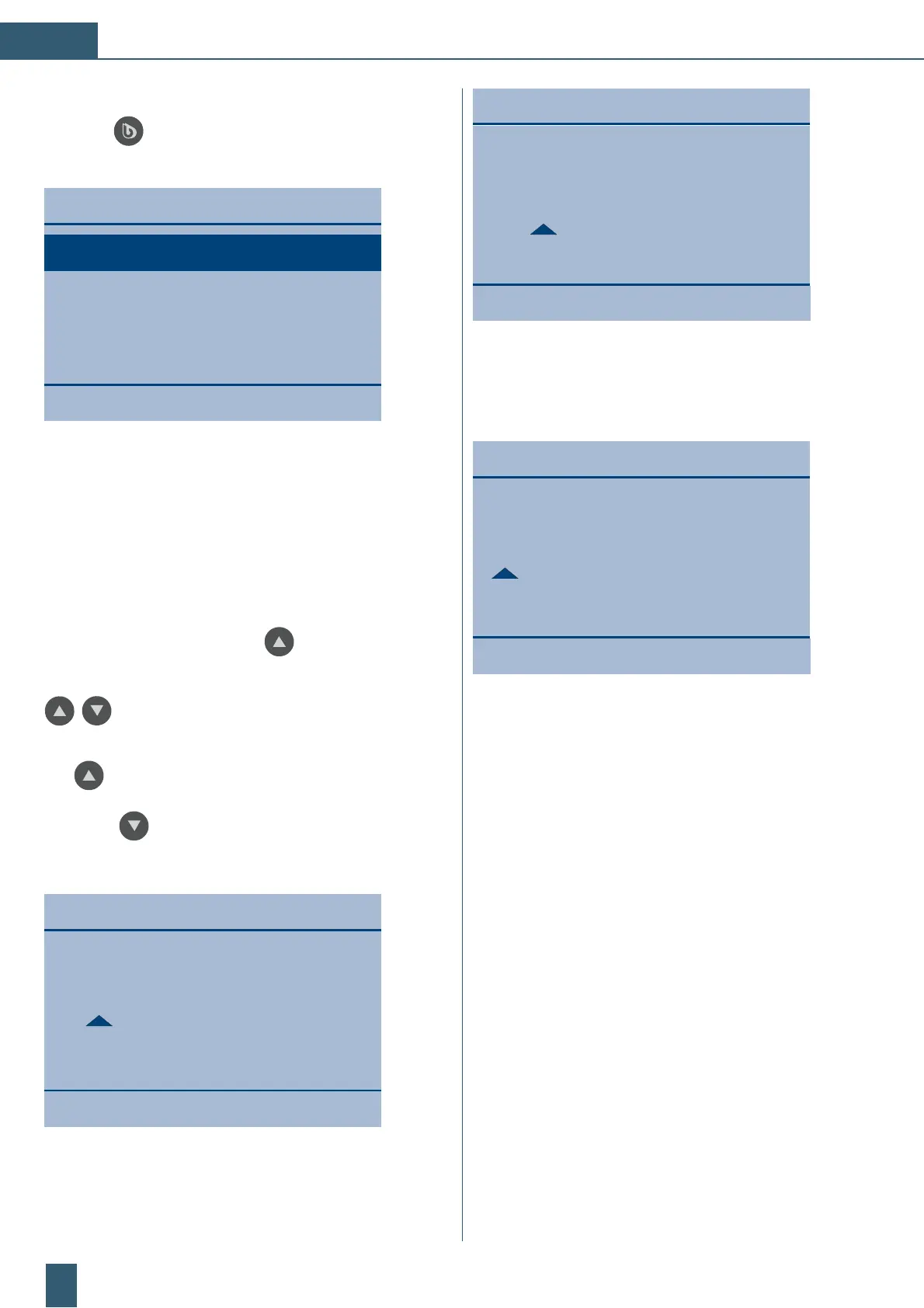
Limit (Conductivity <VE>)
11.0
30.06.2021 12:03
Setup limit value (conductivity):
Selection: 0.1 ... 499.9 S/cm
(when exceeded display of >500 S/cm)
Setup
Raw water in µS/cm:
800
30.06.2021 12:04
(40 to 4000)
Manual input of drinking
water conductivity
Setup of raw water conductivity (manual):
Optional selection: 40 to 4000 S/cm
(cannot be exceeded)
Only visible if the customer has not installed a raw water
conductivity measuring cell.
If the response is “Yes” to the final prompt “Exit
settings?”, the control system is restarted to accept the
set values.
Initial start-up / setup:
Press the “BWT” key for about 3 seconds to access
the main menu.
Menu:
30.06.2021 12:01
Setup
Data logger
Default settings
Reset / cartridge change
Setup:
This selection appears in the main menu:
˳ Z³þĂï
˳ þÖã¾¾³ò
˳ ³½ĂÖþö³þþÆݾö
˳ V³ö³þ©òþòƯ¾³©Ãݾ³
In the Setup menu item, the user can make activated set-
tings. Press the up-arrow key
below the display to
scroll through the options. Depending on the parameter,
you can configure the settings using the up/down arrow
keys.
In the case of multi-digit numerical values, use the up arrow
key
below the display to move the cursor -> select a
small triangle under the relevant digit and use the down
arrow key
to change this digit.
Setup:
Setup
Language:
English
30.06.2021 12:02
Setup, setting the language:
Selection: English, German, French



 To Next Page