©2023 CAE 905K600152 v1.4 67
Using Juno
ECG
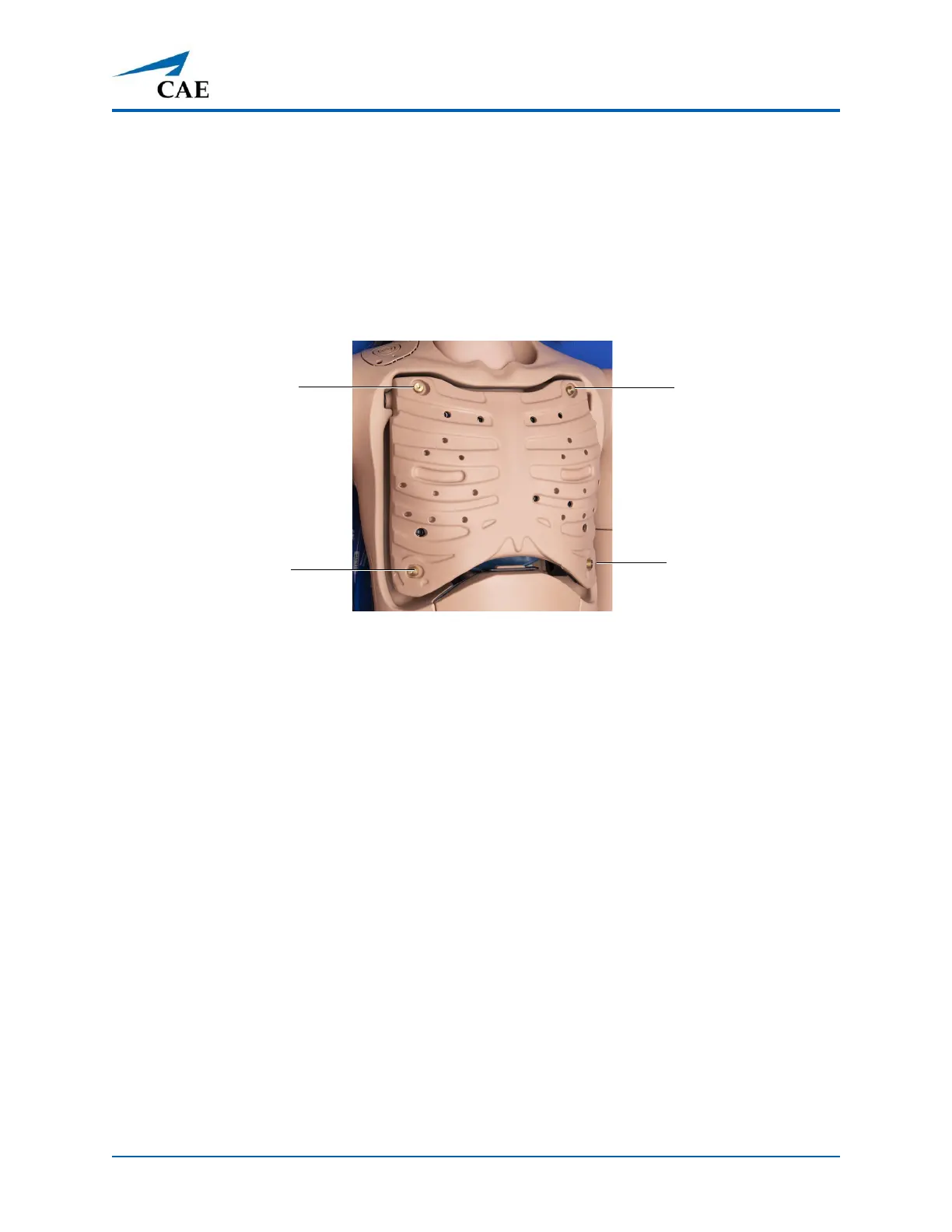
On Juno, a 4-lead ECG signal is emitted from the appropriate positions for display on a standard
monitor.
To produce ECG signals on a standard patient monitor, connect the ECG leads to the posts.
Note: The ECG posts are supplied with the accessories kit and need to be installed at the locations
indicated.
ECG Connections
Blood Pressure
Juno Live and Complete configurations support non-invasive blood pressure measurements, and
systolic and diastolic readings can be obtained and manipulated through the software.
Systolic and Diastolic Blood Pressure
To manually adjust the systolic and/or diastolic blood pressure:
1. From the Cardiovascular panel, select the parameter of desired blood pressure.
2. Set the pressure by moving the blue slider left or right, or by typing in a value.
3. Select Accept to exit and save the changes. The switch is now orange, indicating a
change
has been
made.
4. If using CAE Physiology (optional), return to the programmed physiologic
model by
s
electing the switch and turning the Override switch to Modeled.
Non-Invasive Blood Pressure Measurement
Blood pressure can be taken manually on either arm. Non-invasive blood pressure (NIBP) monitoring
techniques can be used by attaching a standard cuff modified with a T-fitting and adapters.
ECG Connection
ECG Connection
ECG Connection
ECG Connection



 To Next Page