❻
❺
Page
25 - Manual FA01869-EN - 08/2022 - © CAME S.p.A. - The contents of this manual may be changed, at any time, and without notice. - Translation of the original instructions
TECHNICAL DATA
MODELS PXMC3G
Local power supply (V) 9÷15 DC
Maximum absorbed current (mA) 800
Working temperature (°C) -10 to +40
Insulation class III
Regulatory compliance
EN50131-3, Grade 2
Environmental Class II
Dimensions (mm) 91 x 34 x 18
INSTALLATION
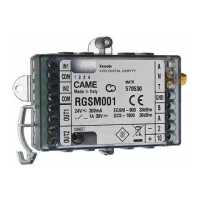
Remove the power supply and connect the dialler to the control unit,
making sure that the connections are made correctly.
Do not force the module into the control unit.
Use the supplied cable gland positioning it between the antenna and
the casing to prevent the antenna connector from coming electrically
into contact with the casing
FITTING THE SIM-CARD (NOT SUPPLIED)
Before fitting and removing the SIM-CARD, CUT OFF THE MAINS
POWER SUPPLY and disconnect the battery. Before fitting the SIM-
CARD, disable the PIN and the answering machine. Power up the
control unit and check that the LED indicates the correct SIM reg-
istration.
Use a tariff plan appropriate to the features that are planned to be
used. Refer to the following table:
Characteristics Meaning
VOICE + SMS
for managing incoming / outgoing
calls and SMSs
VOICE + SMS + DATA
for connection to the CLOUD through
GSM/UMTS network, incoming / out-
going call management and SMS
VOICE + SMS + MMS
VOICE + SMS + MMS
for managing incoming / outgoing
calls and SMSs and MMSs for video
feeds
VOICE + SMS + DATA + MMS
for connecting to the CLOUD via GSM/
UMTS network, and for managing in-
coming / outgoing calls, SMSs, MMSs
and video feeds


 To Next Page