26
Inserting and Removing the Battery Pack
Using a Household Power Supply
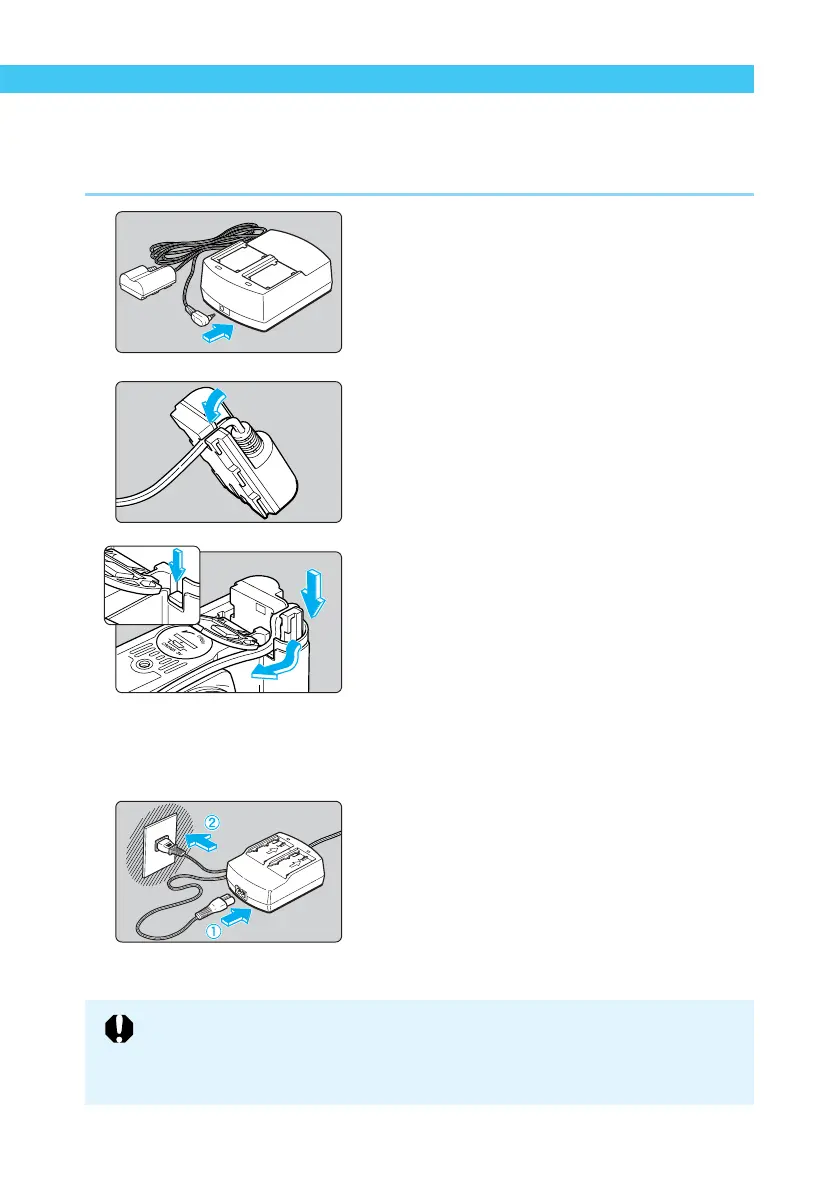
You can operate the EOS D60 from a household power outlet by using the DC coupler. This
enables you to use the camera as long as you like without a battery.
1
Connect the DC coupler.
● Plug the DC coupler into the compact
power adapter.
2
Place the cord in the groove.
● Carefully insert the cord into the groove.
3
Insert the DC coupler into the
camera.
● Open the cover (→24) and lower the
covering on the cord hole.
● Insert the DC coupler and fit the cord into
the cord hole.
● Check that the cord is placed tightly in the
cord hole, and slide the DC coupler into the
chamber until it locks into place.
● Close the cover so that it clicks into place.
4
Connect the power cord.
● Connect the power cord to the compact
power adapter.
● Plug the cord into a power outlet.
● When you are finished, remove the plug
from the power outlet.
● Do not use any DC coupler other than the one provided with your EOS D30 or
D60 camera.
● The DC Coupler cannot be used with cameras other than the EOS D30 and
D60.















 To Next Page