90
Using the Built-in Flash
FE Lock
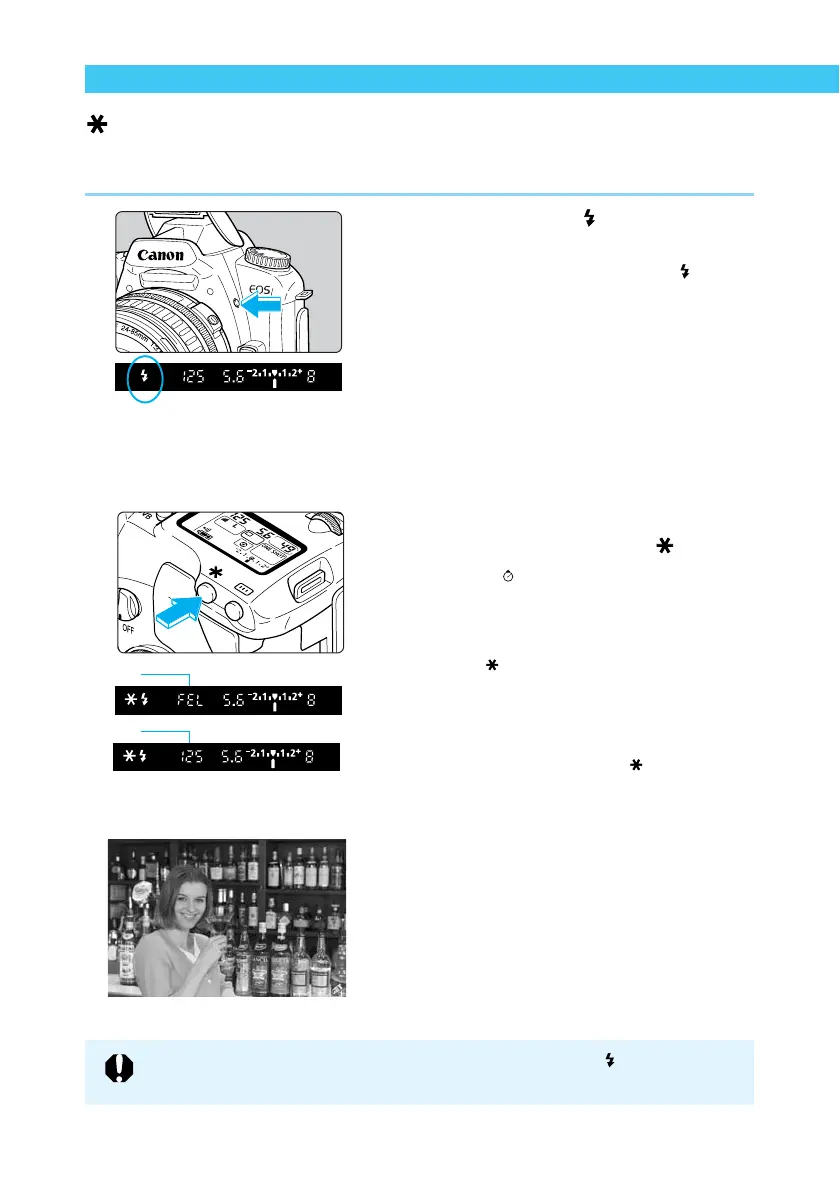
FE (flash exposure) Lock obtains and locks the correct flash exposure reading for any part of a
subject. FE Lock is a function in the Creative zone.
1
Make sure the < > icon in the
viewfinder is on.
● In the Creative zone, press the < > button
to pop up the built-in flash.
2
Focus on the subject.
● Focus on the subject you want to lock the
flash exposure on.
3
Place the center AF point over the
subject, and press the < >
button. (
16
)
➡ The Speedlite fires a preflash and records
the required flash output for this subject in
memory.
➡ The < > icon lights in the viewfinder.
➡ The center AF point will flash in red.
➡ In the viewfinder, the display appears as
shown in 1 for 0.5 seconds, then changes
to 2.
● Each time you press the < > button the
preflash fires, and the FE lock is applied at
the required exposure level.
4
Take the picture.
● Compose the shot and take the picture.
If the subject is far enough away to cause underexposure, the < > icon will blink
in the viewfinder. Move closer to the subject and repeat steps 2 – 4.
1
2















 To Next Page