89
Flash Photography
4
Using the Built-in Flash
Red-eye Reduction
When you use flash in low-light conditions, it can reflect off your subject’s pupils and make
their eyes look red in the recorded imge. This effect is called “red-eye,” and is caused by the
light of the flash reflecting off the retina of the eye. The Red-eye reduction function uses the
camera’s red-eye reduction lamp, which gently shines into the subject’s eyes to constrict the
pupils and thereby reduces the likelihood that red-eye will occur. You can use red-eye reduc-
tion in any picture-taking mode except < > and < > modes.
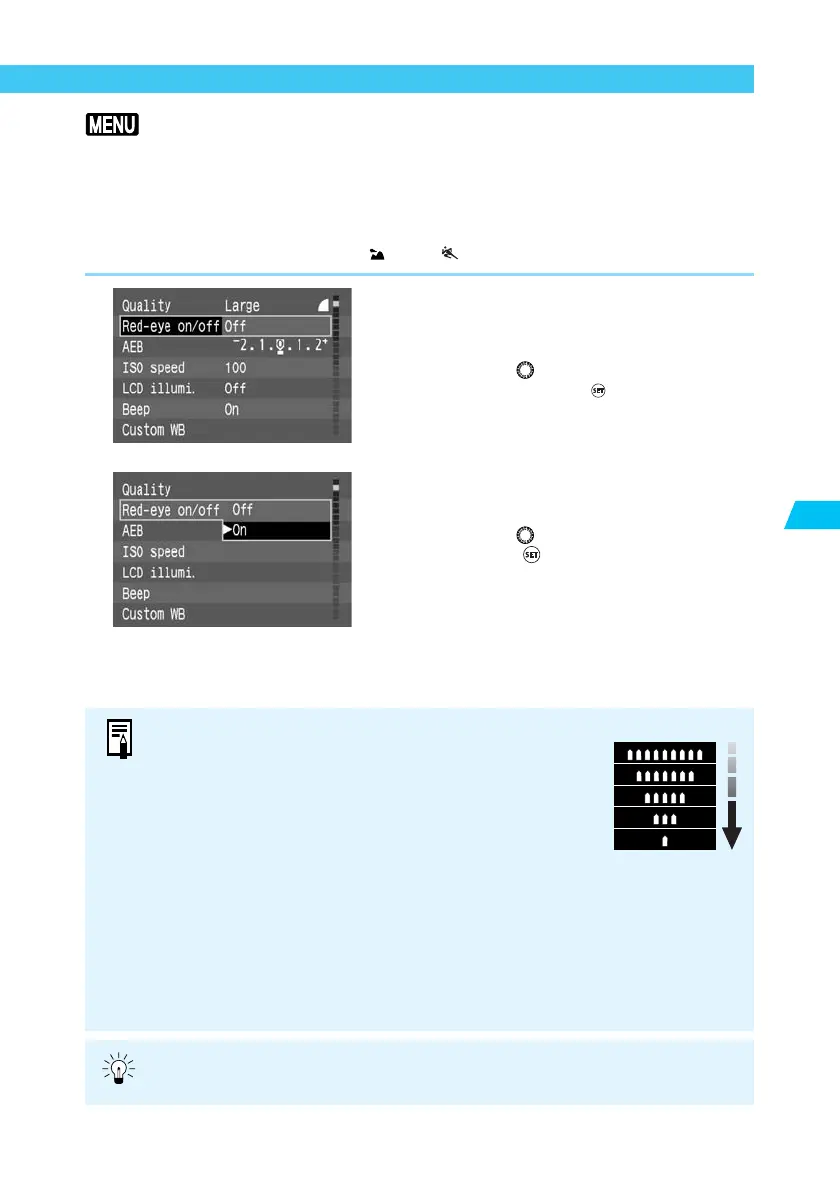
1
From the menu, select [Red-eye
on/off].
● Press the <
MENU
> button.
● Turn the < > dial to select [Red-eye on/
off], then press the < > button.
2
Set the Red-eye reduction func-
tion.
● Turn the < > dial to select [On], then
press the < > button.
➡ The red-eye reduction function is turned
On, and the display returns to the Menu.
● Press the <
MENU
> button to clear the
screen and exit the menu.
● When you press the shutter button down halfway, the red-
eye reduction lamp indicator appears in the viewfinder.
● Red-eye reduction is effective only when the subject is
looking at the red-eye reduction lamp. Be sure to tell your
subjects to look at the lamp.
● To increase the effectiveness of red-eye reduction, press the
shutter button down fully after the red-eye reduction lamp
(which lights for approximately 1.5 seconds) indicator goes
off.
● You can take a picture anytime by pressing the shutter
button down fully, even if the red-eye reduction lamp is on.
● Red-eye reduction also operates when you use an EOS-
dedicated Speedlite.
● The effectiveness of red-eye reduction varies from subject to
subject.
Red-eye reduction
lamp indicator
Red-eye reduction is more effective in bright interior locations, with the camera
closer to the subject.















 To Next Page