57
Advanced Operations
3
AF Point Selection
The AF point can be selected automatically or manually. In the Basic Zone modes and < >
mode, AF point selection will be automatic. In the < >, < >, < >, and < > modes, AF
point selection can be set to either automatic or manual.
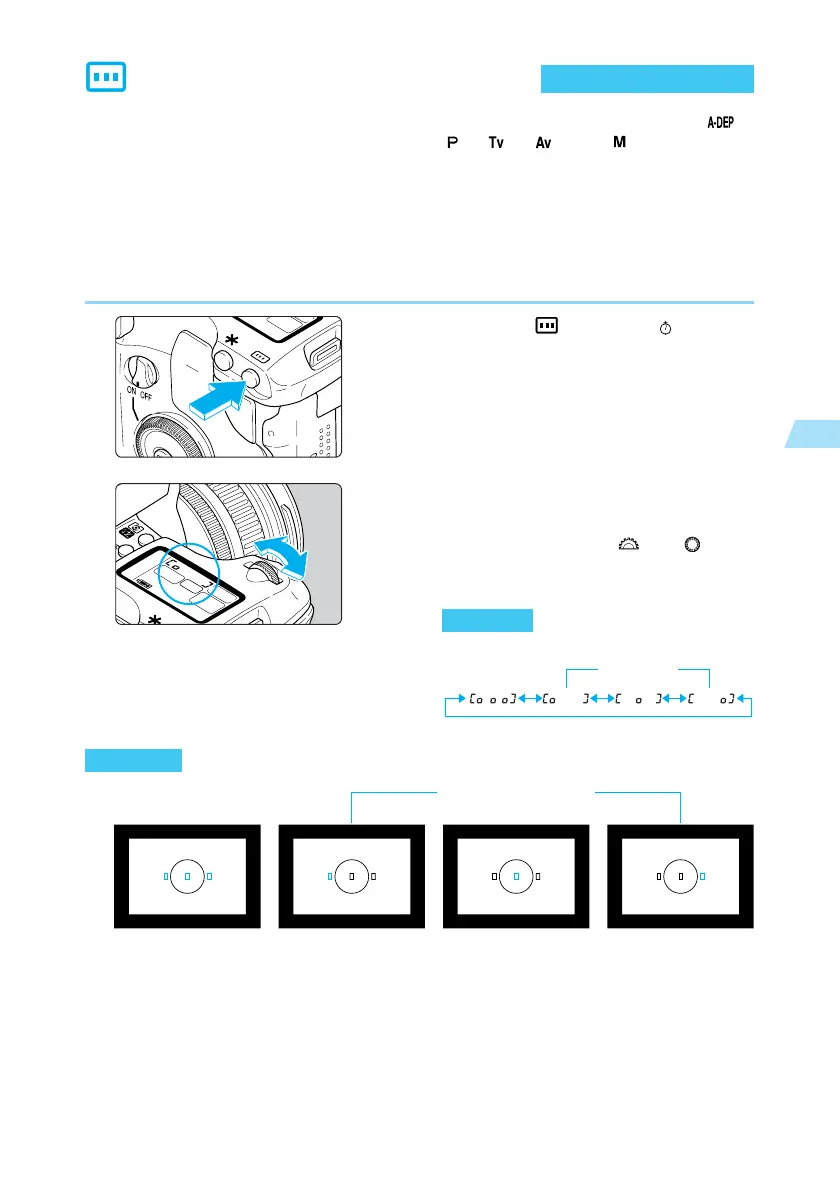
Automatic selection : The camera selects the AF point automatically according to conditions.
Manual selection : You can select any of the three AF points manually. This is best when
you want to be sure to focus on a particular subject, or to use the speed
of the AF focusing function to help you compose a particular shot
quickly.
1
Press the < > button. (
6
)
2
Select the AF point.
➡ Look at the LCD panel or the viewfinder
display as you turn the < > or < > dial.
● Press the shutter button halfway to ready
the camera for shooting.
●
Automatic selection
: All the AF points will light
in red.
●
Manual selection: The desired AF point
lights in red.
Automatic AF point
selection
Manual AF point
selection
Automatic
AF point selection
Manual
AF point selection
LCD panel
Viewfinder















 To Next Page