63
Advanced Operations
3
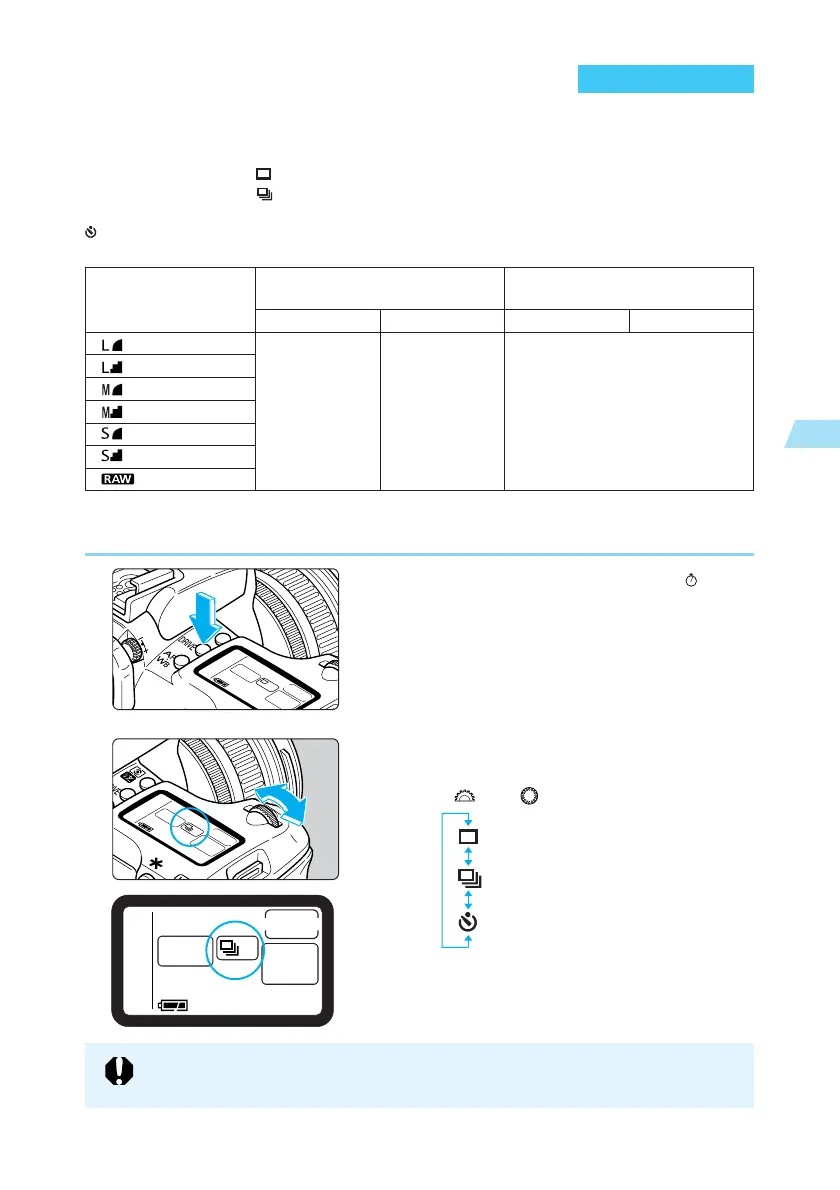
Selecting a Drive Mode
You can set the EOS D60’s drive mode to single-frame shooting, continuous shooting or self-
timer operation.
Single-frame shooting < >: Press the shutter button to take one image.
Continuous shooting < >: You can use the continuous shooting mode by pressing and
holding the shutter button.
Self-timer operation: When you press the shutter button, the picture will be taken
about 10 sec. later. (→81)
● The figures above are based on Canon’s testing standards (at 1/250 sec. or faster and ISO
100).
1
Press the <
DRIVE
> button. (
6
)
2
Select the drive mode.
● Look at the LCD panel as you turn the
< > or < > dial.
: Single-frame shooting
: Continuous shooting
: Self-Timer Operation
● Press the shutter button down halfway to
return to ready-to-shoot mode.
Size/Quality
Large/Fine
Large/Normal
Medium/Fine
Medium/Normal
Small/Fine
Small/Normal
RAW
ONE SHOT
3
AI SERVO
2.5
ONE SHOT AI SERVO
Maximum number of images
(Approx. images/sec.)
Max. Burst During Continuous Shooting
(Approx. images)
8
If the CF card’s remaining capacity is enough for less than 8 images, continuous
shooting might not be possible.















 To Next Page