EasyManua.ls Logo

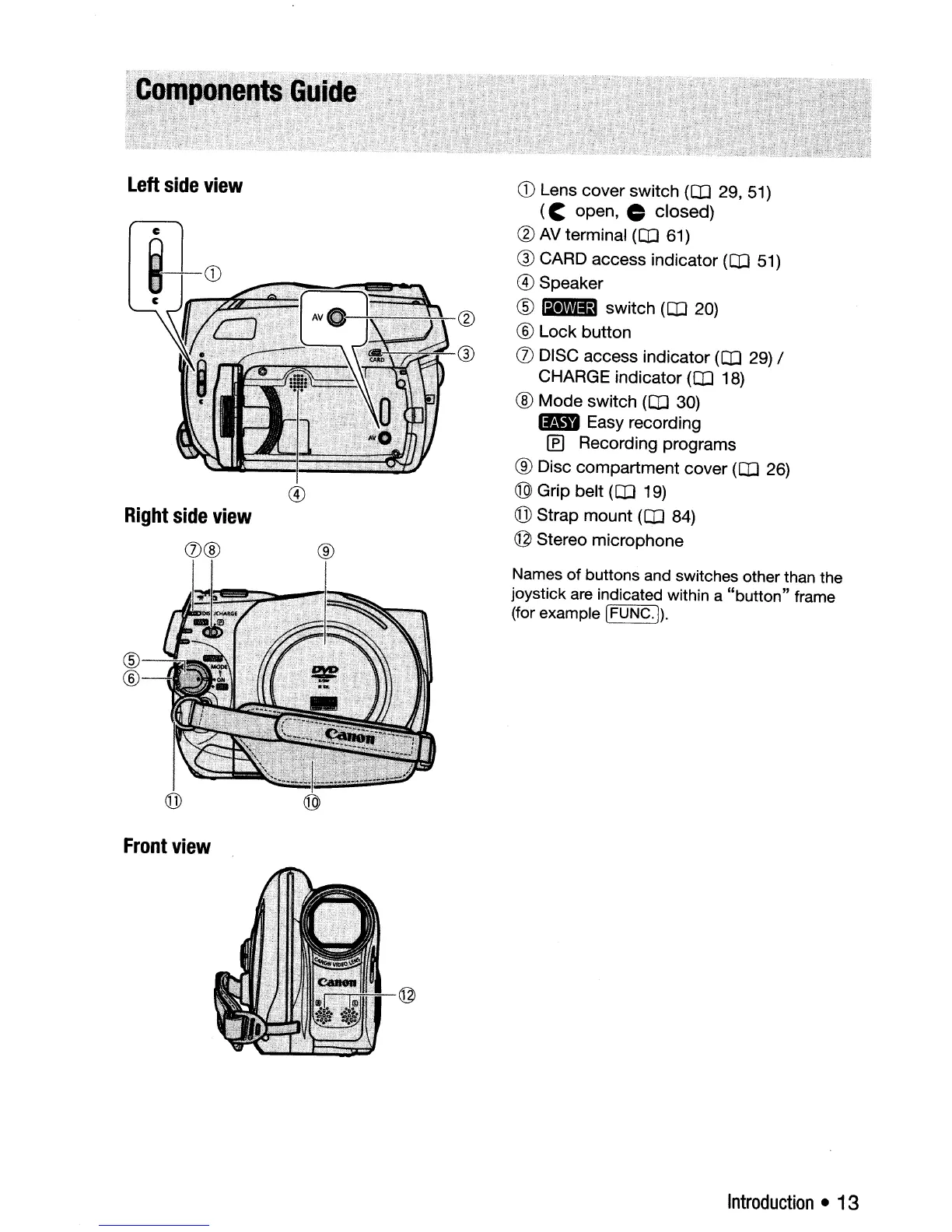
Canon DC310 - Camcorder Component Identification; Left Side View Components; Right and Front View Components

Canon DC310
98 pages
Print Icon
To Next Page IconTo Next Page
To Previous Page IconTo Previous Page
Loading...
left
side
view
c
i-CD
c
Right
side
view
0@
®
CD
Lens cover switch (OJ
29,51)
(C
open, closed)
(g)
AV
terminal (OJ
61)
® CARD access indicator (OJ
51)
® Speaker
®
IBiD
switch (OJ 20)
® Lock button
(J)
DISC access indicator (OJ
29)
/
CHARGE indicator (OJ
18)
® Mode switch (OJ 30)
Im1
Easy recording
If]
Recording programs
® Disc compartment cover (OJ 26)
® Grip belt (OJ 19)
(j])
Strap mount (OJ
84)
@ Stereo microphone
Front
view
Names
of
buttons and switches other than the
joystick are indicated within a
"button"
frame
(for example
IFUNC.
I).
Introduction
13

Table of Contents

Other manuals for Canon DC310

Related product manuals