EasyManua.ls Logo

Canon DC310 - Connecting to External Video Devices; Connecting to TVs and VCRs

Canon DC310
98 pages
Print Icon
To Next Page IconTo Next Page
To Previous Page IconTo Previous Page
Loading...
External
Connections
This chapter explains step-by-step how
to
connect your camcorder
to
an external device such as a TV
or
VCR.
Open the LCD panel
to
access.
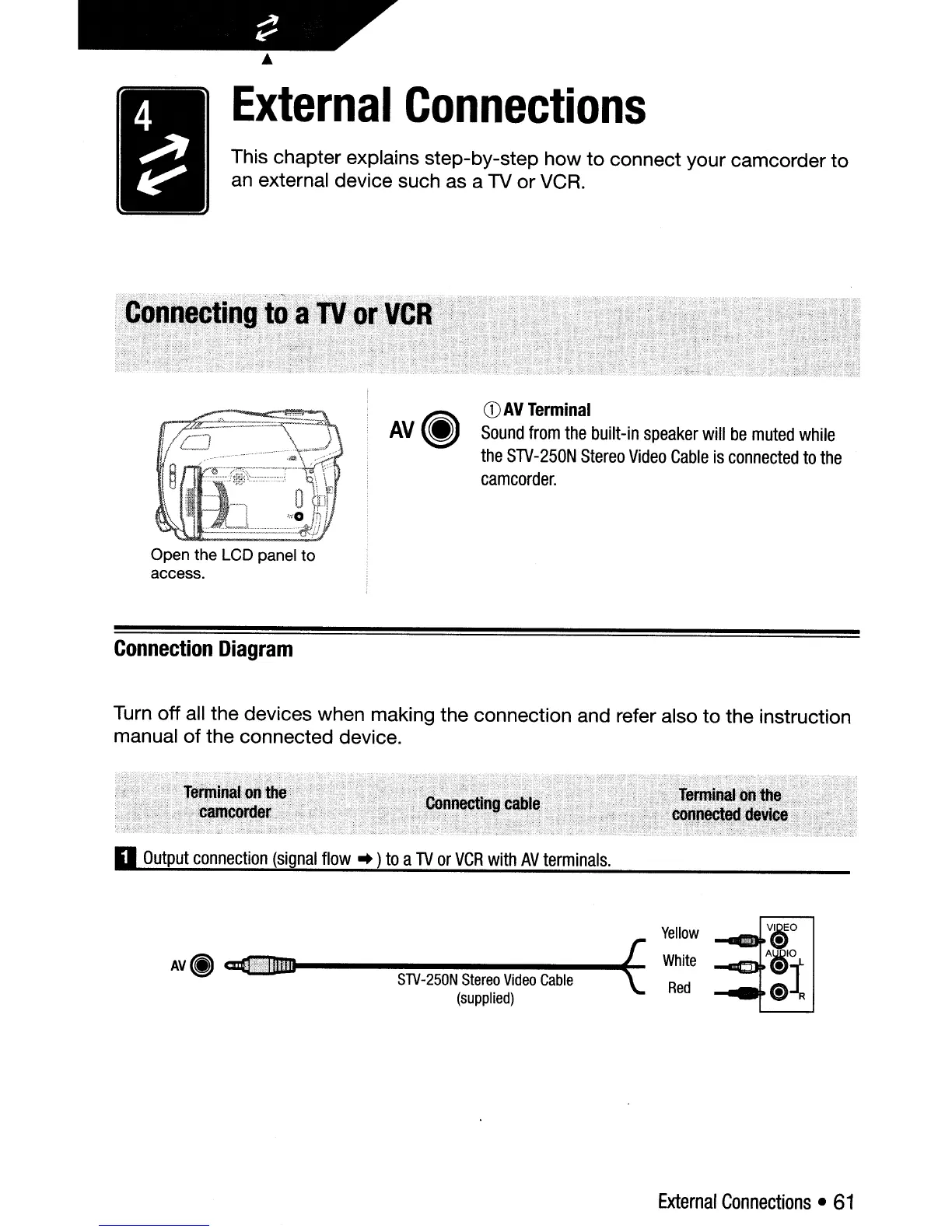
Connection
Diagram
AV(j)
CD
AV
Terminal
Sound
from
the
built-in
speaker
will
be
muted
while
the
STV-250N
Stereo
Video
Cable
is
connected
to
the
camcorder.
Turn off all the devices when making the connection and refer also
to
the instruction
manual
of
the connected device.
II
Output
connection
(signal
flow
~
)
to
a
TV
or
VCR
with
AV
terminals.
A\I~
~----------
....
tE-
",y~~
-
STV-250N
Stereo
Video
Cable
(supplied)
Yellow
White
Red
v~o
~\!J
--
A~O
--
\!JT
;:
(;)~
External
Connections
61

Table of Contents

Other manuals for Canon DC310

Related product manuals