rS
STILL
IMG
OPER.
[ERASE
ALL
~
ORO]
[ERASE
ALL
IMAGES]
[INITIALIZE
CARD]
ctti
DISPLAY
SETUP
[NO],
[YES]
[NO],
[YES]
[INITIALIZE],
[COMPL.lNII],
[CANCEL]
.............................
•
•
[BRIGHTNESS]
[TV
SCREEN]
[MARKERS]
[DATA
CODE]
[LANGUAGE]
[DEMO
MODE]
[mJ
ON],
[l!JD
OFF]
•
•
[l!JD
OFF],
[EW
LEVEL(WHn],
•
•
[EG
LEVEL(GRY)],
[mw
GRID(WHT)],
[§f'G
GRID(GRY)]
[ffiEJ
DATE],
[e
TIME],
•
36
[lire
DATE
&
TIME],
[
..
CAMERA
DATA]
[CESTINA],
[DEUTSCH],
[EAAHNIKA],
•
•
•
•
24
[ENGLISH],
[ESPANOL],
[FRANCAIS],
[ITALIANO],
[MAGYAR],
[MELAYU],
[POLSKI],
[ROMANA],
[TURKCE],
[PYCCI{l.1111],
[YKPAfHCbKA],
[
~.;sJI],
L.s
....
.Jl9], [5111:1'1"
vm
],
[M'if*$3t],
[~m9='>:],
[~~01],
[B*~fi]
[mJ
ON],
[OJ
OFF]
• •
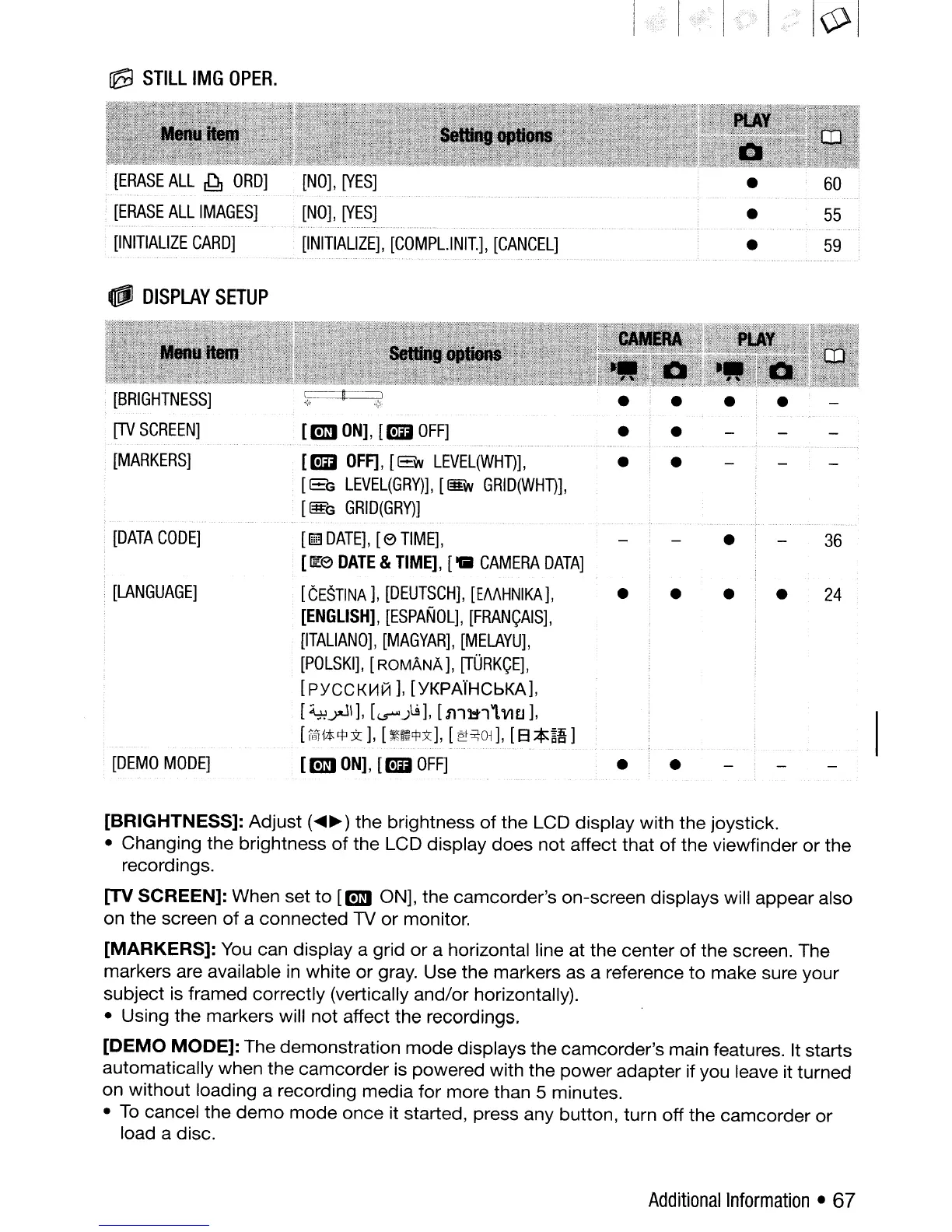
[BRIGHTNESS]:
Adjust
(~~)
the brightness
of
the
LCD display with
the
joystiCk.
• Changing
the
brightness
of
the LCD display
does
not
affect that
of
the viewfinder
or
the
recordings.
[TV
SCREEN]:
When
set
to
[mJ
ON], the camcorder's on-screen displays will appear also
on the screen
of
a
connected
1V
or
monitor.
[MARKERS]:
You
can display a grid
or
a horizontal line at the center
of
the screen. The
markers are available in white
or
gray. Use the markers as a reference
to
make sure your
subject is framed correctly (vertically
and/or
horizontally).
• Using the markers will
not
affect
the
recordings.
[DEMO
MODE]:
The demonstration
mode
displays the camcorder's main features. It starts
automatically when the
camcorder
is powered with the
power
adapter if you leave it turned
on
without
loading a recording media
for
more than 5 minutes.
•
To
cancel the
demo
mode
once
it started, press any button, turn off the
camcorder
or
load a disc.
Additional
Information
• 67



 To Next Page