~
SYSTEM
SETUP
•
•
•
•
•
•
•
•
•
[
...
»)
HIGH
VOLUME],
[
••
)
LOW
VOLUME],
[mD
OFF]
[
rmJ
ON],
[mD
OFF]
[mD
10
min],
[EImm
20
min],
[m..
30
min]
[riiJ
RESET],
[=
CONTINUOUS]
[~
NORMAL
TV),
[mJi)
WIDE
TV]
[POWER
SAVE]
[@
STANDBY
OFF]
[SPEAKER
VOL.]
[BEEP]
[FILE
NOS.]
[TV
TYPE]
[FIRMWARE]
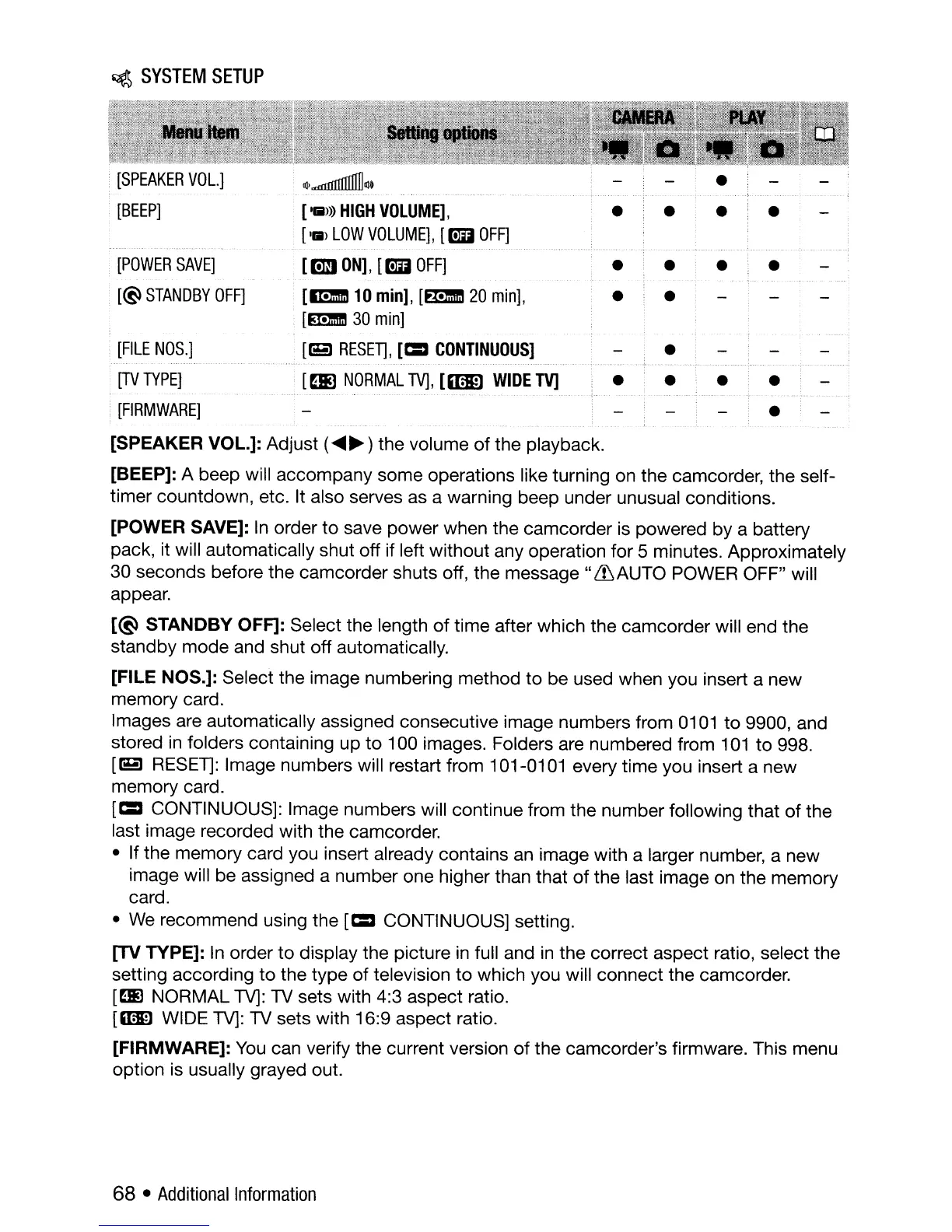
[SPEAKER VOL.]: Adjust (
....
~
) the volume
of
the playback.
[BEEP]: A beep will accompany some operations like turning on the camcorder, the self-
timer countdown, etc. It also serves as a warning beep under unusual conditions.
[POWER SAVE]: In order
to
save power when the camcorder is powered by a battery
pack, it will automatically shut off if left without any operation for 5 minutes. Approximately
30 seconds before the camcorder shuts off, the
message"
&AUTO
POWER OFF" will
appear.
[@
STANDBY OFF]: Select the length
of
time after which the camcorder will end the
standby
mode
and shut off automatically.
[FILE NOS.]: Select the image numbering method
to
be used when you insert a new
memory card.
Images are automatically assigned consecutive image numbers from 0101
to
9900, and
stored
in
folders containing up
to
100 images. Folders are numbered from
101
to
998.
[riiJ
RESET]: Image numbers will restart from 101-0101 every time you insert a new
memory card.
[=
CONTINUOUS]: Image numbers will continue from the number following that
of
the
last image recorded with the camcorder.
• If the memory card you insert already contains
an
image with a larger number, a new
image will be assigned a number one higher than that
of
the last image on the memory
card.
•
We
recommend using the
[=
CONTINUOUS] setting.
[TV
TYPE]:
In
order
to
display the picture
in
full and
in
the correct aspect ratio, select the
setting according
to
the
type
of
television
to
which you will connect the camcorder.
[ml
NORMAL TV): TV sets with 4:3 aspect ratio.
[WID WIDE
TV):
TV
sets with 16:9 aspect ratio.
[FIRMWARE]:
You
can verify the current version
of
the camcorder's firmware. This menu
option is usually grayed out.
68 •
Additional
Information



 To Next Page