Additional
Information
This chapter contains troubleshooting advice, screen messages,
handling and maintenance tips, and other information.
Appendix:
Menu
Options
Lists
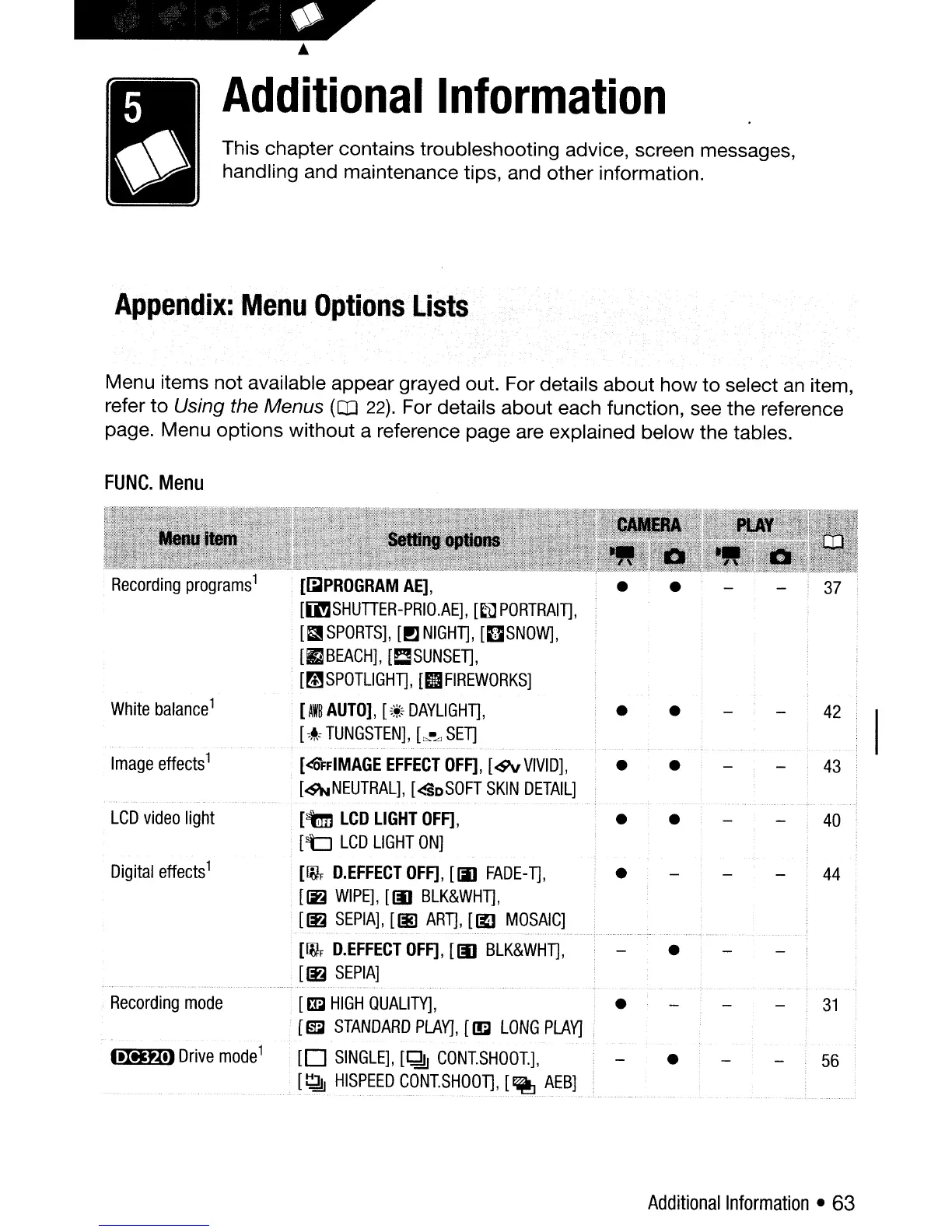
Menu items not available appear grayed out. For details about how
to
select
an
item,
refer to Using the Menus
(CD
22). For details about each function, see the reference
page. Menu options without a reference page are explained below the tables.
FUNC.
Menu
[~PROGRAM
AE],
[[l!3SHUTIER-PRIO.AE],
[~PORTRAln,
• [13
SPORTS],
[PJ
NIGHn,
[OSNOW],
.
[rJBEACH],
[CSUNSEn,
[mSPOTLlGHT],
[II
FIREWORKS]
White
balance
1
[AWB
AUTO],
[~~c
DAYLIGHn,
•
•
42
[
,l<
TUNGSTEN],
[~Ll
SET]
Image
effects
1
[<OFFIMAGE
EFFECT
OFF],
[<9v
VIVID],
• •
43
[~NEUTRAL],
[<SDSOFT
SKIN
DETAIL]
LCD
video
light
[tm
LCD
LIGHT
OFF],
•
•
40
[~
LCD
LIGHT
ON]
Digital
effects
1
[IVF
D.EFFECTOFF],
[iii
FADE-T],
•
44
[~
WIPE],
[III
BLK&WHn,
[~
SEPIA],
[~
ART],
[~
MOSAIC]
[[fJF
D.EFFECT
OFF],
[III
BLK&WHT],
•
[IE
SEPIA]
Recording
mode
[mJ
HIGH
QUALITY],
•
[~
STANDARD
PLAYJ,
[~
LONG
PLAY}
.tItJt..teJ
Drive
mode
1
[0
SINGLE],
[~
CONISHOO1],
•
56
[~
HISPEED
CONISHOOn,
[~
AEBJ
Additional
Information
• 63



 To Next Page