Selecting
the
Recording
Mode
Zooming:
Optical,
Advanced
and
Digital
Zoom
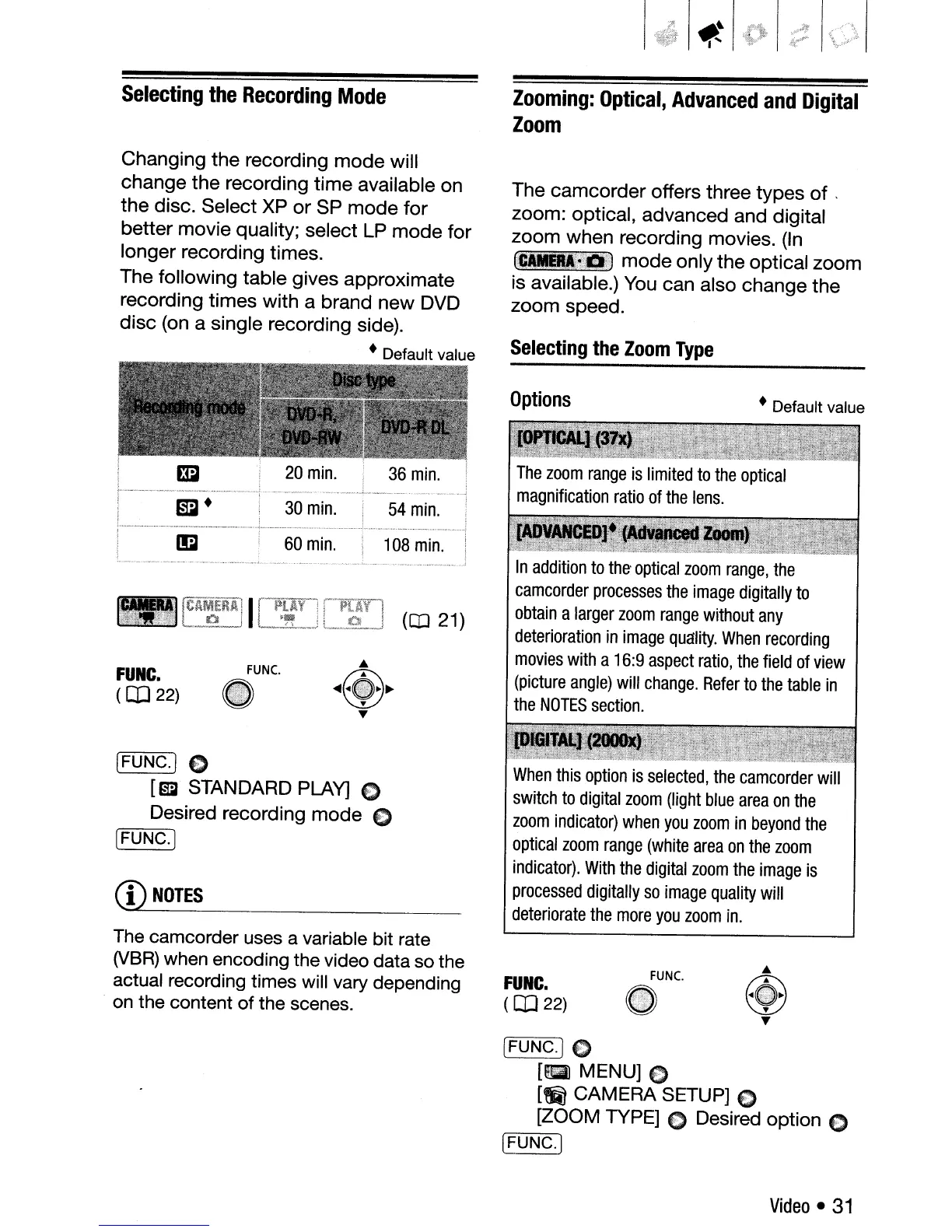
Changing the recording
mode
will
change the recording time available on
the
disc. Select
XP
or SP mode for
better movie quality; select
LP
mode for
longer recording times.
The following table gives approximate
recording times with a brand new DVD
disc (on a single recording side).
• Default value
The camcorder offers three types
of
.
zoom: optical, advanced and digital
zoom when recording movies.
(In
_~4.J~
mode only the optical zoom
is available.)
You
can also change the
zoom speed.
Selecting
the
Zoom
Type
• Default value
In
addition
to
the-
optical
zoom
range,
the
camcorder
processes
the
image
digitally
to
obtain
a
larger
zoom
range
without
any
deterioration
in
image
quality.
When
recording
movies
with
a
16:9
aspect
ratio,
the
field
of
view
(picture
angle)
will
change.
Refer
to
the
table
in
the
NOTES
section.
Options
54
min.
108
min.
60
min.
30
min.
FUNC.
(CD
22)
[FUNG·l C
[ml· STANDARD PLAY] 0
Desired recording mode E)
,------.
iFUNG.]
CD
NOTES
When
this
option
is
selected,
the
camcorder
will
switch
to
digital
zoom
(light
blue
area
on
the
zoom
indicator)
when
you
zoom
in
beyond
the
optical
zoom
range
(white
area
on
the
zoom
indicator).
With
the
digital
zoom
the
image
is
processed
digitally
so
image
quality
will
deteriorate
the
more
you
zoom
in.
The
camcorder uses a variable bit rate
(VBR)
when encoding the video data so the
actual recording times will vary depending
.
on
the content of the scenes.
FUNC.
(CD
22)
FUNC.
~
•
....
~
~
T
T
[FUNC.]0
[aJ
MENU] E)
[~
CAMERA SETUP] E)
[ZOOM TYPE] C Desired option E)
r---~
[FUNG.]
Video
•
31



 To Next Page