• The image stabilizer cannot be turned off when the mode switch
is
set to
1rB.
•
We
recommend setting the image stabilizer to
[m
OFF]
when using a tripod.
[WIDESCREEN]: The camcorder uses the full width
of
the image sensor providing high-
resolution 16:9 recordings.
• Since the screens on the camcorder have
an
aspect ratio
of
16:9, recordings with a 4:3
aspect ratio will appear
in
the center
of
the screen with black sidebars.
•
Playing
back
a
widescreen
recording:
TV sets compatible with the Video
ID-1
system will
automatically switch to wide (16:9) mode. Otherwise, change the aspect ratio of the
TV
manually.
To
play back on a
TV
with normal aspect ratio
(4:3)
change the
[TV
TYPE]
setting accordingly
(CD
68).
[WIND SCREEN]: The camcorder automatically reduces the background sound of wind
when recording outdoors.
• The wind screen cannot be turned off when the mode switch
is
set
to
...
• Some low-frequency sounds will be suppressed along with the sound
of
wind. When
recording
in
surroundings unaffected by wind or if you want to record low-frequency
sounds, we recommend setting the wind screen
to
[m
OFF
~I.s].
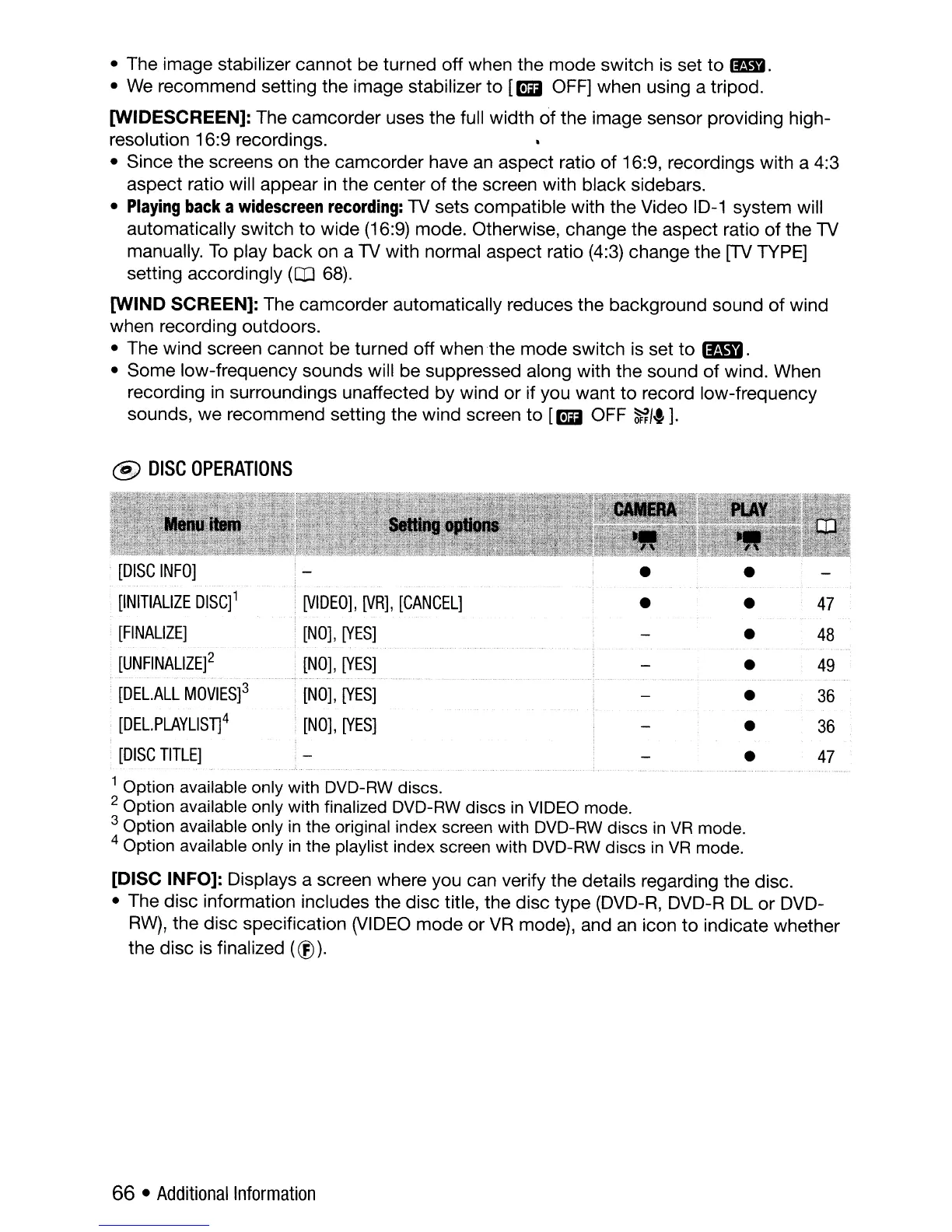
@
DISC
OPERATIONS
[DISC
INFO]
[INITIALIZE
DISC]1
.
[VIDEO],
[VR],
[CANCEL]
•
•
47
[FINALIZE]
[NO],
[YES]
•
48
[UNFINALlZE]2
[NO],
[YES]
•
49
[DEL.ALL
MOVIES]3
[NO],
[YES]
•
36
[DEL.
PLAYLISTj
4
[NO],
[YES]
•
36
[DISC
TITLE]
•
47
1 Option available only with DVD-RW discs.
2 Option available only with finalized DVD-RW discs
in
VIDEO mode.
3 Option available only
in
the original index screen with DVD-RW discs
in
VR
mode.
4 Option available only
in
the playlist index screen with DVD-RW discs
in
VR
mode.
[DISC INFO]: Displays a screen where you can verify the details regarding the disc.
• The disc information includes the disc title, the disc type (DVD-R, DVD-R DL or DVD-
RW),
the disc specification
(VIDEO
mode or
VR
mode), and
an
icon
to
indicate whether
the disc is finalized
(®).
66 •
Additional
Information



 To Next Page