FUNC.
Menu
(cont.)
[~
TO
PLAYLlST]2
[~
TO
ORIGINAL]3
[dl
ADD
TO
PLAYLlST]2
[~Q
MOVE]3
[-t
DIVIDE]3
[((
DELETE]4
,
[SPEAKER
VOL.]5
•
[SLIDESHOW]
[PROTECT]
[PRINT
ORDER]
Size:
·
.tM~~·)
[LW
1152x648]
I
[L
1152x864]
I
·
[S
640x480]
· .tMUt)
: [l1024x768],
[S
640x480]
,
Quality:
[l8
SUPER
FINE],
[.
FINE],
[...
NORMAL]
[ALL
SCENES],
[ONE
SCENE],
[CANCEL]
·
[NO],
[YES]
, - ••••••••••
111111.
........................ - .
:
[I!d,o
0]
-
[~99]
COPIES
46
46
45
46
46
•
36
•
35
•
54
.,
........
•
58
•
60
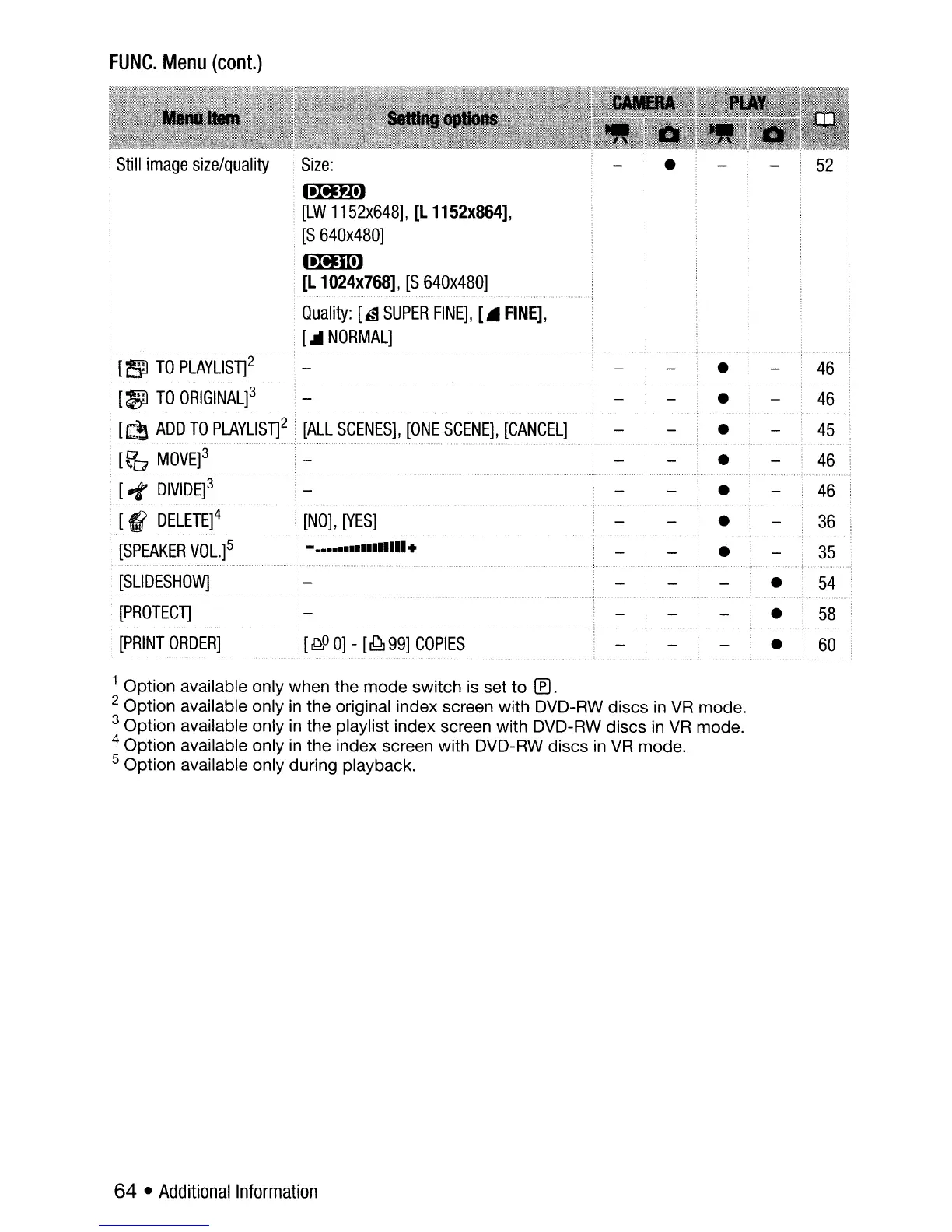
1 Option available only when the mode switch is set to
If).
2 Option available only
in
the original index screen with DVD-RW discs
in
VR
mode.
3 Option available only
in
the playlist index screen with DVD-RW discs
in
VR
mode.
4 Option available only
in
the index screen with DVD-RW discs
in
VR
mode.
S Option available only during playback.
64
•
Additional
Information



 To Next Page