EasyManua.ls Logo

Canon DC310 - Advanced Photo Shooting Modes; Continuous and High-Speed Shooting; Auto Exposure Bracketing (AEB)

Canon DC310
98 pages
Print Icon
To Next Page IconTo Next Page
To Previous Page IconTo Previous Page
Loading...
11I8'll)
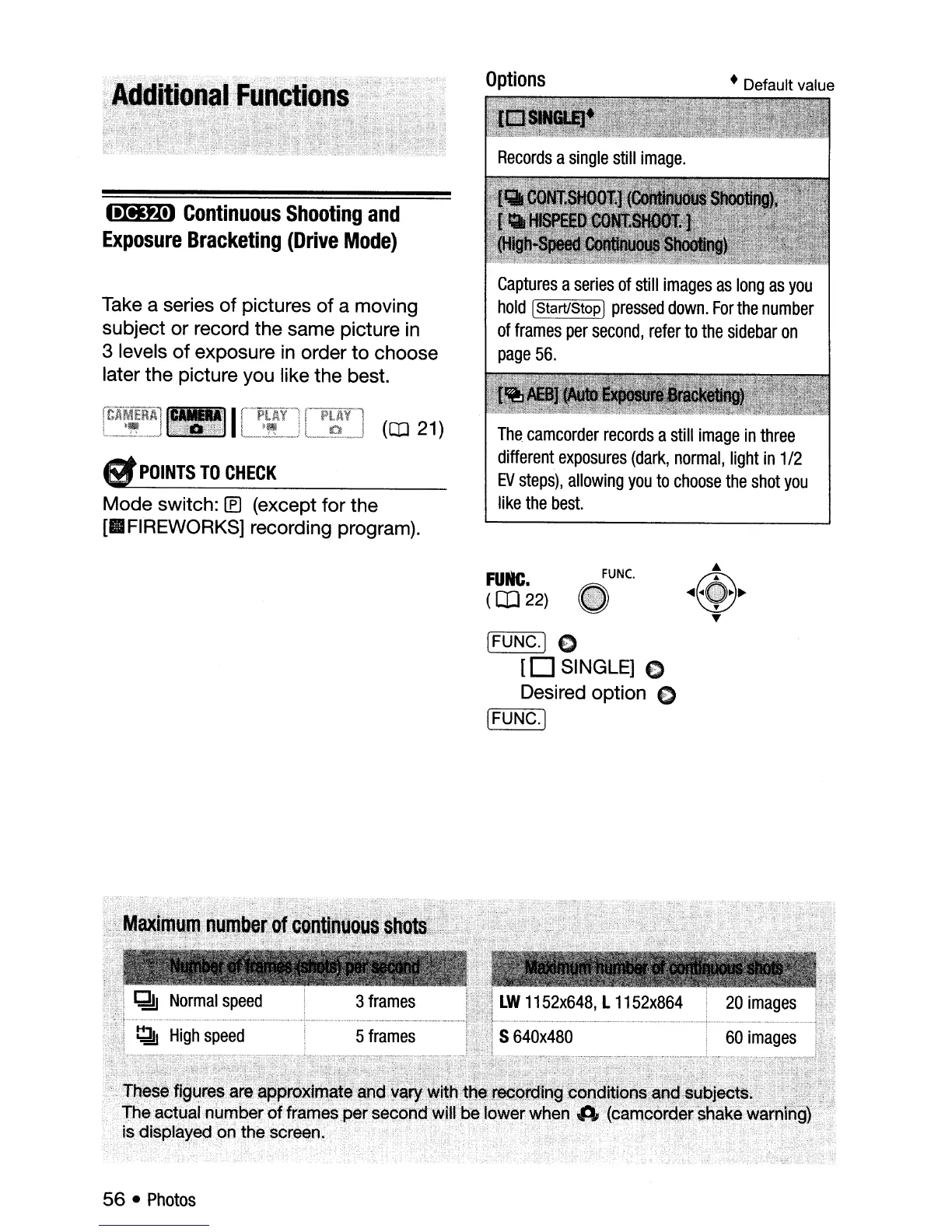
Continuous
Shooting
and
Exposure
Bracketing
(Drive
Mode)
Options
Default value
Take a series
of
pictures
of
a moving
subject or record the same picture
in
3 levels
of
exposure
in
order
to
choose
later the picture you like the best.
6f
POINTS
TO
CHECK
Mode switch: [f) (except for the
[II
FIREWORKS] recording program).
Captures
a
series
of
still
images
as
long
as
you
hold
IStart/StopI
pressed
down.
For
the
number
of
frames
per
second,
refer
to
the
sidebar
on
page
56.
The
camcorder
records
a
still
image
in
three
different
exposures
(dark,
normal,
light
in
1/2
EV
steps),
allowing
you
to
choose
the
shot
you
like
the
best.
FUMe
(CD
22)
FUNC.
(FUNC.] 0
[0
SINGLE] 0
Desired option C
[r=F:-:-:U
N:-:-::C=--.]
56
Photos

Table of Contents

Other manuals for Canon DC310

Related product manuals