Preparing
for
Live
View
Shooting
'*
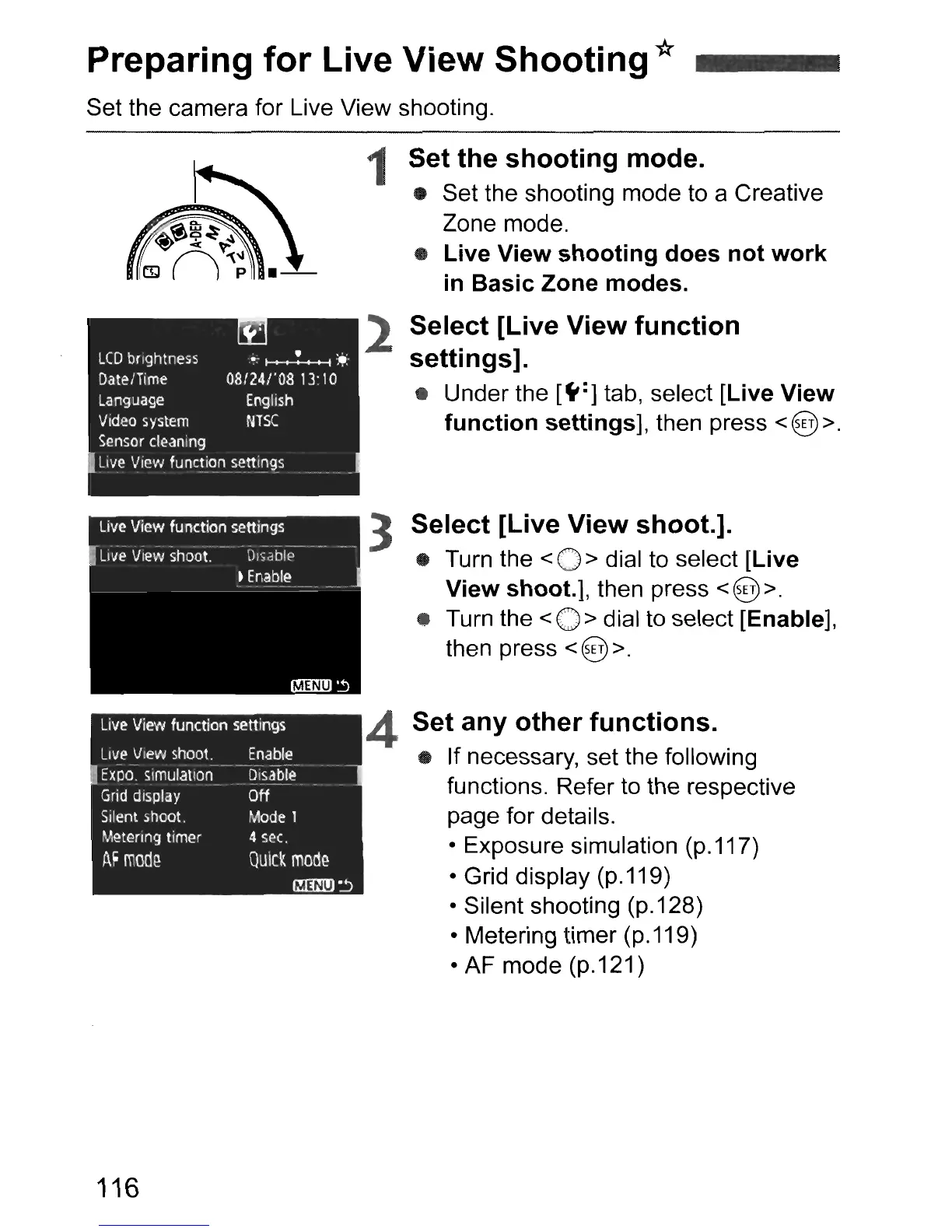
Set the camera for Live View shooting.
Live
View function settings
Set
any
other
functions.
• If necessary, set the following
functions. Refer to the respective
page for details.
• Exposure simulation (p.117)
• Grid display (p.119)
• Silent shooting (p.128)
• Metering timer (p.119)
• AF mode (p.121)
3
Select
[Live
View
shoot.].
• Turn the < 0 > dial to select [Live
View
shoot.],
then press <@>.
• Turn the < 0 > dial to select [Enable],
then press < @ >.
4
1 Set
the
shooting
mode.
• Set the shooting mode to a Creative
Zone mode.
•
Live
View
shooting
does
not
work
in
Basic
Zone
modes.
2
Select
[Live
View
fu
nction
settings].
• Under the
[~:]
tab, select [Live
View
function
settings],
then press <@>.
Enable
Disable
Off
Mode
1
4
sec.
QUick
mode
I!Illrn
~
LIVE:'
View
shoot.
Expo.
simulation
Grid
display
Silent
shoot.
Metering
timer
AF
mod~
116



 To Next Page