Changing
Image
Playback
Settings
lIBmJ
Adjusting
the
LCD
Monitor
Brightness
You
can adjust the brightness
of
the LCD monitor to make it easier to
read.
]
LCD
brightness
Date/Time
Language
Video
system
..
.
..
~.:~:.
08/241'08
13:
10
English
NTSC
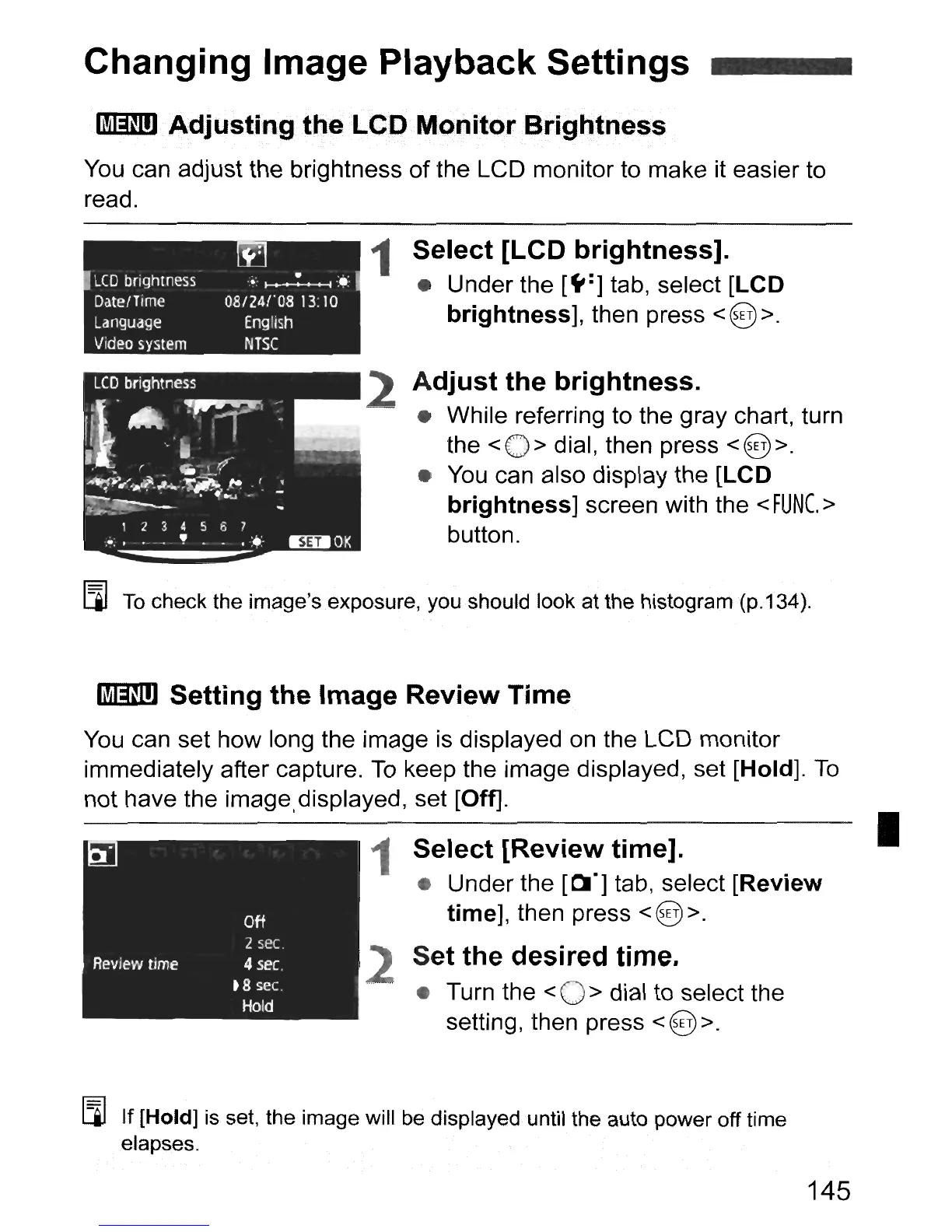
1
Select
[LCD
brightness].
• Under the
[~:]
tab, select [LCD
brightness],
then press <@>.
2
Adjust
the
brightness.
• While referring to the gray chart, turn
the
<0>
dial, then press <@>.
•
You
can also display the [LCD
brightness]
screen with the <
FUNC.
>
button.
[JJ
To
check the image's exposure, you should look at the histogram (p.134).
Im3mJ
Setting
the
Image
Review
Time
You
can set how long the image
is
displayed on the LCD monitor
immediately after capture.
To
keep the image displayed, set [Hold].
To
not have the image,displayed, set [Off].
Select
[Review
time].
• Under the
[0·]
tab, select
[Review
time], then press <@>.
Set
the
desired
time.
• Turn the < 0 > dial
to
select the
setting
I then press < @ >.
[il
If
[Hold] is set, the image will be displayed until the auto power off time
elapses.
145
I



 To Next Page