Recharging the Battery
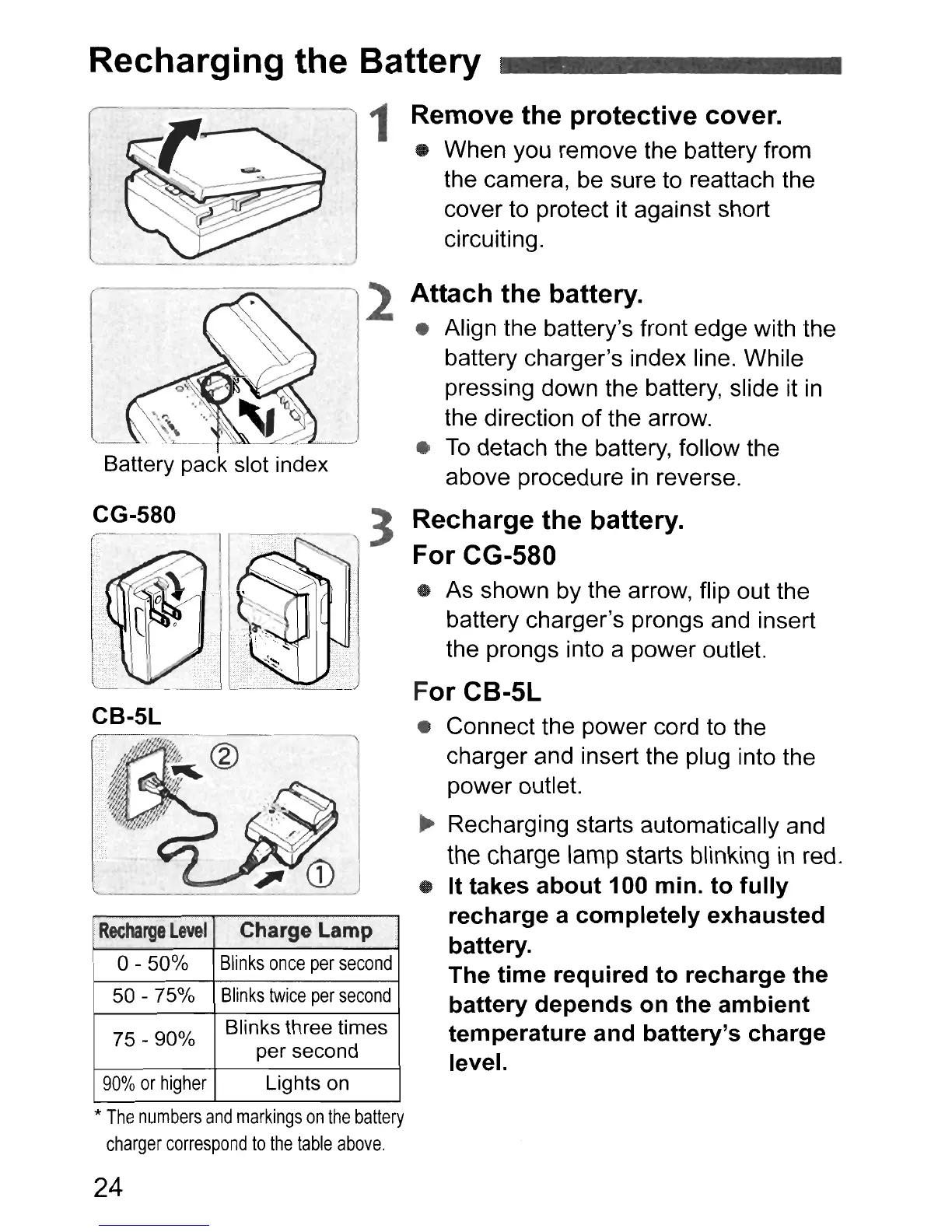
Battery pack slot index
1 Remove the protective cover.
• When you remove the battery from
the camera, be sure to reattach the
cover to protect it against short
circuiting.
2 Attach the battery.
• Align the battery's front edge with the
battery charger's index line. While
pressing down the battery, slide it
in
the direction
of
the arrow.
•
To
detach the battery, follow the
above procedure
in
reverse.
Recharge
Level
Charge Lamp
0-50%
Blinks
once
per
second
50 - 75%
Blinks
twice
per
second
75 - 90%
Blinks
th
ree times
per second
90%
or
higher
Lights on
Recharge the battery.
For CG-580
• As shown by the arrow, flip out the
battery charger's prongs and insert
the prongs into a power outlet.
For CB-5L
• Connect the power cord to the
charger and insert the plug into the
power outlet.
~
Recharging starts automatically and
the
charge
lamp
starts
blinking in red.
• It takes about 100 min. to fully
recharge a completely exhausted
battery.
The time required to recharge the
battery depends on the ambient
temperature and battery's charge
level.
------,
CG-580
*
The
numbers
and
markings
on
the
battery
charger
correspond
to
the
table
above.
24



 To Next Page