When Autofocus Fails
Autofocus can fail to achieve focus (the focus confirmation light
<.
>
blinks) with certain subjects such as the following:
Subjects difficult to focus
• Low-contrast subjects
(Example: Blue
sky,
solid-color walls, etc.)
• Subjects
in
low light
• Extremely backlit or reflective subjects
(Example: Car with a reflective body, etc.)
• Near and far subjects covered by
an
AF point
(Example: Animal
in
a cage, etc.)
• Repetitive patterns
(Example: Skyscraper windows, computer keyboards, etc.)
In
such cases, do one
of
the following:
(1) With One-Shot
AF,
focus an object at the same distance as the
subject and lock the focus before recomposing (p.50).
(2) Set the lens focus mode switch to <MF> and focus manually.
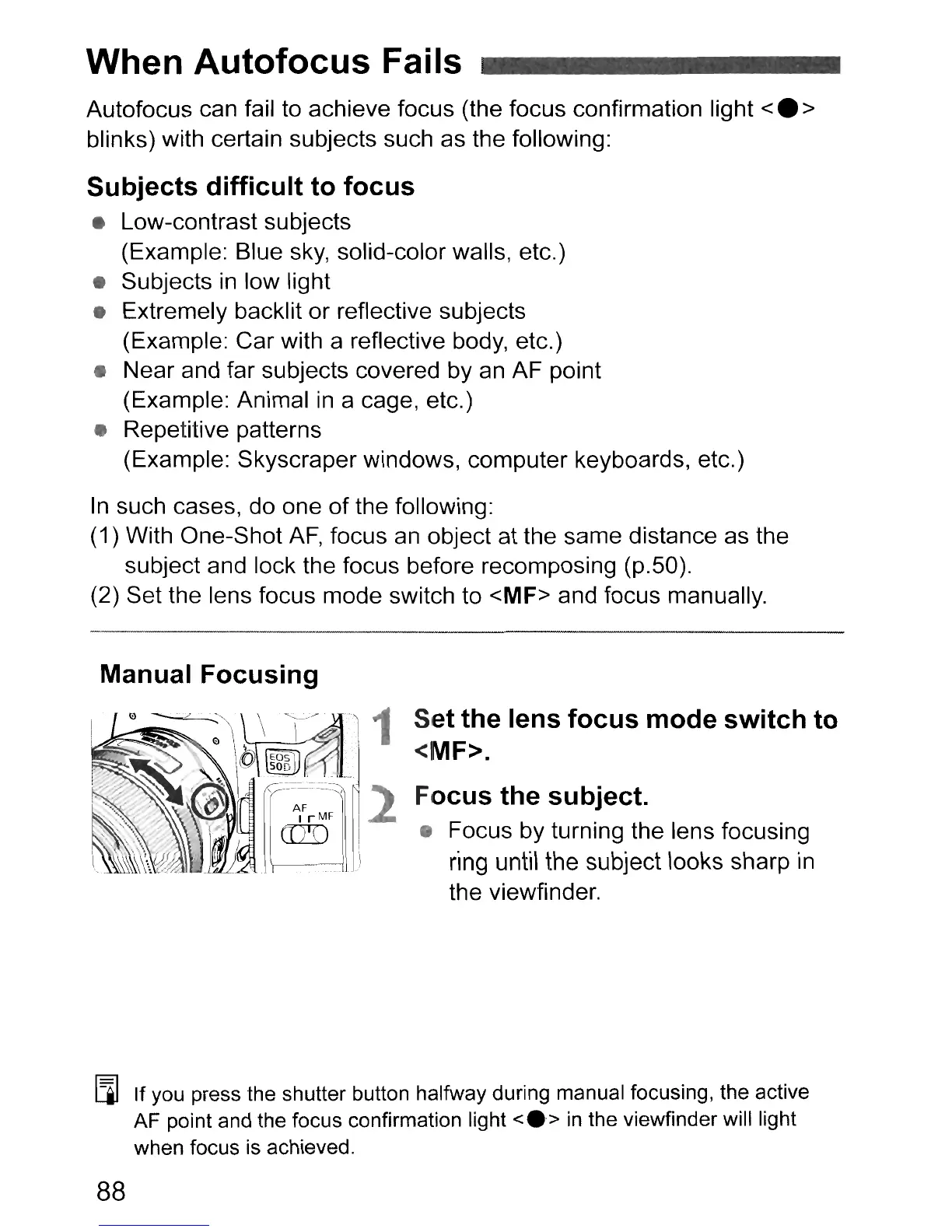
Manual Focusing
Set the lens focus mode switch to
<MF>.
Focus the subject.
• Focus by turning the lens focusing
ring until the subject looks sharp in
the viewfinder.
[Q]
If you press the shutter button halfway during manual focusing, the active
AF point and the focus confirmation light
<e>
in
the viewfinder will light
when focus is achieved.
88


 To Next Page