IlimJ!J
Lens
Peripheral Illumination
Correction
_
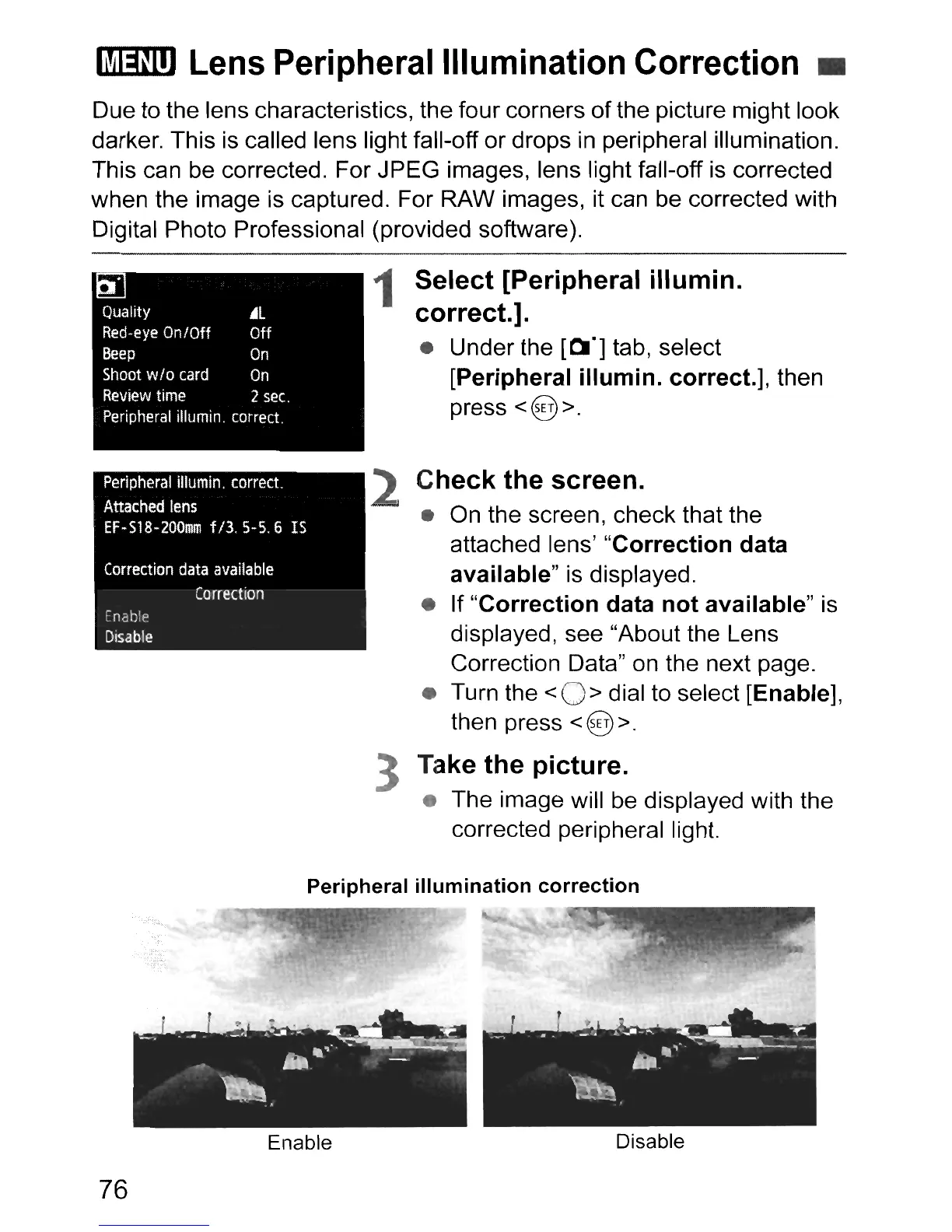
Due to the lens characteristics, the four corners ofthe picture might look
darker. This is called lens light fall-off or drops
in
peripheral illumination.
This can be corrected. For JPEG images, lens light fall-off
is
corrected
when the image
is
captured. For RAW images, it can be corrected with
Digital Photo Professional (provided software).
Quality
~l
Red-eye
On/Off Off
Beep
On
Shoot
w/o
card
On
Review
time
2
sec.
Peripheral
i1lumin.
correct.
Peripheral
illumin. correct.
Attached
lens
EF·S18·200mm
f/3. 5-5.6
IS
Correction
data
available
Correction
Enabip
Disable
1 Select [Peripheral
illumin.
correct.].
• Under the
[0"]
tab, select
[Peripheral iIIumin. correct.], then
press
<@>.
2
Check
the screen.
•
On
the screenI check that the
attached lens'
"Correction
data
available"
is displayed.
• If
"Correction
data
not
available"
is
displayed, see "About the Lens
Correction Data" on the next page.
• Turn the
<
0>
dial to select [Enable],
then press <@ >.
3 Take
the
picture.
• The image will
be
displayed with the
corrected peripheral light.
Peripheral
illumination
correction
76
Enable
Disable



 To Next Page