Im3mI
Setting the Image-recording Quality _
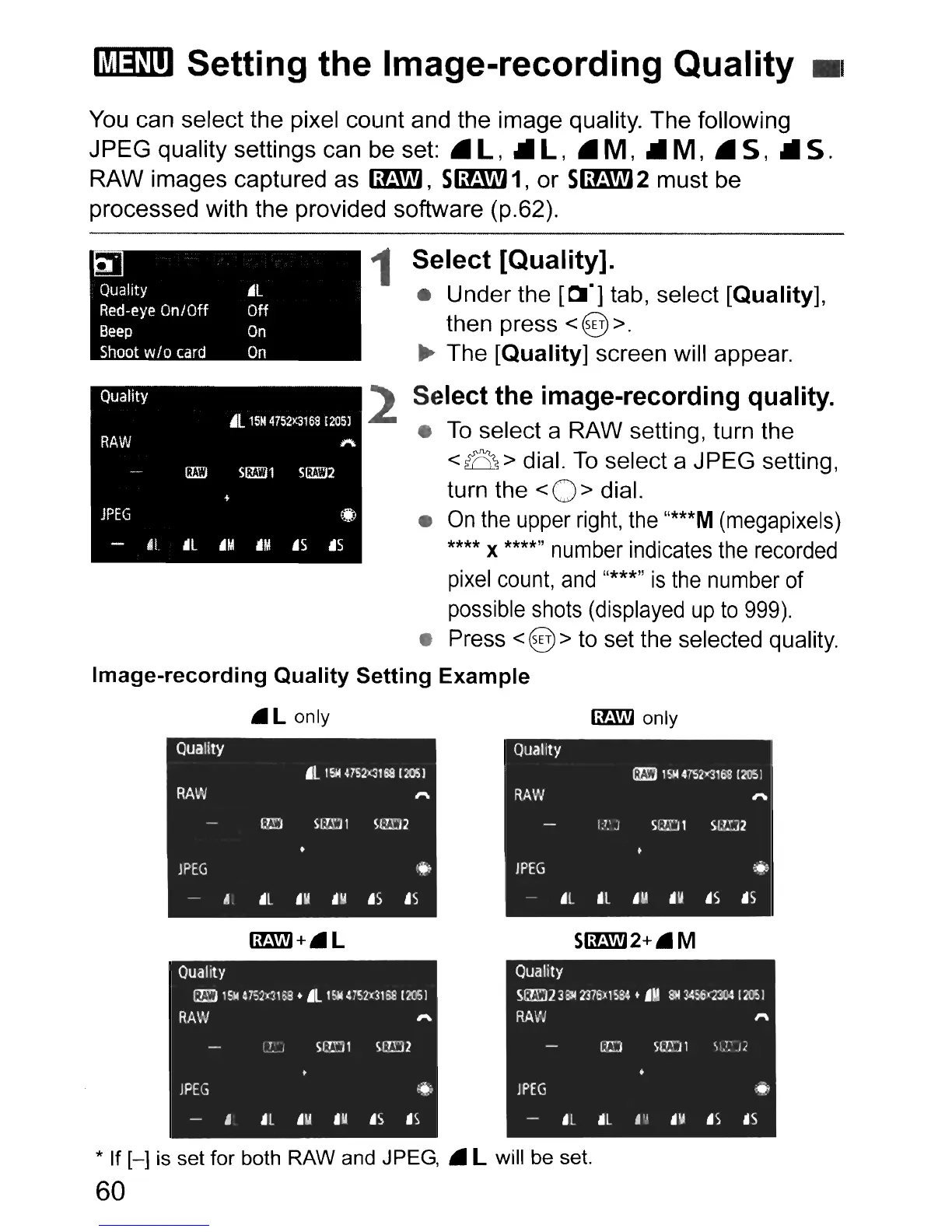
You can select the pixel count and the image quality. The following
JPEG
quality settings can be set:
.l,
.Ill,
• M, .II M, • S, .II S.
RAW images captured as
fimW,
SfimW
1,
or
SfimW2
must be
processed with the provided software (p.62).
Quality
.L
15M
4752){316S
£205l
RAW
1"\
(J£'J
S!m1
S(J£'J2
+
JPEG
•
~!.
ill
'M
i1M
.5
i1S
~L
Off
On
On
Quality
Red-eye
On/Off
Beep
Shoot
w/o
card
1 Select [Quality]"
•
Under
the [01"] tab, select [Quality],
then press < @>.
~
The [Quality] screen will appear.
2 Select the image-recording quality"
•
To
select a RAW setting, turn the
< B > dial.
To
select a
JPEG
setting,
turn the
< 0 > dial.
•
On
the
upper
right,
the
"***M
(megapixels)
****
x
****"
number indicates
the
recorded
pixel
count,
and
"***,,
is
the
number of
possible shots (displayed
up
to
999).
• Press <@> to set the selected quality.
Image-recording
Quality
Setting
Example
•
Quality
.l
,~
41S2X3'~
12051
RAW
'"
ru:J
SlT.Ul
Sl!D2
lPEG
(~
04
'L
•
lit
,Il
.5
.5
Iif.:.Wj 0 nIy
Quality
1m
1514
mM1Si
(205)
RAW
'"
1.
7
.'
J
SLID
1
SI.7lJ2
lPEG
...
'L
'L
U
.U
.5
.5
* If
[-]
is set for both RAW and JPEG, • L will be set.
60



 To Next Page