Attaching and Detaching a Lens
Attaching a Lens
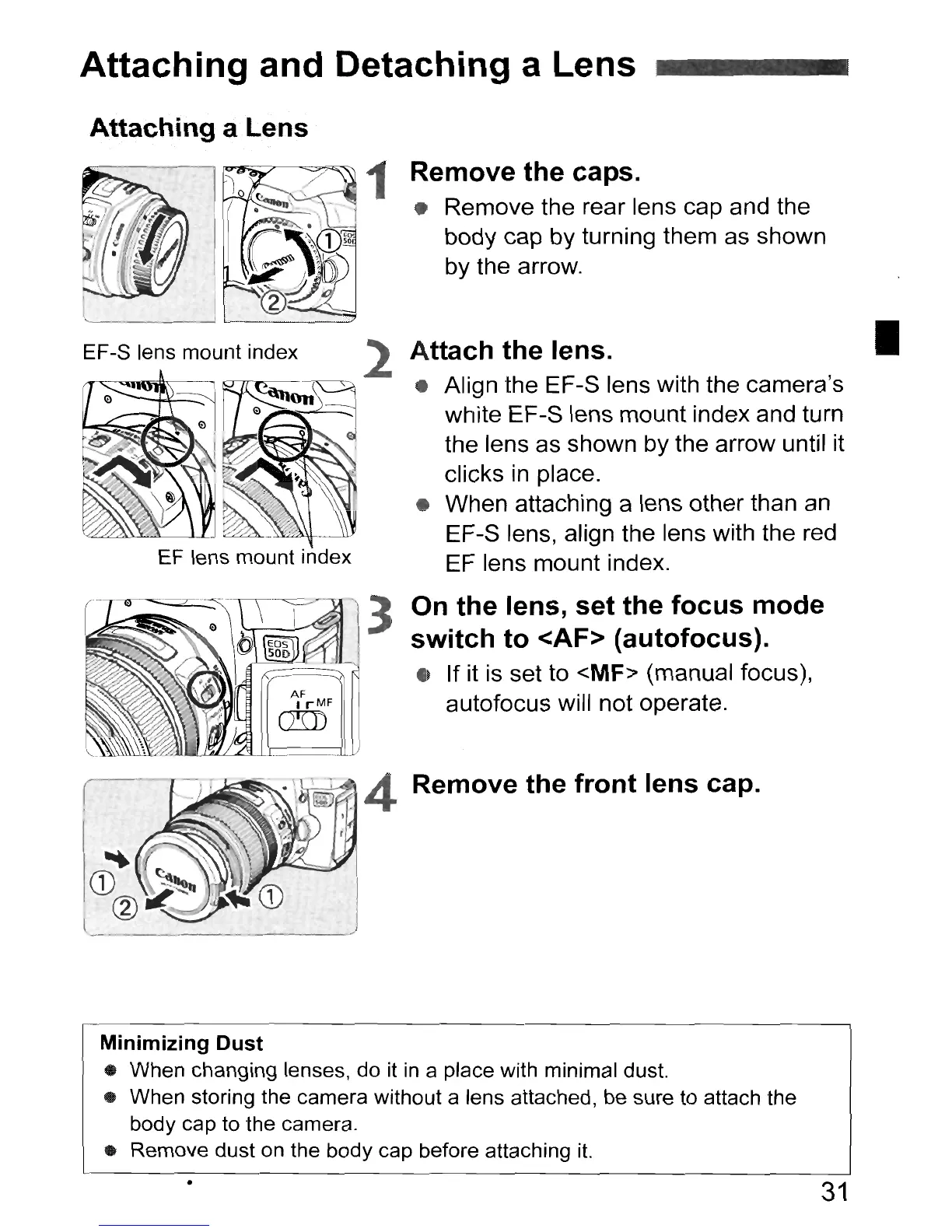
EF-S lens mount index
1 Remove the caps.
• Remove the rear lens cap and the
body cap by turning them as shown
by the arrow.
Attach the lens.
• Align the EF-S lens with the camera's
white EF-S lens mount index and turn
the lens as shown by the arrow until it
clicks
in
place.
• When attaching a lens other than an
EF-S lens, align the lens with the red
EF lens mount index.
•
On the lens, set the focus mode
switch to <AF> (autofocus).
• If it is set to <MF> (manual focus),
autofocus will not operate.
Remove the front lens cap.
Minimizing Dust
• When changing lenses, do it in a place with minimal dust.
• When storing the camera without a lens attached, be sure to attach the
body cap to the camera.
• Remove dust on the body cap before attaching it.
•
31



 To Next Page