~
Creative Auto Shooting
The <
@)
> (Creative Auto) mode enables you to easily change the
picture's brightness, etc. The default settings are the same as the
< 0 >
(Full Auto) mode.
*
CA
stands for Creative Auto.
I
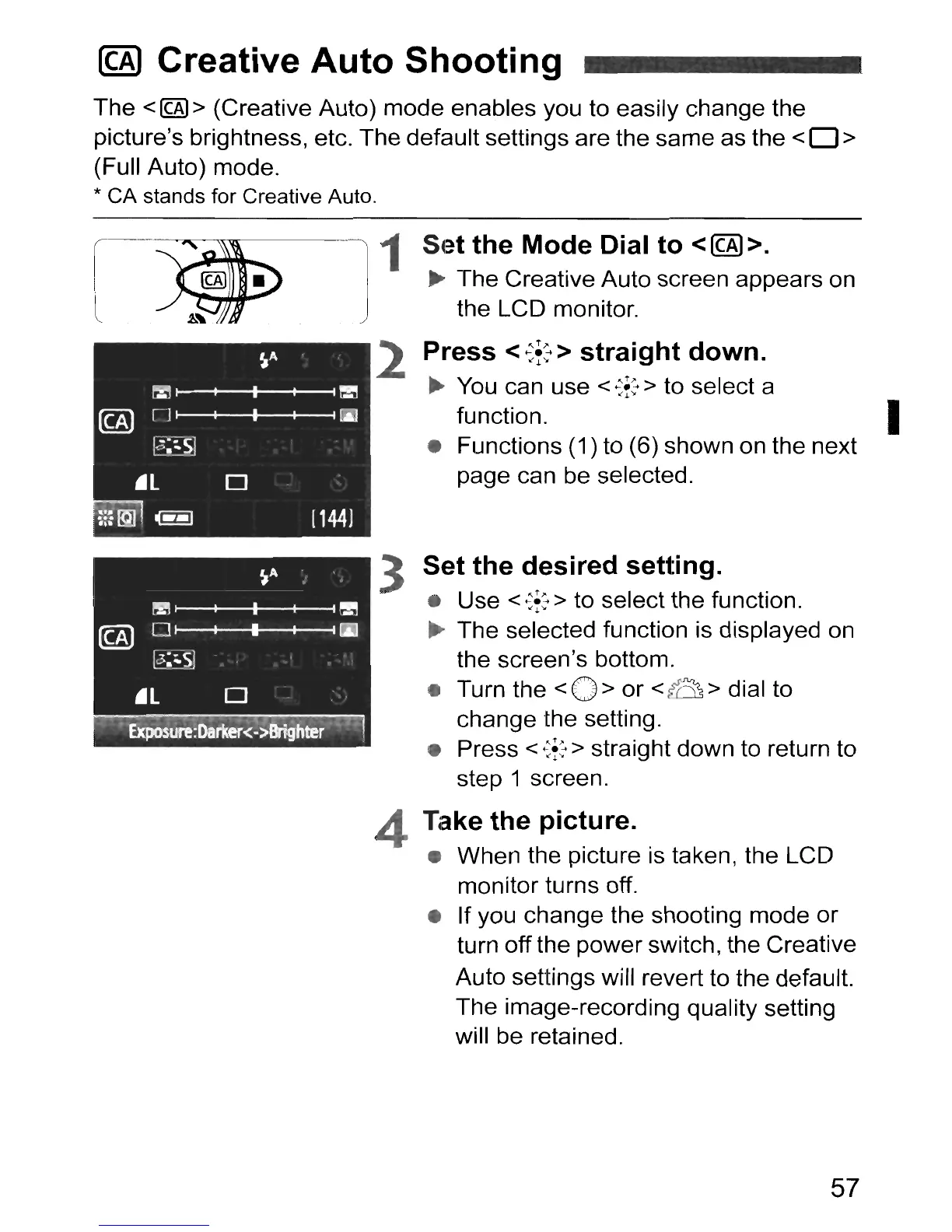
Set the Mode Dial to
<@».
~
The Creative Auto screen appears on
the LCD monitor.
Press <
~f:
> straight down.
~
You
can use <
~f:
> to select a
function.
• Functions (1) to (6) shown on the next
page can be selected.
3 Set the desired setting.
• Use <
~f:
> to select the function.
~
The selected function is displayed on
the screen's bottom.
• Turn the
<0>
or <fCt> dial to
change the setting.
• Press
<
~f:
> straight down to return to
step 1 screen.
Take the picture.
• When the picture is taken, the LCD
monitor turns off.
• If you change the shooting mode or
turn off the power switch
I the Creative
Auto settings will revert to the default.
The image-recording quality setting
will be retained.
4
-1
1
j
2
57



 To Next Page