Menu Operations
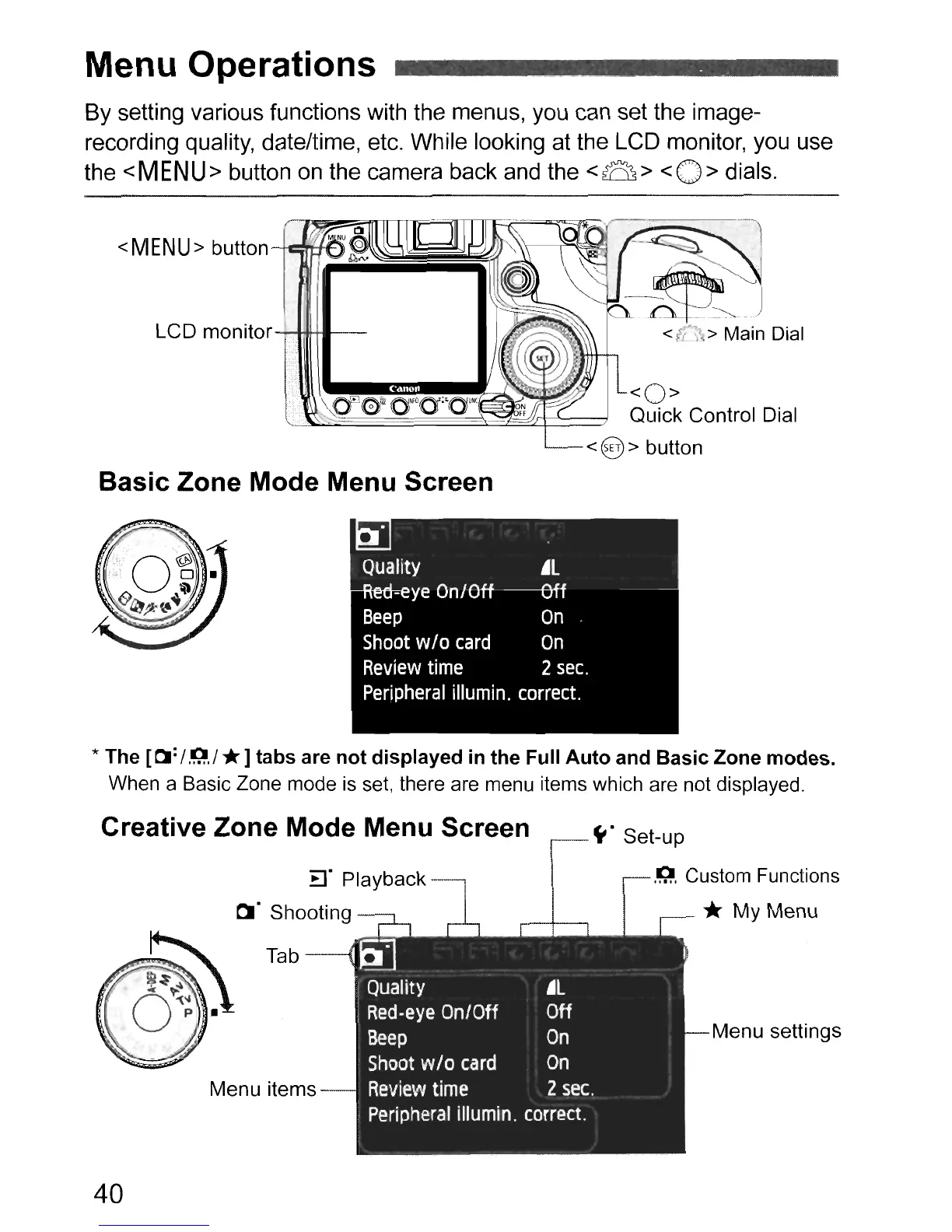
By setting various functions with the menus, you can set the image-
recording quality, date/time, etc. While looking at the LCD monitor, you use
the
<MENU>
button on the camera back and the
<B>
<0>
dials.
<MENU>
button--tt:=~~~))~===_~
LCD monitar
........-I"IH-III-----
<0>
Quick Control Dial
<@> button
Basic Zone Mode Menu Screen
!
Quality
.L
Red-eye
On/Off Off
Beep
On
Shoot
wlo
card
On
Review
time
2
sec.
Perjpheral
illumin.
correct.
* The
[0:
/
.Q.
/*]tabs are
not
displayed in the Full
Auto
and Basic Zone modes.
When a Basic Zone mode
is
set, there are menu items which are not displayed.
Creative Zone Mode Menu Screen
..
.
..
~.
Set-up
.IQ,
Custom Functions
tt
t
Menu settings
-
Ib]
Quality
.L
Red-eye
On/Off
Off
Beep
On
Shoot
wlo
card
On
Review
time
2
sec.
Peripheral
iIIumin.
correct.
Tab--U
Menu items
40



 To Next Page