Menu Operations
I
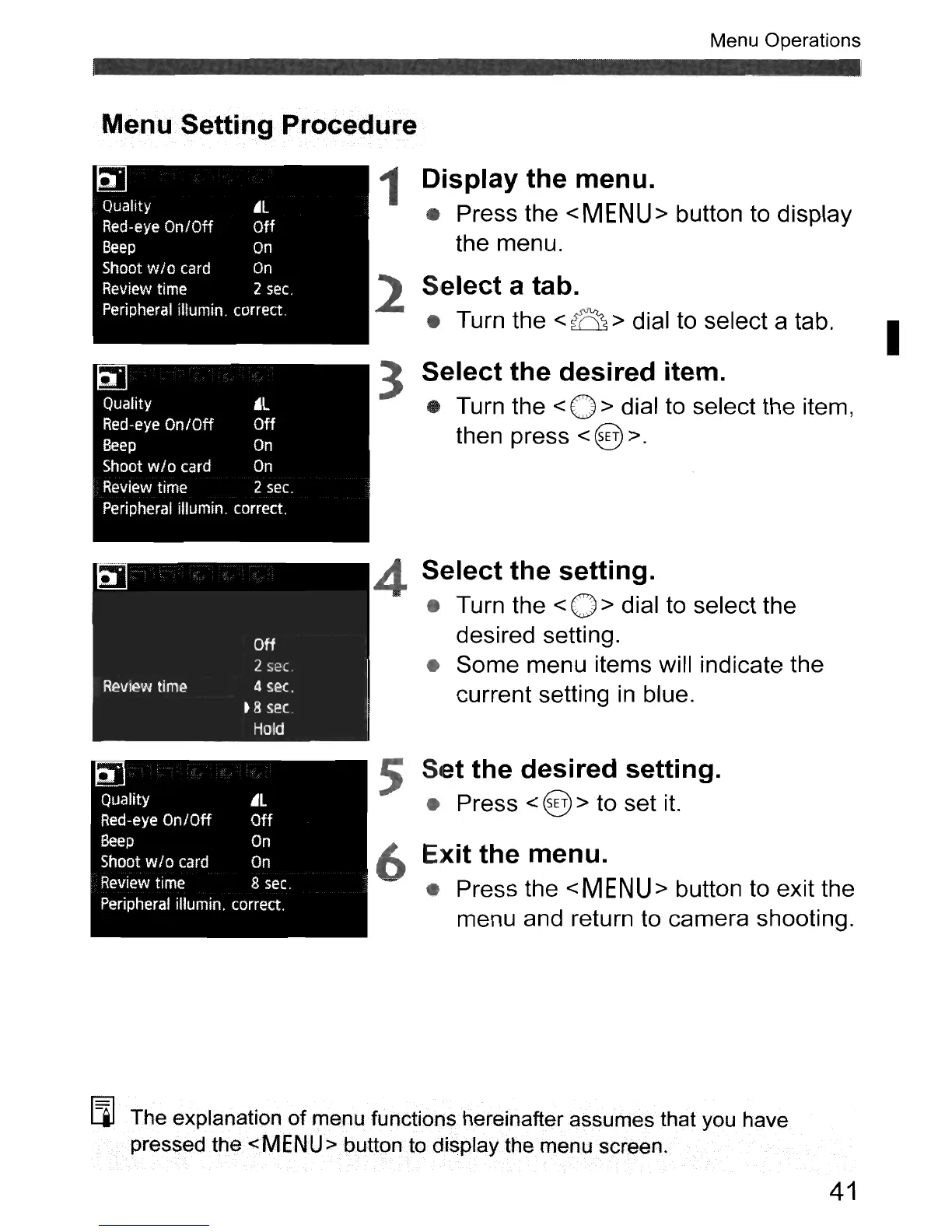
Select a tab.
• Turn the <a > dial to select a tab.
3 Select the desired item.
• Turn the
<0>
dial to select the item,
then press
< @ >.
2
Quality
AL
Red-eye On/Off
Off
Beep
On
Shoot
wI
0 card
On
Review
time
2
sec.
Peripheral illumin. correct.
Menu.·
SettingProcecJure
1 Display the menu.
• Press the
<MENU>
button to display
the menu.
00
Quality
~L
Red-eye On/Off
Off
Beep
On
Shoot
w/o
card
On
Review
time
2
sec.
Peripheral iIlumin. correct.
5 Set the desired setting.
• Press < @ > to set it.
~
Quality
AL
Red-eye
On/Off
Off
Beep
On
Shoot
wlo
card
On
Review
time 8
sec.
Peripheral ilIumin. correct.
4
6
Select the setting.
• Turn the < 0 > dial to select the
desired setting.
•
Some
menu items will indicate the
current setting
in
blue.
Exit the menu.
• Press the
<MENU>
button to exit the
menu and return to camera shooting.
[l] The explanation
of
menu functions hereinafterassumesthat you have
pressed the
<MENU>
buttonto
display the menu screen.
41



 To Next Page