WB:
Setting the White Balance
1<
t:::".-.,d
Custom White Balance
Custom white balance enables you to manually set the white balance
for a specific light source for better accuracy. Do this procedure under
the actual light source to
be
used.
o
o
Spot metering circle
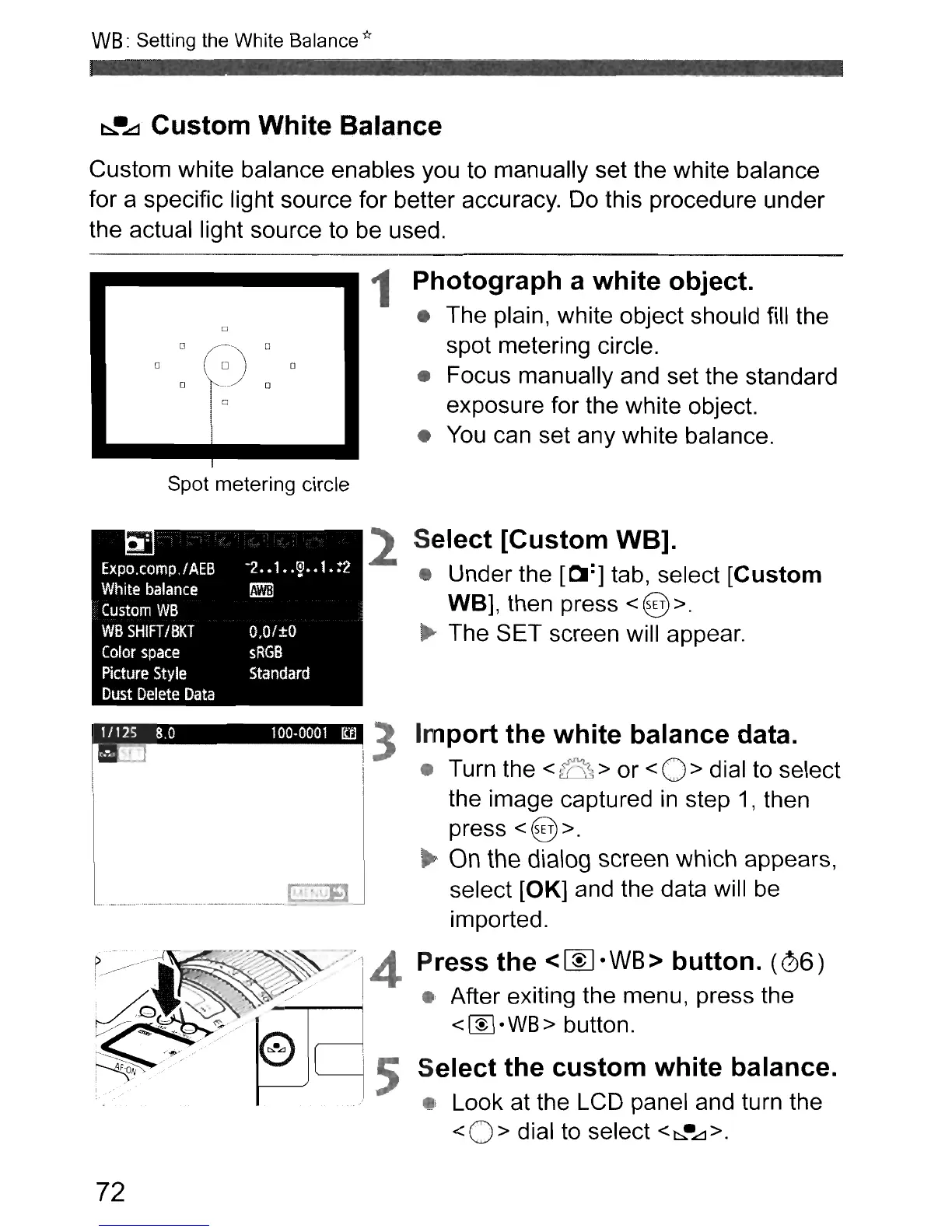
1 Photograph a white object.
• The plain, white object should fill the
spot metering circle.
• Focus manually and set the standard
exposure for the white object.
•
You
can set any white balance.
2 Select [Custom WB].
• Under the [01:] tab, select [Custom
WB],
then press < @ >.
...
The SET screen will appear.
.....
_ _ _
__
_ _
..
~-
-?::.III
J 3 Import the white balance data.
• Turn the
<~>
or
<0>
dial to select
the image captured
in
step
1,
then
press
<@>.
On
the
dialog
screen
which appears,
select
[OK]
and the data will
be
imported.
~
...
/.··~_1
'-:i'<~
..',4 Press the <
~
·
WB
> button.
(06)
i
~~.
~
'.
V'
I • After exiting the menu, press the
~
....
e 5
se~:·t::>c:u~::n~
white
balance
.
..
/ • Look at the LCD panel and turn the
<0>
dial to select <
t::::,.
•
.£:l
>.
72



 To Next Page