EasyManua.ls Logo

Canon EOD 50D - Reverting the Camera to the Default Settings

Canon EOD 50D
321 pages
Print Icon
To Next Page IconTo Next Page
To Previous Page IconTo Previous Page
Loading...
Before You Start
INFO.
button Normal disp.
Flash
control
Camera
user
setting
((ear
settmgs
Firmware
Ver.
1.0.0
UiI3mJ
'Reverting
theCarnera
to
the
Default
Settings
*
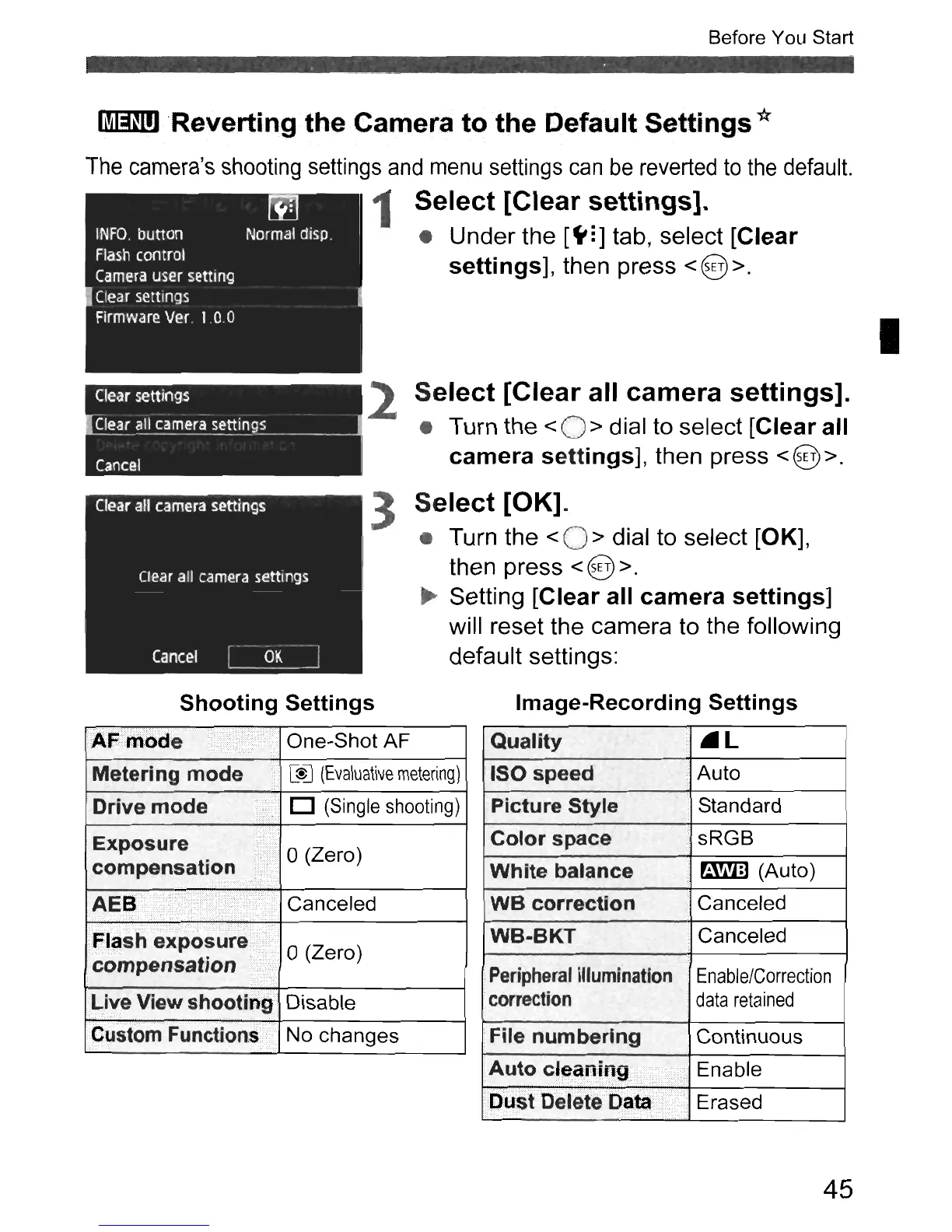
The
camera's
shooting
settings
and
menu
settings
can
be
reverted
to
the
default.
1
Select
[Clear
settings].
Under the
[~:]
tab, select
[Clear
settings],
then press <@>.
I
Clear
settings
- -
Clea~
~l!
camera
settl,,!g~.
_
Cancel
2
Select
[Clear
all
camera
settings].
Turn the
<0>
dial to select
[Clear
all
camera
settings],
then press <@>.
3
Select
[OK].
Turn the < 0 > dial to select [OK],
then press
< @ >.
~
Setting
[Clear
all
camera
settings]
will reset the camera to the following
default settings:
Shooting
Settings
Metering
mode
.•..
[$J
(Evaluative
metering)
Drive
mode'
D
(Single
shooting)
Exposure)
0 Z
compensation
ii
(ero)
i
.••
·•••
AEB
,"
.'
Canceled
.,",',:::'
..
,
,.
' , :.;.:',,:::,<:>,.,
:-::
..
:::::':'
- :':'.,:::::.:,.
•.
F:llshexposure<:
0 (Zero)
compensation
iii/,;
Liye View shooth1g Disable
CllstomFunctjon~/"
No changes
Image-Recording
Settings
Quality
.l
ISO speed
.'
Auto
Picture
Style Standard
Color
space
sRGB
White
balance
r:.wm
(Auto)
we
correction
Canceled
WB-BKT
Canceled
Peripheral
illumination
Enable/Correction
correction
data
retained
File
numbering
Continuous
Auto
c~~a"'~"'9It
Enable
.
Dust
Delete
Data
,
.•....
Erased
45

Table of Contents

Related product manuals