Before You Start
Camera
Settings
Auto
power
off
1 min.
Beep
On
Shoot
wfo
card
On
Review
time
2
sec.
Highlight
alert Disable
AF
point
display
Disable
"i$togr~m
...........
;
Brightness
....
'''''.'
Camera
Settings
Image
jump
wfB
10 images
Auto
rotate
On
0.
LCD
brightness
~!:.
I I I TI I I
:,:
.DatelTime
No
changes
Language
No
changes
Video system
No
changes
Camera
user settings
No
changes
My Menu
settings
No
changes
About
Copyright
Information
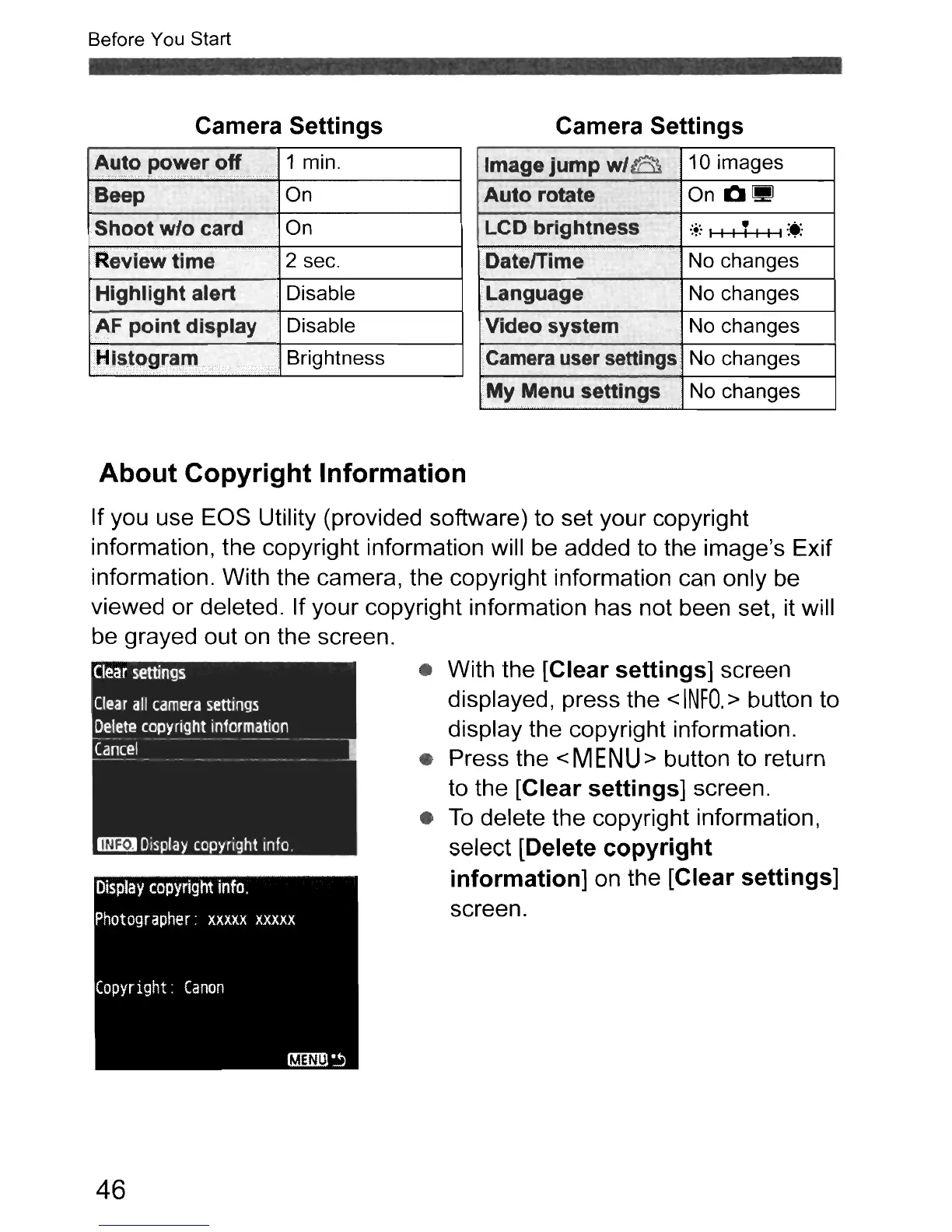
If you use EOS Utility (provided software) to set your copyright
information, the copyright information will be added to the image's Exif
information. With the camera, the copyright information can only be
viewed or deleted. If your copyright information has not been set, it will
be
grayed out
on
the screen.
Clear
settings
Clear
all
camera
settings
Delete
copyright
information
Cancel
~
Display
copyright
info.
46
• With the [Clear
settings]
screen
displayed, press the
<
INFO.
> button to
display the copyright information.
• Press the
<MENU>
button to return
to the
[Clear
settings]
screen.
•
To
delete the copyright information,
select
[Delete
copyright
information]
on the [Clear settings]
screen.



 To Next Page