Chapter 2
2-13
2.5.2.3.2 Fixing delivery stationary jam
0021-1326
If within a specified time after the registration sensor (SR4) detects the paper trailing edge, the fixing delivery sensor (SR8) cannot detect the paper trailing edge.
2.5.2.4 Other Jams
2.5.2.4.1 Fixing wrapping-up jam
0021-1327
If the fixing delivery sensor (SR8) cannot detect the paper, after it detects paper leading edge until the fixing delivery stationary starts the detection.
2.5.2.4.2 Inside stationary jam 1
0021-1328
If during power ON/door close, paper feeder pre-registration sensor (SR1)/registration sensor (SR4)/manual feed tray registration sensor (SR7)/fixing delivery sen-
sor (SR8)/fixing loop sensor (SR10)/pre-registration sensor (SR12)/cassette paper sensor (SR13) detect paper.
2.5.2.4.3 Inside stationary jam 4
0021-2018
If before/after printing, paper feeder pre-registration sensor (SR1)/registration sensor (SR4)/manual feed tray registration sensor (SR7)/fixing delivery sensor (SR8)/
fixing loop sensor (SR10)/pre-registration sensor (SR12) detect paper.
2.5.2.4.4 Duplex re-pickup jam
0021-1330
If the registration sensor (SR4) cannot detect the paper leading edge in a specified time after reversal starts.
2.5.2.4.5 Door open jam
0021-1329
During printing, if each sensor detects paper when the door-open is detected.
2.5.3 Cassette Pickup
2.5.3.1 Separation Roller Method
0021-1331
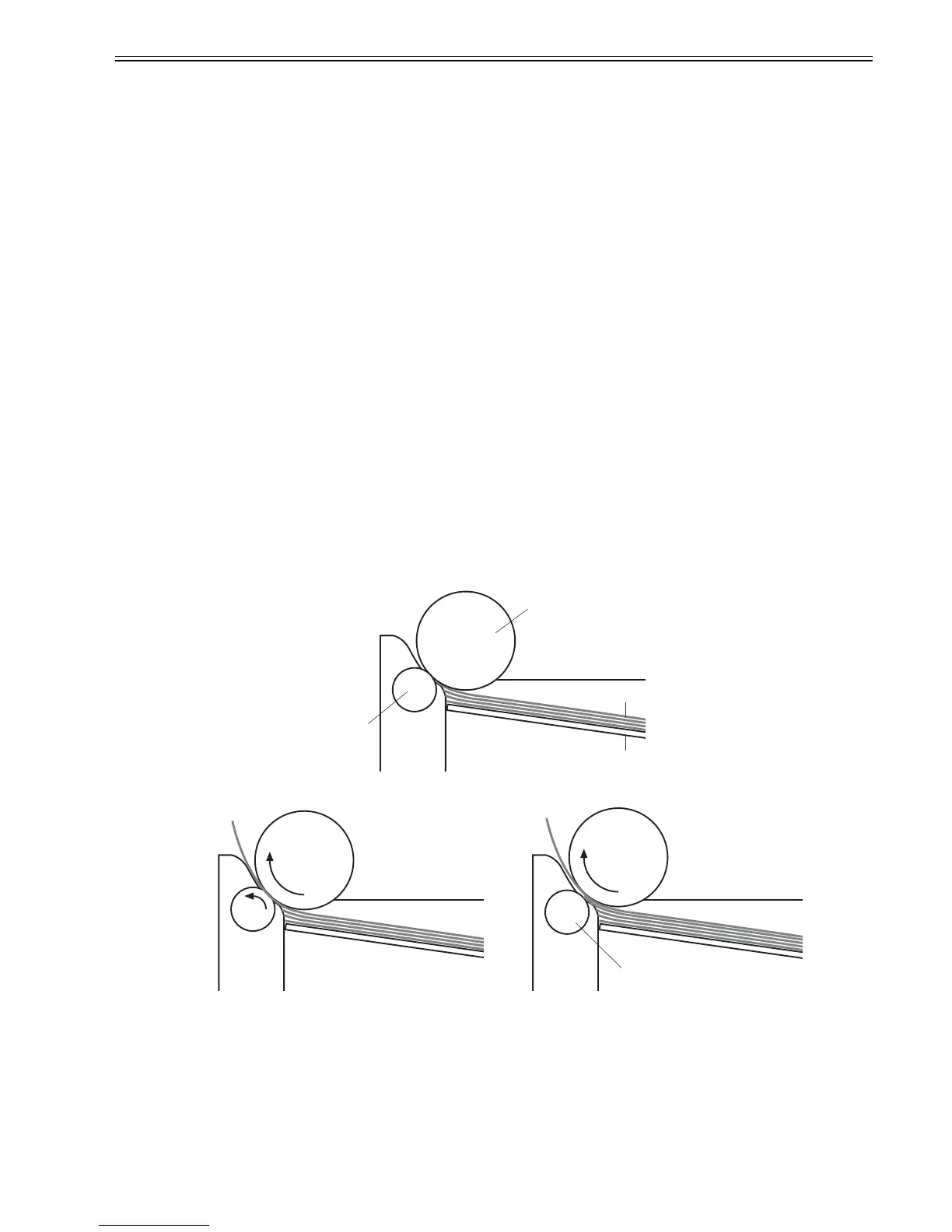
The printer has a separation roller method to prevent multiple sheets of media from entering to the printer.
The paper separation roller follows the rotational direction of the pick-up roller because it does not have its own driving force.
- Normal-feed
The separation roller is driven by the pickup roller through a sheet of print media. That is, the separation roller rotates in the media feed direction.
- Multiple-feed
The low friction force between the sheets weakens the rotational force from the pickup roller. The separation roller is limited its rotational force and it does not
rotate with such weak driving force from the pickup roller. As the separation roller does not rotate, the multiple sheets are not fed to the printer.
F-2-17
Media
Separation roller
Pickup roller
Lifting plate
<Multiple-feed><Normal-feed>
The separation roller does not rotate.













 To Next Page