Chapter 3
3-1
3.1 EXTERNAL AND CONTROLS SYSTEM
3.1.1 Rear Cover
3.1.1.1 Removing rear cover
0021-3909
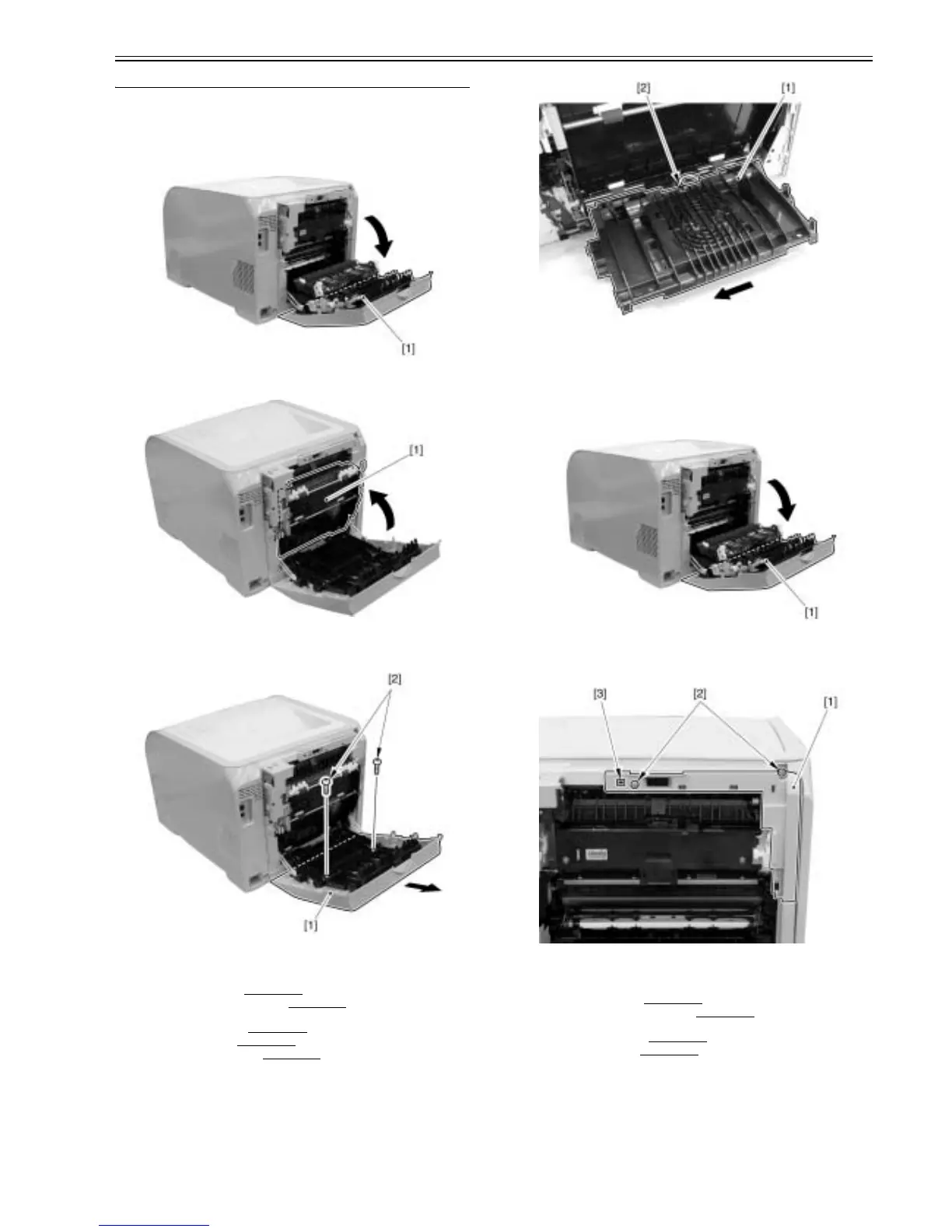
1) Open the rear cover assembly [1].
F-3-1
2) Close the duplex feeding assembly [1].
F-3-2
3) Remove the rear cover [1] in the arrow direction.
- 2 screws [2]
F-3-3
3.1.1.2 Pre-procedure for removing rear cover lib unit
0021-3933
1) Remove the right cover. (page 3-3)Reference[Removing right cover]
2) Remove the upper rear cover (left).(page 3-1)
Refrence[Removing upper
rear cover (left)]
3) Remove the upper cover. (page 3-5)
Reference[Removing upper cover]
4) Remove the rear cover.(page 3-1)
Reference[Removing rear cover]
5) Remove the lower rear cover.(page 3-1)
Reference[Removing lower rear
cover]
3.1.1.3 Removing rear cover lib unit
0021-3936
1) Remove the rear cover lib unit [1] in the arrow direction.
- 1 connector [2].
F-3-4
3.1.2 Rear Upper Cover
3.1.2.1 Removing upper rear cover (left)
0021-3890
1) Open the rear cover assembly [1].
F-3-5
2) Remove the upper rear cover (left) [1].
- 2 screws [2]
- 1 claw [3]
F-3-6
3.1.2.2 Pre-procedure for removing lower rear cover
0021-3921
1) Remove the right cover.(page 3-3)Reference[Removing right cover]
2) Remove the upper rear cover (left).(page 3-1)
Reference[Removing up-
per rear cover (left)]
3) Remove the upper cover.(page 3-5)
Reference[Removing upper cover]
4) Remove the rear cover.(page 3-1)
Reference[Removing rear cover]
3.1.2.3 Removing lower rear cover
0021-3924
1) Remove the upper rear cover (right) [1].
- 1 claw [2]













 To Next Page