Chapter 3
3-21
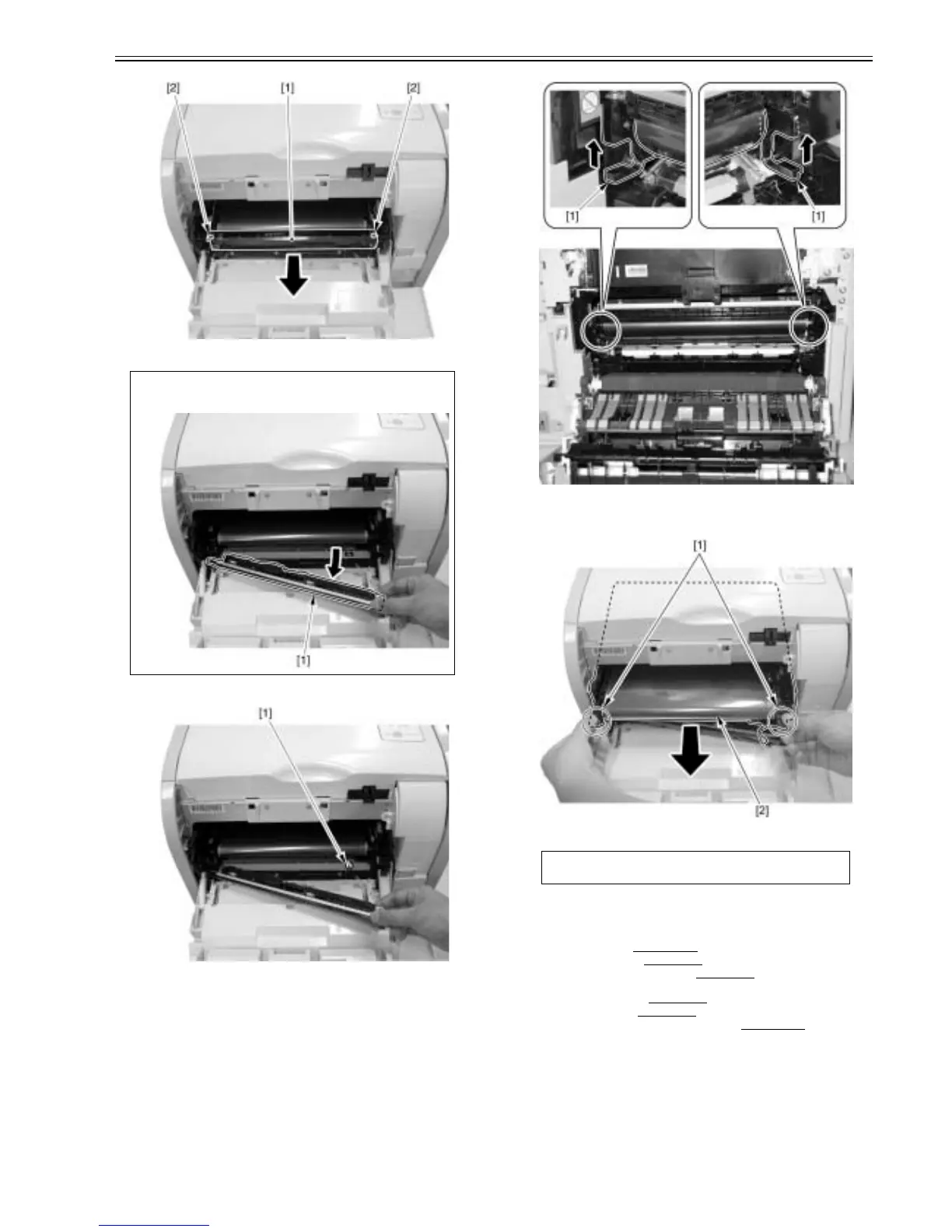
F-3-92
7) Remove the connector [1].
F-3-93
8) Move two handles [1] of the ITB at the rear side of the main unit in the
arrow direction.
F-3-94
9) Hold two handles [1] of the ITB at the front side of the main unit and re-
move the ITB unit [2] in the arrow direction.
F-3-95
3.3.4 RD Sensor Unit
3.3.4.1 Pre-procedure for removing RD sensor unit
0021-4274
1) Remove the ITB unit.(page 3-20)Reference[Removing ITB unit]
2) Remove the right cover.(page 3-3)
Reference[Removing right cover]
3) Remove the upper rear cover (left).(page 3-1)
Reference[Removing up-
per rear cover (left)]
4) Remove the upper cover.(page 3-5)
Reference[Removing upper cover]
5) Remove the left cover.(page 3-4)
Reference[Removing left cover]
6) Remove the high voltage power supply PCB.(page 3-14)
Reference[Re-
moving high voltage power supply PCB]
3.3.4.2 Removing RD sensor unit
0021-4275
1) Remove the cable [2] from the cable guide [1].
- 1 connector [3]
CAUTION:
Further pull out the RD sensor unit [1] to the front so as not to damage the belt
when removing the ITB unit.
CAUTION:
Be careful not to touch the belt when you remove the ITB unit.













 To Next Page