Chapter 3
3-23
3.4.2 Pickup Unit
3.4.2.1 Pre-procedure for removing pick-up unit
0021-4276
1) Remove the right cover.(page 3-3)Reference[Removing right cover]
2) Remove the upper rear cover (left).(page 3-1)
Reference[Removing up-
per rear cover (left)]
3) Remove the upper cover.(page 3-5)
Reference[Removing upper cover]
4) Remove the right frame cover.(page 3-3)
Reference[Removing right
frame cover]
3.4.2.2 Removing pick-up unit
0021-4277
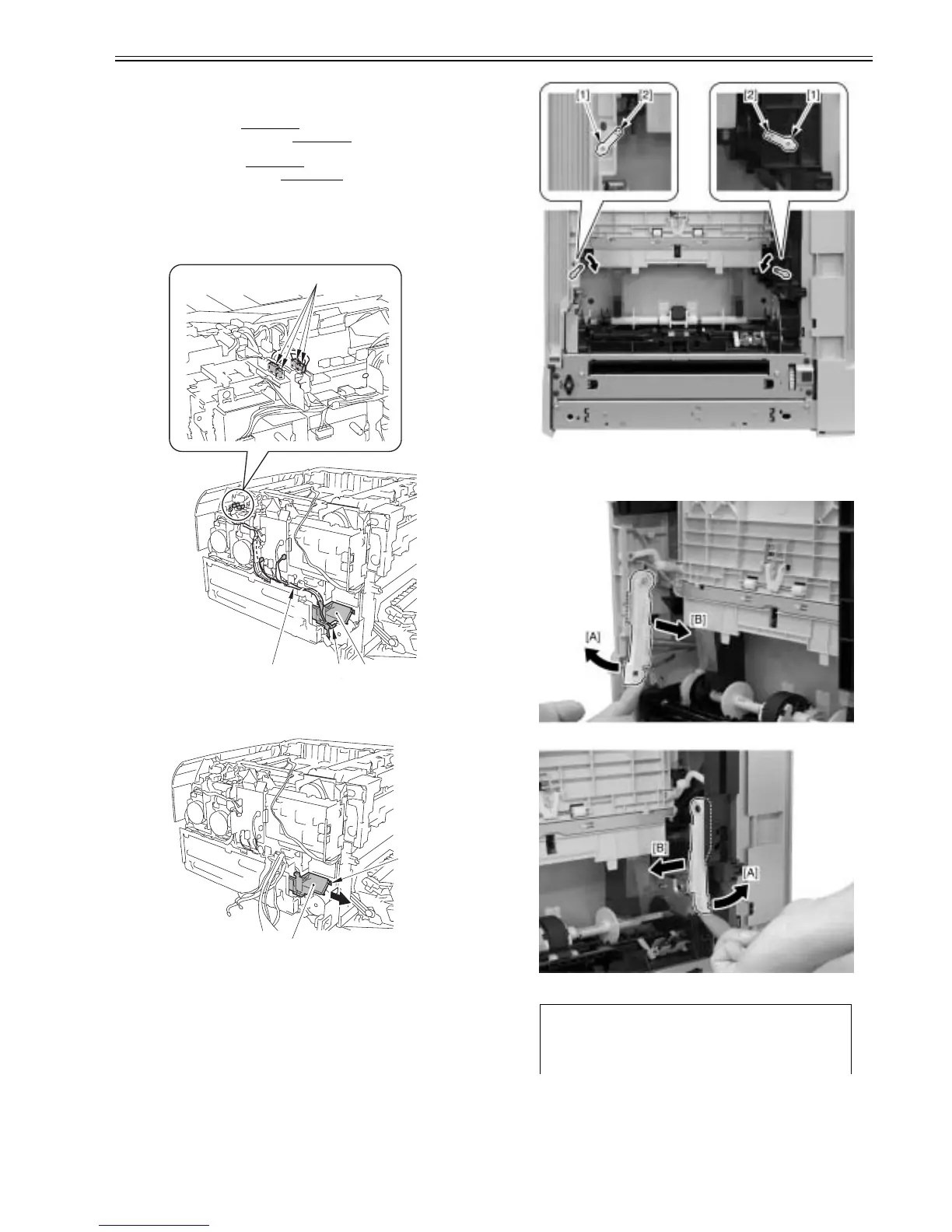
1) After removing 7 connectors [1], remove the cable [2] from the cable
guide [3].
F-3-101
2) Remove the cable guide [1] in the arrow direction.
- 1 boss [2]
F-3-102
3) Turn two stoppers [1] inward and remove them.
- 2 bosses [2]
F-3-103
4) After moving two arms [1] in the direction of the arrow [A], move them
to the direction of the arrow [B] and remove them.
F-3-104
[1]
[1][2] [3]
[1]
[2]
Caution:
When you remove the arms, the spring [1] might come off, and therefore
you should be careful not to lose it.













 To Next Page