Chapter 3
3-19
3.3 IMAGE FORMATION SYSTEM
3.3.1 Drum/ITB Motor
3.3.1.1 Pre-procedure for removing drum motor
0021-3990
1) Remove the right cover.(page 3-3)Reference[Removing right cover]
2) Remove the upper rear cover (left).(page 3-1)
Reference[Removing up-
per rear cover (left)]
3) Remove the upper cover.(page 3-5)
Reference[Removing upper cover]
4) Remove the right frame cover.(page 3-3)
Reference[Removing right
frame cover]
3.3.1.2 Removing drum motor
0021-3991
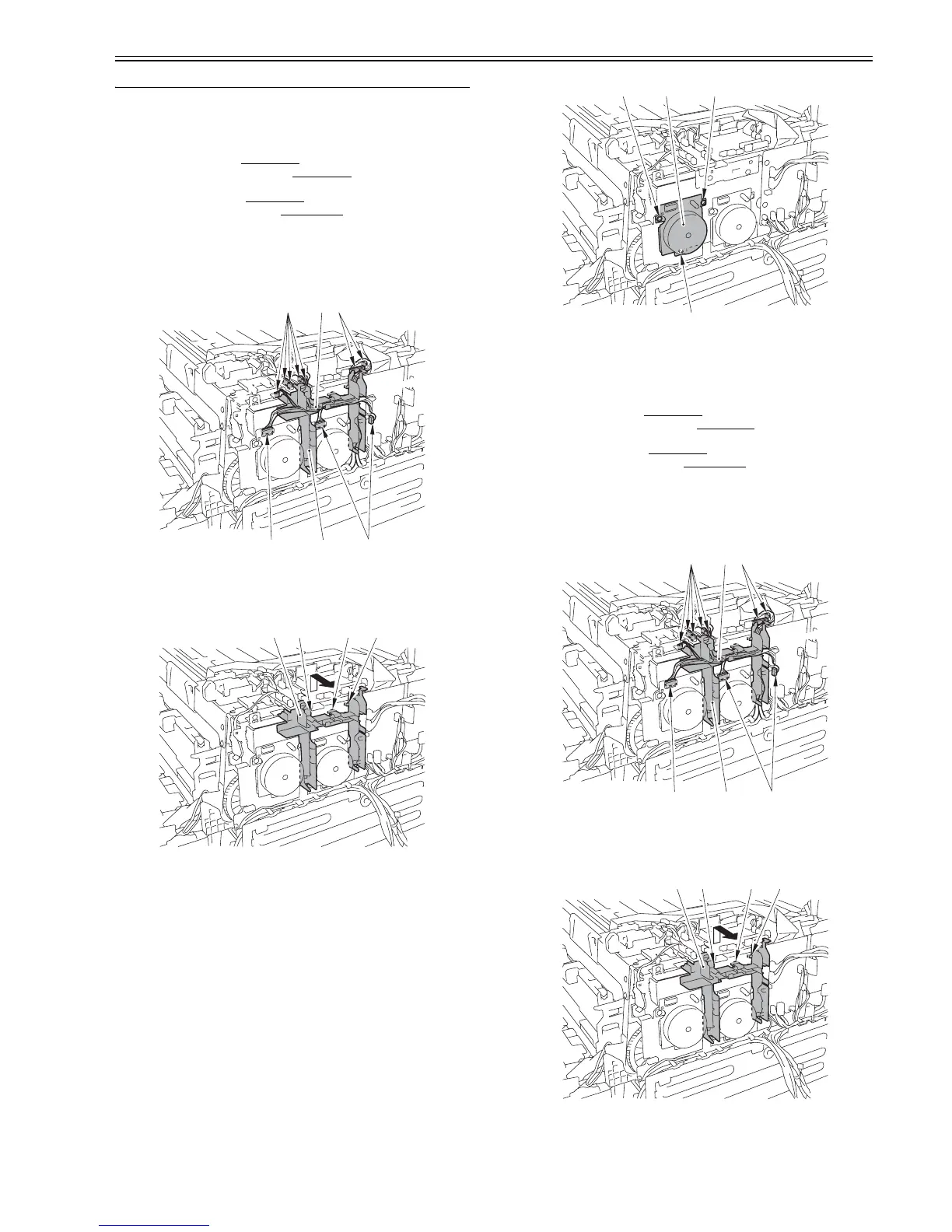
1) Remove 10 connectors [1], and then remove the cable [2] from the cable
guide [3].
F-3-81
2) Remove the cable guide [1]. (From top to front direction)
- 1 claw [2]
- 2 protrusions [3]
F-3-82
3) Remove the drum motor [1].
- 3 screws [2]
F-3-83
3.3.2 Developing Rotary Motor
3.3.2.1 Pre-procedure for removing developing motor
0021-3985
1) Remove the right cover.(page 3-3)Reference[Removing right cover]
2) Remove the upper rear cover. (left).(page 3-1)
Reference[Removing up-
per rear cover (left)]
3) Remove the upper cover.(page 3-5)
Reference[Removing upper cover]
4) Remove the right frame cover.(page 3-3)
Reference[Removing right
frame cover]
3.3.2.2 Removing developing motor
0021-3988
1) Remove 10 connectors [1], and then remove the cable [2] from the cable
guide [3].
F-3-84
2) Remove the cable guide [1].
- 2 claws [2]
- 1 protrusion [3]
F-3-85
3) Remove the developing motor [1].
- 3 screws [2]
[1] [1][3]
[1] [1][2]
[1] [2][2] [3]
[1][2] [2]
[2]
[1] [1][3]
[1] [1][2]
[1] [2][2] [3]












 To Next Page