[F-43] Using Preview to Configure the Printing Preferences
Using Preview in the [Page Setup], [Finishing], or [Paper Source] sheet in the printer driver, you can configure the
printing preferences.
Depending on which icon on the upper left on Preview ([
] or [ ]) is selected, the specifiable options vary.
When [
] is selected
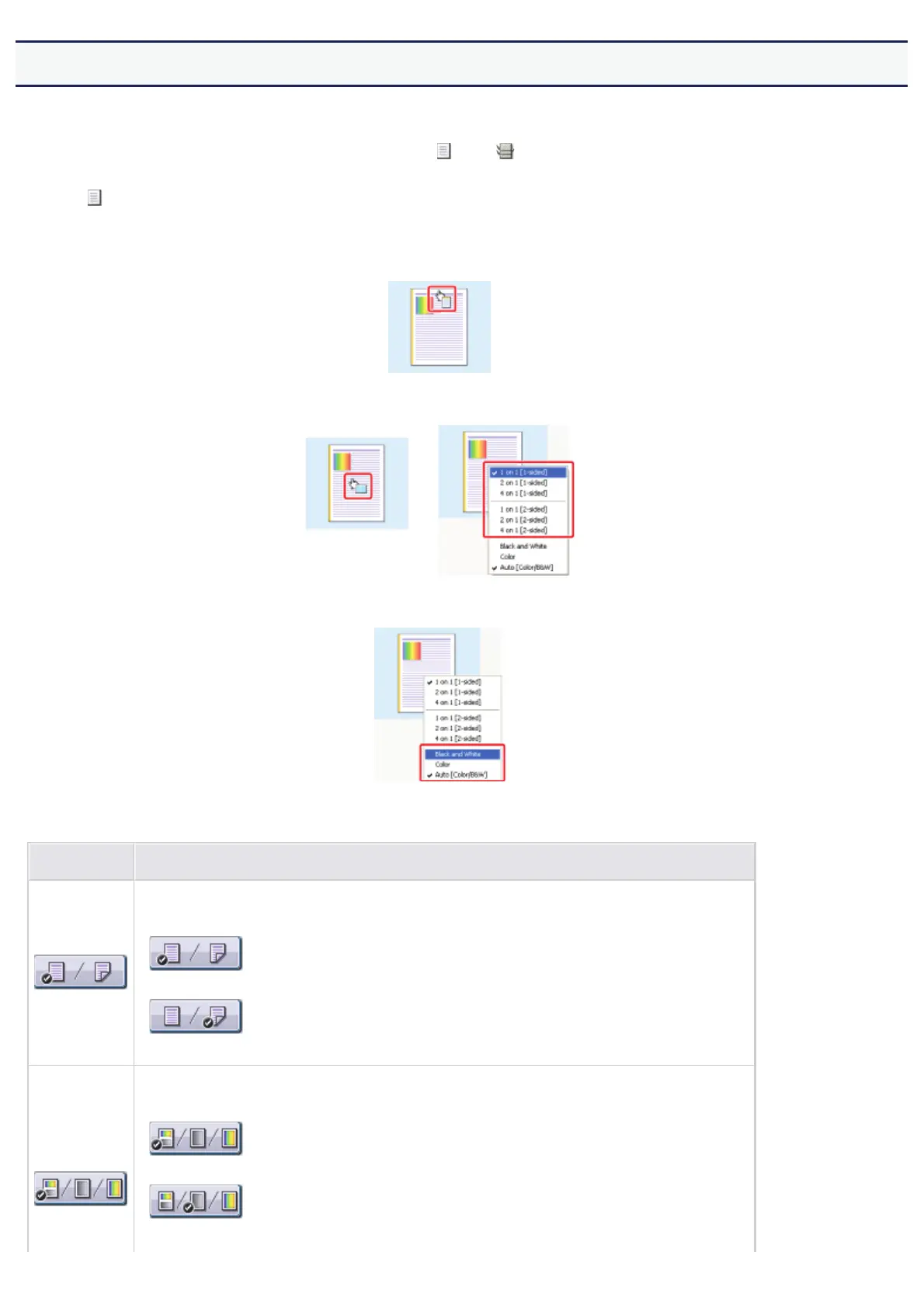
You can specify the following settings according to the clicked position on Preview.
[Binding Location]: Left-click an edge of the document image.
[Page Layout]: Repeatedly left-click within the document image or right-click on Preview.
[Color Mode]: Right-click on Preview.
The use of the buttons at the bottom of the preview pane is as follows.
Button Use
By clicking the button, you can switch the mode between [1-sided Printing] and [2-sided Printing].
•
[1-sided Printing]
•
[2-sided Printing]
By clicking the button, you can specify the setting for [Color Mode].
•
[Auto Detect]
•
[Black and White]
㻟㻡㻞㻌㻛㻌㻣㻜㻡













 To Next Page